
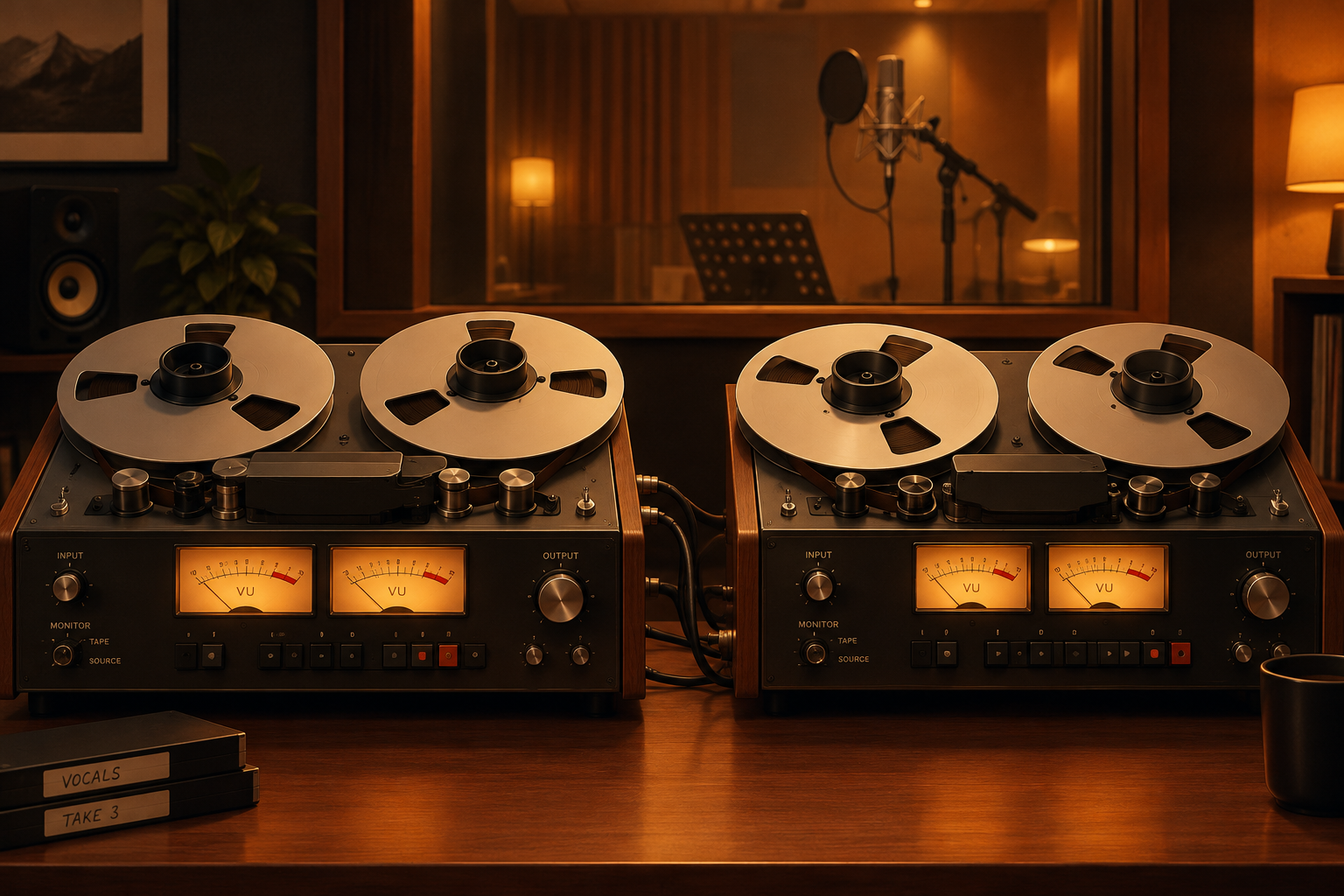
Automatic double tracking (ADT) is the trick Abbey Road engineer Ken Townsend built in 1966 so John Lennon could stop singing every vocal twice. Today the same effect is a plugin, and you can get a convincing doubler for free on Windows, macOS and Linux. This piece covers where ADT came from, how it works, which free plugins do it best, and how to set one up so it thickens a vocal without making it sound like a chorus pedal.
The key facts
These are the points that matter before you open a plugin:
- ADT was invented at EMI’s Abbey Road Studios in 1966 by engineer Ken Townsend, during the sessions that became the Beatles’ Revolver.
- It was built to replace manual double tracking. Singers would record the same part twice and layer the takes. Lennon found that tedious and asked for a machine that could do it.
- The original method used two tape machines. A delayed and slightly wavering copy of the vocal sat under the original. The time offset drifted by a few milliseconds as the second machine’s speed changed.
- Modern doublers recreate this with delay, modulation and small pitch offsets. Some add timing randomisation so the copy behaves like a second human take.
- Free plugins cover most of what paid doublers do. The paid tools still win on true take-to-take variation, which is where Synchro Arts and Abbey Road’s own licensed plugin earn their prices.
What automatic double tracking actually is
Real double tracking is simple. You sing a part, then sing it again on a second track, matching the first as closely as you can. You can’t match it perfectly. The tiny differences in timing, pitch and tone are the point. Played together, the two takes sound bigger and smoother than one voice.
Automatic double tracking fakes that second performance. Instead of a new take, the effect makes a copy of the original and nudges it out of alignment. Delay the copy by a few milliseconds and the ear hears two sources. Wobble that delay slightly and the copy drifts the way a human double does. Shift its pitch by a few cents and the two voices stop phase-locking into one.
The difference between ADT and a chorus effect is mostly about amount and intent. A chorus uses short, deeply modulated delays and often several voices, so it shimmers. ADT stays subtle. You want the listener to hear “two singers”, not “an effect”.
Natural doubles vs ADT vs a doubler plugin
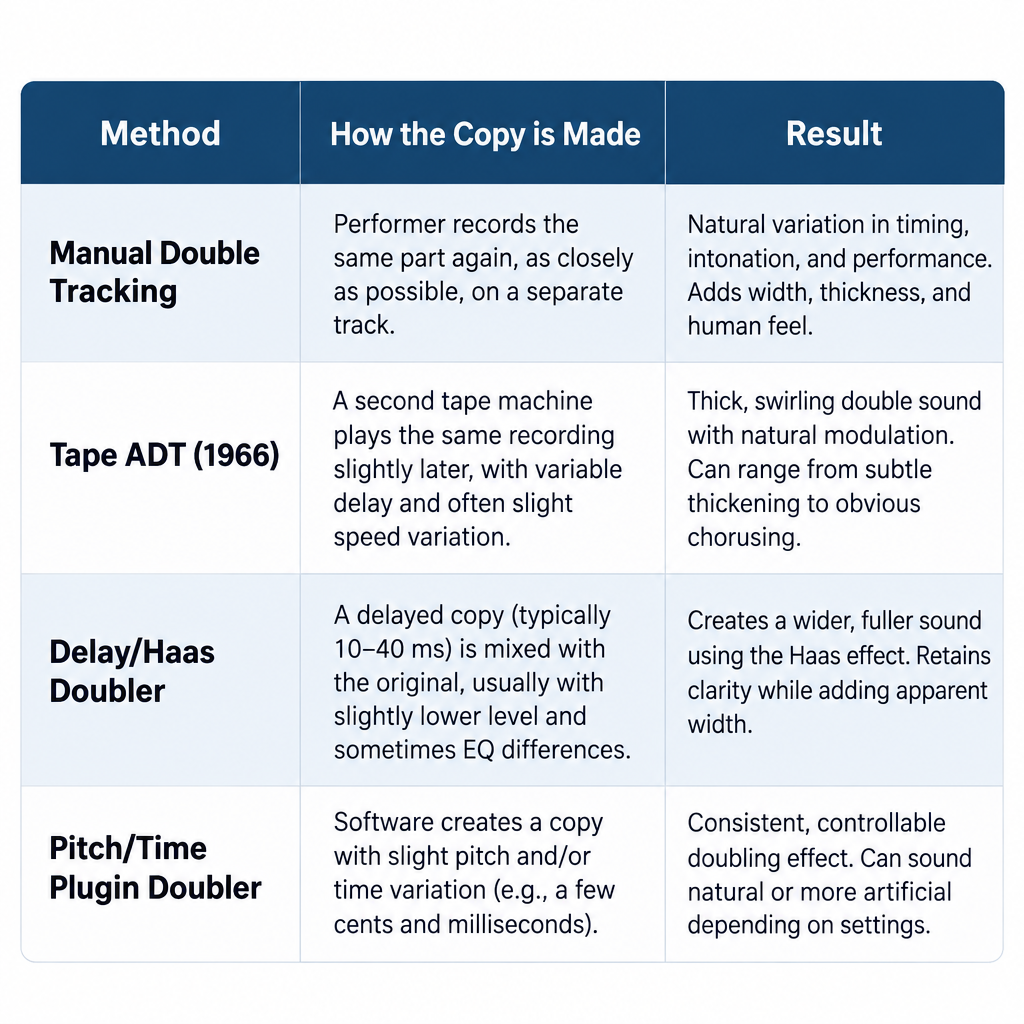
| Method | How the second voice is made | Sounds like | Cost |
|---|---|---|---|
| Manual double tracking | A second real performance | Two genuine takes, with consonant and breath differences | Your time |
| Tape ADT (1966) | A delayed copy with drifting speed | A thick, slightly phasey double | Two tape machines and an engineer |
| Delay/Haas doubler | A fixed or modulated delay of the original | Wide and thick, can comb-filter in mono | Free plugins |
| Pitch/time doubler | Copy with small pitch offset and timing variation | Closest to a second take | Free to paid |
| Performance-aware doubler | Software generates timing and pitch variations that track the phrase | Nearly a real double | Paid (for example Synchro Arts tools) |
How Abbey Road built ADT in 1966
Abbey Road Studios has told this story many times, and Ken Townsend’s own accounts are consistent. Lennon disliked the chore of double-tracking his voice. He wanted the sound without the second performance. Townsend worked out a way to get it using equipment already in the building.
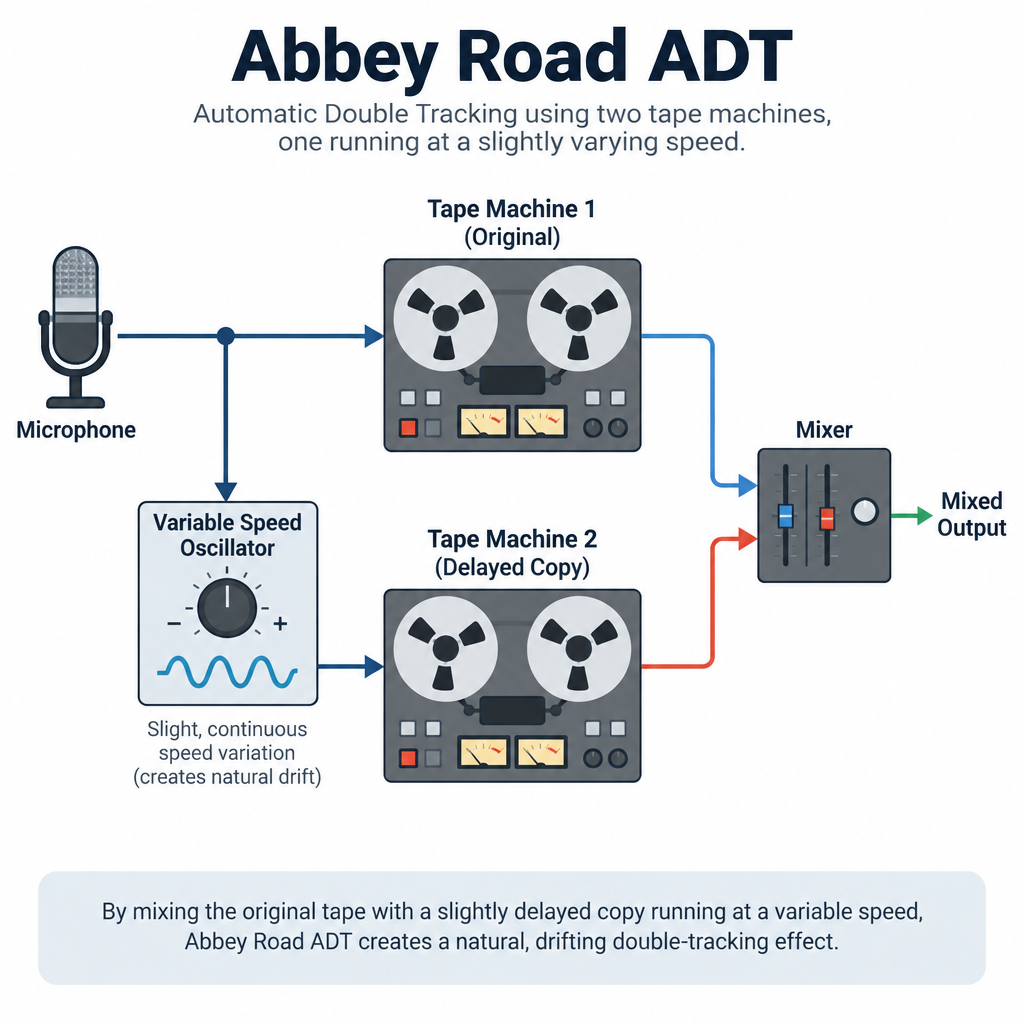
The core idea used the gap between the heads on a tape machine. A tape machine records on one head and plays back on another a short distance further along the tape path. That distance creates a natural delay. Townsend took the vocal from the main machine and fed it to a second machine. The second machine recorded it and played it back a moment later. That delayed copy was mixed back in with the original.
The clever part was speed control. By driving the second machine from a variable oscillator, the engineer could speed it up or slow it down during the mix. That changed the delay time continuously. A fixed delay sounds like an echo or a static comb filter. A drifting delay sounds alive, closer to a person singing slightly early on one word and slightly late on the next.
The “flanging” story
A widely repeated anecdote from the period has George Martin explaining ADT to Lennon with a deliberately absurd description involving a “double-bifurcated sploshing flange”. Lennon reportedly started calling the effect “flanging” after that. The story appears in many Beatles histories. Whether it is the true origin of the word “flanger” is less certain, since engineers elsewhere were also pressing on tape reel flanges to slow machines down. Treat it as a good studio legend with real roots, not a settled etymology.
Why it mattered beyond the Beatles
ADT spread quickly. Once other engineers heard it on Revolver and later records, tape-based doubling became a standard production technique through the late 1960s and 1970s. The same two-machine setup, pushed to shorter delays, gave studios the jet-plane flanging sound heard on many psychedelic records.
In the mid-1970s, digital hardware changed the game again. Eventide’s H910 Harmonizer let engineers pitch-shift a signal by a tiny amount and blend it with the original. That “micro-pitch” approach became the other classic way to fake a double, and it still sits inside many modern doubler plugins.
How a doubler plugin creates the effect
Strip any doubler down and you’ll find some mix of four ingredients. Knowing them helps you judge free plugins, because most free tools only do one or two.
1. Delay. The copy is offset in time. Very short delays (under about 10 milliseconds) cause audible comb filtering and a hollow sound. Delays roughly in the 15-40 millisecond range read as a second source without sounding like a distinct echo. That window is related to the Haas, or precedence, effect: the brain fuses two closely spaced sounds and hears them as one wider image.
2. Modulation. A slow LFO moves the delay time back and forth. This is the software version of the oscillator-driven tape machine. Slow rates and shallow depths sound like a human double. Fast or deep settings turn into chorus or vibrato.
3. Pitch offset. Shifting the copy by a few cents stops the two signals from lining up into a single phasey tone. Many engineers detune one copy up and another down, then pan them apart.
4. Randomisation and tone. The better doublers vary timing per phrase instead of following a regular LFO. Some also filter or saturate the copy, because a real second take never has identical tone.
What none of the free tools do is change the performance itself. A real double has different breaths, slightly different vowel shapes and consonants that land at different times. That’s the gap the paid “performance-aware” tools aim at.
Automatic double tracking plugins: the free options
Here is how the free doublers compare. Prices and formats come from each developer’s own listings as we understand them. Free plugins change their installers and requirements often, so confirm formats on the developer’s page before you download.
| Tool | Price | Platforms | Formats | Best for |
|---|---|---|---|---|
| iZotope Vocal Doubler | Free (account required) | Windows, macOS | VST3, AU, AAX (check current listing) | One-knob vocal doubles |
| Voxengo Stereo Touch | Free | Windows, macOS | VST, VST3, AU, AAX | Turning a mono vocal or guitar into a wide stereo double |
| Kilohearts Essentials (Haas, Chorus, Delay) | Free (account and installer) | Windows, macOS | VST, VST3, AU, AAX, CLAP | Building your own doubler chain |
| TAL-Chorus-LX | Free | Windows, macOS, Linux | VST, VST3, AU, AAX, CLAP (check current listing) | Subtle analogue-style thickening |
| Polyverse Wider | Free | Windows, macOS | VST, VST3, AU, AAX | Mono-safe widening |
| Airwindows (Doublelay and others) | Free, open source (MIT) | Windows, macOS, Linux | VST, VST3, AU, LV2, CLAP via Consolidated | Lightweight, no-GUI processing |
| Calf Studio Gear (Haas Enhancer, Multi Chorus) | Free, open source (GPL) | Linux | LV2 | Linux producers in Ardour, Qtractor or Carla |
iZotope Vocal Doubler iZotope released Vocal Doubler as a free plugin, and it’s the closest thing to a free “real” doubler. The interface is a single large control for separation plus a few extras: a variation amount, a stereo width setting, and a wet/dry mix. You can audition the effected signal alone to hear what the double is doing.
Under the hood it combines small timing and pitch variations instead of a plain fixed delay. That’s why it sounds more like a second take than a Haas trick. On a lead vocal in a dense mix it works well at low to moderate settings. Push the variation too far and you get warble on sustained notes.
Limits: you need an iZotope (now part of Native Instruments) account and its installer to get it. It isn’t open source, and there is no Linux build. iZotope uses free plugins as a way into its paid ecosystem, so expect upgrade prompts and marketing email. We couldn’t confirm the current download path or version number at the time of writing, so check iZotope’s free plugin listing directly.
Voxengo Stereo Touch
Voxengo has offered Stereo Touch for free for years. It takes a mono signal and creates a stereo image using a classic delay-based approach, with the delayed copy spread across the stereo field. It’s efficient, stable and available in every major format on Windows and macOS.
It works best on sources recorded in mono that need to sit wider: a single vocal take for a backing part, a mono acoustic guitar, a synth line. You get control over the delay time and the stereo spread. Lower delay times sound tighter. Longer times sound more obviously doubled.
Limits: it’s a widener first. There’s no pitch variation, so it will never sound as human as a true doubler. Delay-based stereo also collapses badly in mono if you overdo it. Use Voxengo’s mono-compatibility check (or your DAW’s mono button) every time you touch it.
Kilohearts Essentials
Kilohearts Essentials is a free bundle of small effects. For doubling, three are useful: Haas (a dedicated precedence-effect delay), Chorus and Delay. Each one is a separate plugin, and they also run as “snapins” inside Kilohearts’ hosts.
The value here is control. You can build a proper doubler chain: a Haas offset of about 20 ms on one side, a slow, shallow chorus to add drift, and a high-cut filter so the copy sits behind the lead. That gets you surprisingly close to a tape-style ADT sound.
Limits: you need a Kilohearts account and its installer to get the free bundle, and the paid upgrades are advertised inside the installer. No Linux builds. The chain approach also takes more work than a one-knob doubler.
TAL-Chorus-LX
TAL-Chorus-LX is TAL Software’s free emulation of the chorus circuit from the Roland Juno-60. It’s famous on synths, but it’s also an excellent subtle doubler on vocals and guitars. The chorus modes are fixed, so it’s quick to dial in.
On vocals, keep the mix low. The Juno chorus is lush, and at full wet it sounds like an 80s pad. Around 15-25% wet it adds the slight drift and width a double gives you, without obvious pitch wobble.
Limits: it isn’t a doubler by design, so there’s no timing randomisation. TAL provides Linux builds, which makes it one of the few good free choices for Linux users outside LV2. Confirm current format support on TAL’s site, as it has expanded over time.
Polyverse Wider
Polyverse Music released Wider as a free plugin, developed in collaboration with the electronic duo Infected Mushroom. Its selling point is mono compatibility. Polyverse says it widens the image without the cancellation you get from simple Haas delays when the mix is summed to mono.
That makes it a sensible choice for doubles that need to survive phone speakers, club systems and broadcast. It’s a single-knob tool, so it’s quick.
Limits: it widens rather than doubles. You won’t hear a second singer. Pair it with a light chorus or a manual double if you want that effect. No Linux build.
Airwindows
Airwindows is the plugin catalogue of developer Chris Johnson. The code is open source under the MIT licence, and the plugins are packaged together in Airwindows Consolidated for VST3, AU, CLAP and LV2, with Windows, macOS and Linux support. There are no fancy interfaces: you get sliders.
Doublelay is the plugin in the catalogue aimed most directly at doubling, built around independent delays per side. Airwindows also has several chorus and ensemble plugins that work as subtle doublers. The sound tends to be clean and the CPU load tiny.
Limits: the catalogue is huge, and plugin names and parameters aren’t always self-explanatory. Expect to read the developer’s notes for each one. The no-GUI approach suits producers who mix by ear, not by graphics.
Calf Studio Gear
Calf Studio Gear is a long-running open-source plugin suite for Linux in LV2 format, released mainly under the GPL and partially under the LGPL. For doubling, the Haas Stereo Enhancer and Multi Chorus are the useful ones. Run them in Ardour, Qtractor or Carla.
The Haas Stereo Enhancer is exactly what it sounds like: a mono source split into two channels with independent delays, gains and balance. Add a slow Multi Chorus behind it for movement and you have a basic ADT chain on Linux.
Limits: Calf development has slowed, and some distributions package older builds. It’s Linux-only in practice. Interfaces look dated, but the DSP is solid.
Synchro Arts and the paid end of ADT
The tools that come closest to a real second take are paid. Synchro Arts is the name most often cited. Its VocAlign is used across film, TV and music production to align one vocal to another. Revoice Pro builds on that with processes that can generate doubles from a single performance, varying timing and pitch in a way that follows the phrase instead of a fixed LFO.
That’s the key difference. A free delay-based doubler moves every word by the same rules. A performance-aware tool treats each syllable separately, so consonants and note starts land at different times, as they would in a real second take. On exposed vocals, that difference is audible.
Abbey Road also licenses its own name. Waves sells Abbey Road Reel ADT, developed with Abbey Road Studios to model the original tape-based process, including the varispeed control that made the delay drift. Waves also sells a dedicated Doubler plugin, and Soundtoys’ MicroShift is a widely used micro-pitch doubler in the Harmonizer tradition.
We haven’t listed prices for any of these. Waves in particular discounts constantly, and Synchro Arts updates its product line and pricing. Check the developers’ pages and treat any price you see in an old article as out of date.
Do you need the paid tools?
For most home producers, no. A free doubler under a lead vocal in a full mix does the job. You’ll hear the paid tools’ advantage on sparse arrangements, ballads and exposed backing vocals, where the listener can pick out the double. If you’re in that situation and you can sing, the best “plugin” is still a real second take.
How to set up a convincing double with free plugins
The steps below work in any DAW. They describe a delay-plus-modulation chain, which you can build from Kilohearts Essentials, Calf or Airwindows. With iZotope Vocal Doubler you can skip straight to the levels and mono check.
Quick steps: fake ADT in any DAW
- Put the lead vocal on its own track.
- Create an aux or send with a doubler or delay.
- Set the delay to about 20 ms, fully wet.
- Add slow, shallow modulation or a few cents of detune.
- Low-pass the double and blend it under the lead.
- Check in mono and adjust.
Step 1: Prepare the lead
Edit and tune the lead first. Any pitch or timing problem in the original gets copied into the double and becomes more obvious. Compress the lead before the send so the double follows a consistent level.
Step 2: Use a send instead of an insert
Put the doubler on an aux or bus and send the vocal to it. That way you control the double’s level, EQ and panning separately from the dry vocal. If you use the doubler as an insert, keep its mix control around 20-35% to start.
Step 3: Set the delay
Start with a delay of about 20 milliseconds on the double. Move it between roughly 15 and 35 ms and listen. Shorter settings sound tighter and more “in” the lead. Longer settings sound more like two singers. Below about 10 ms you’ll hear phasey comb filtering, which is a flanger sound, not a double.
For a wide stereo double, use two delays: one at around 15 ms panned left, one at around 25 ms panned right. Different times on each side stop the image from feeling symmetrical and artificial.
Step 4: Add drift
Add a chorus or modulation stage after the delay with a very slow rate (well under 1 Hz) and low depth. You want the delay to wander by a millisecond or two, as the tape machines did. If you can hear pitch wobble on long notes, the depth is too high.
As an alternative, detune the copy instead. A few cents up on one side and a few cents down on the other is a classic micro-pitch double. Start at around 5-10 cents. Beyond 15 cents it starts sounding out of tune.
Step 5: Shape the tone
A real double rarely matches the lead’s tone exactly. Put a low-pass filter on the double, somewhere around 6-8 kHz, and a high-pass around 150-200 Hz. That keeps sibilance and low-end mud out and pushes the double behind the main vocal.
Step 6: Blend and check mono
Bring the double up until the lead feels thicker, then pull it back a couple of dB. Doubles work best when you notice them most as an absence when muted. Then hit your DAW’s mono button. If the vocal goes thin or hollow, shorten the stereo difference, lower the double, or move to a mono-safe widener like Polyverse Wider.
Producer tip
Mute the double on the most important words, like the first line of a chorus or a held final note. A single, dry voice at that moment hits harder, and the double feels bigger when it comes back.
Doing ADT by hand in Audacity
You don’t need a plugin at all. Audacity, the free, open-source editor for Windows, macOS and Linux, can make a manual ADT double with built-in tools. Menu paths below are for Audacity 3.x.
- Select the vocal track and choose Edit > Duplicate (or Ctrl+D / Cmd+D) to create a copy.
- With the copy selected, choose Effect > Pitch and Tempo > Change Pitch and enter a small change in cents, around +6 to +10. Leave “Use high quality stretching” on if your version offers it.
- Drag the copy’s clip by its top bar to shift it slightly later, about 15-30 ms. Zoom in so you can see the offset against the timeline.
- Pan the original slightly left and the copy slightly right using each track’s pan slider.
- Lower the copy’s gain slider by 4-8 dB so it sits under the lead.
This gives you a fixed, static double. It sounds fine under a full mix but can’t drift the way tape ADT did. For drift, you’d need to cut the copy into phrases and nudge each one by a slightly different amount, which is tedious but effective. That’s essentially manual double tracking with software, and it often beats a plugin on exposed parts.
Watch out
Audacity’s pitch change renders a new file on that track. Keep a backup of the original take or work on a duplicate so you can’t overwrite your only good vocal.
Doubler app: what you get on phones and tablets
Plenty of people searching “doubler app” want to do this on a phone. The honest answer: we couldn’t confirm a free, actively maintained standalone doubler app at the time of writing. Small effect apps appear and vanish from app stores regularly, so any specific recommendation would date quickly.
What you can rely on is the effects already inside mobile DAWs and recording apps. Most include a chorus and a short delay. Set the delay to around 20 ms, fully wet, at low volume, add a touch of chorus, and you have a basic double. On iPad, some desktop plugin developers ship AUv3 versions of their effects that load inside iOS hosts, but availability varies by developer and we couldn’t verify a free doubler among them.
If you have a choice, record on the phone and double on a computer. The free desktop tools above are far more capable than anything we’ve found on mobile.
Beyond vocals: other places ADT works
ADT started as a vocal trick, but the effect works on many sources:
- Rhythm guitars. A Haas-style double on a mono guitar part gives you a wide wall of sound. Real double-tracked guitars (two performances, panned hard) still sound bigger, so use ADT when you only have one take.
- Synth leads. A subtle double stops a mono synth sounding thin without changing its character the way heavy chorus does.
- Backing vocals. Doubling a stack of harmonies turns three voices into what sounds like six. Keep the doubles darker than the lead.
- Snare and percussion. A very short, quiet double can add body, though it gets phasey fast. Use carefully.
Avoid ADT on bass and kick drum. Low frequencies and short delays cause cancellation that ruins mono playback, and most club and phone systems behave like mono below about 100 Hz.
ADT and mastering: keep it in the mix
Doubling is a mixing decision. It doesn’t belong on a master bus. Applying a doubler or Haas widener to a full stereo mix smears transients, shifts the centre image and can cause serious mono problems. If a mix feels narrow at the mastering stage, the fix is almost always in the arrangement or the individual tracks.
There’s one practical mastering connection: the mono check. Mastering engineers routinely check mixes in mono. Any delay-based double that collapses badly will surface there. Do that check yourself while mixing and you’ll save a revision.
Automatic double tracking is here to stay
Nearly 60 years after Townsend wired two tape machines together, ADT is still a core part of vocal production. The reasons are practical. Many singers can’t double a part tightly. Many sessions run out of time. Many home producers record one good take and need it to sound bigger. A doubler solves all three.
The technique also adapts. Tape gave way to digital delay, which gave way to pitch shifters, and now to software that analyses a performance and generates variations syllable by syllable. Each step got closer to the real thing a singer does on a second pass.
What happens next
The obvious direction is AI-assisted voice processing. Voice-modelling tools can already generate new vocal performances from a recording, and some producers use them to create backing parts and doubles. We haven’t verified a free, open-source tool that does this specifically as a doubler at the time of writing, so treat claims of “AI doublers” carefully and test before you trust one on a release.
On the free side, development is steady rather than dramatic. Open-source projects like Airwindows keep adding plugins and formats, including CLAP and LV2, which matters for Linux users. Commercial developers keep releasing free doublers and wideners as entry points to paid bundles. Expect the free options to keep getting better, and expect each free download to come with an account sign-up and upsell emails.
Our position
For most producers on free tools, iZotope Vocal Doubler is the quickest route to a believable vocal double, and a Kilohearts or Calf delay-plus-chorus chain is the most flexible. Linux users should start with Calf or Airwindows. If a part is exposed and you can sing it again, record a real double. No plugin, free or paid, fully replaces it.
FAQ
What is the difference between double tracking and automatic double tracking?
Double tracking means recording the same part twice with two real performances. Automatic double tracking creates the second part from a processed copy of the first, using delay, modulation and sometimes pitch shift. Real doubles sound more natural. ADT is faster and works when you only have one take.
Who invented automatic double tracking?
Ken Townsend, an engineer at EMI’s Abbey Road Studios, developed ADT in 1966 during the Beatles’ Revolver sessions. John Lennon disliked recording his vocals twice, and Townsend’s tape-based method gave him the doubled sound from a single performance.
Is ADT the same as chorus or flanging?
They use related techniques but sound different. Flanging uses very short delays (a few milliseconds) and gives a sweeping, jet-like sound. Chorus uses short, modulated delays and often multiple voices for shimmer. ADT uses slightly longer delays with gentle drift so it sounds like a second singer.
What is the best free doubler plugin?
For vocals, iZotope Vocal Doubler is the easiest free option on Windows and macOS. For flexibility, build a chain with Kilohearts Essentials’ Haas and Chorus. On Linux, use Calf Studio Gear’s Haas Stereo Enhancer or Airwindows. Check each developer’s current listing for formats and requirements.
What delay time should I use for a vocal double?
Start around 20 milliseconds and adjust between roughly 15 and 35 ms. Under about 10 ms you’ll hear comb filtering. Much over 40 ms, the double starts to sound like a slapback echo instead of a second voice.
Will a doubler make my vocal sound bad in mono?
It can. Delay-based doubles cause phase cancellation when the stereo mix is summed to mono. Always check with your DAW’s mono button, keep the double lower in level, and use a mono-safe widener such as Polyverse Wider if the vocal goes thin.
Is there a good free doubler app for phones?
We couldn’t confirm a free, maintained standalone doubler app at the time of writing. Most mobile recording apps include chorus and delay effects that can create a basic double. For better results, record on your phone and add the double on a computer with a free plugin.