
When most music makers search “t-rack,” they mean IK Multimedia’s T-RackS, a mixing and mastering suite for Windows and macOS. It comes in a free version that runs as a standalone app and as a plugin in your DAW. The free tier gives you the full T-RackS shell and a small set of Classic modules, and every other processor is a paid add-on you can trial first. Below we cover what the free download includes, how to install it, how to build a first mastering chain with it, and which free tools fill the gaps it leaves.
What T-RackS actually is
T-RackS (IK writes it “T-RackS,” and plenty of people search “t-racks” or “t-rack”) is a modular processing environment. A host shell holds a chain of slots, and you load processors into those slots: equalisers, compressors, limiters, tape emulations, reverbs and metering. The idea is a virtual mastering rack. You assemble the chain you want, save it as a preset and use it on a single track, a mix bus or a whole album.
It has been around since the early 2000s, which makes it one of the longest-running mastering suites on the market. The current generation runs in two ways:
- As a plugin. You insert it on a channel or your master bus inside a digital audio workstation, the same way you’d use any other effect.
- As a standalone app. You drag finished mixes into it, process them and export the masters without opening a DAW. This mode also handles album assembly: track order, gaps between songs and fades.
The standalone mode matters more than people expect. Someone who records in a simple editor, such as the Audacity audio editor, can still master in T-RackS without learning a full DAW.
How the free version works
IK runs T-RackS on a “Custom Shop” model. You download one shell, and modules unlock inside it according to what you own. The free version is that same shell with a small group of free processors already authorised. Historically those have been the Classic Equalizer and the Classic Compressor, which come from the original T-RackS hardware-style modelling.
Every other module in the catalogue appears in the shell’s browser too. You can load those modules in trial mode, hear them on your own material, and buy only the ones you want. This is the main reason the free version is worth installing even if you never pay. It lets you test expensive-sounding processors on your own mixes before spending anything.
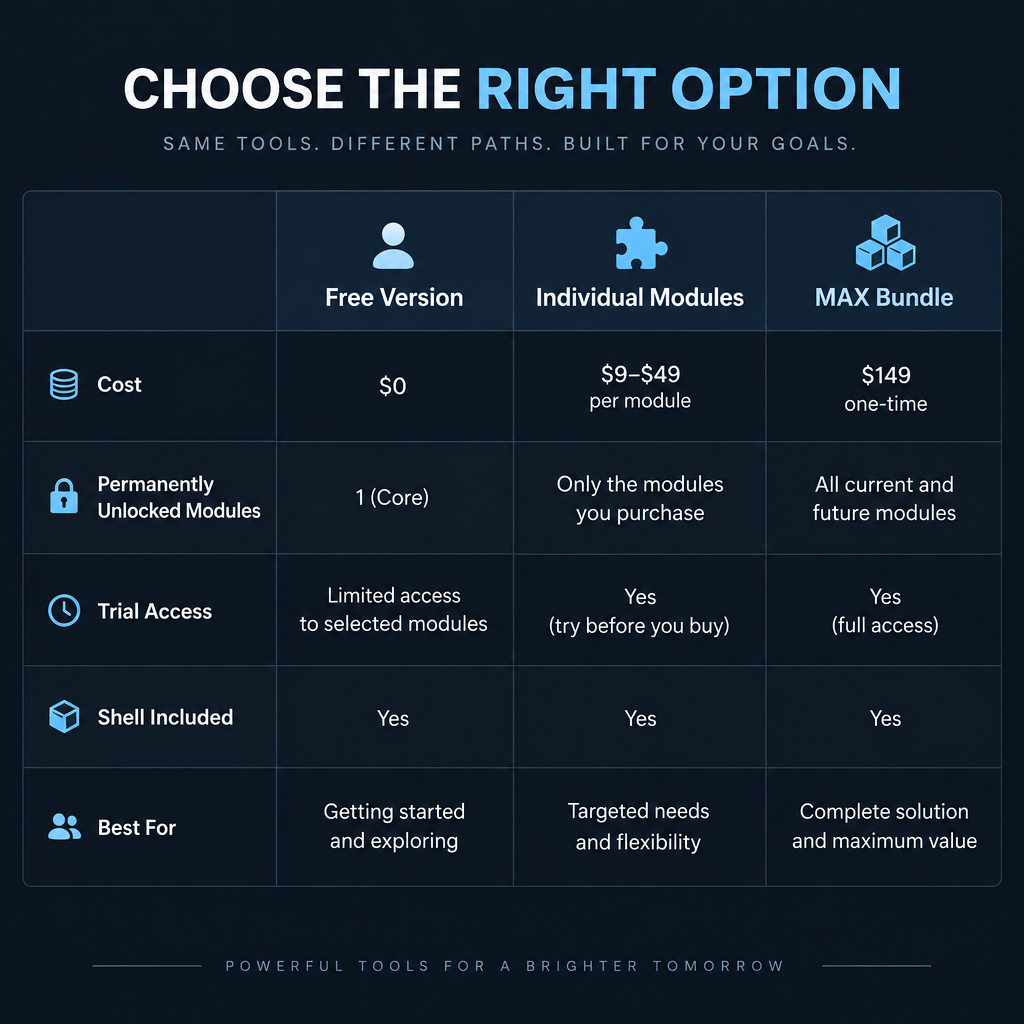
Here is how the free tier compares to the paid routes.
| Free version | Individual modules | MAX bundle | |
|---|---|---|---|
| Cost | Free with IK account | Paid per module | One paid bundle |
| Shell (standalone + plugin) | Included | Included | Included |
| Permanently unlocked modules | Classic EQ, Classic Compressor | The ones you buy | Full catalogue for that version |
| Other modules | Trial mode only | Trial mode only | Unlocked |
| Saving chains and presets | Yes | Yes | Yes |
| Best for | Learning, light EQ and glue | Filling one specific gap | Mastering-focused studios |
IK runs sales very often, and its “group buy” and seasonal promotions regularly cut module prices sharply. We’d never pay full price for an individual T-RackS module. Add the ones you like to a wishlist and wait.
Watch out
The free version needs an IK Multimedia user account and online authorisation through IK Product Manager. Activate on the machine you’ll actually record on, and keep your login details safe so you can reinstall later.
Installing T-RackS
IK distributes all its software through one installer app, IK Product Manager. You don’t download T-RackS as a separate file anymore.
Quick steps: install the free T-RackS
- Create a free account on the IK Multimedia site.
- Download and install IK Product Manager.
- Log in to Product Manager with that account.
- Find T-RackS in the product list and click Install.
- Choose plugin formats (VST3, AU or AAX) and finish.
- Rescan plugins in your DAW and look for T-RackS.
Choosing plugin formats
During installation, only tick the formats you need. On Windows that usually means VST3, plus AAX if you run Pro Tools. On a Mac, Logic Pro and GarageBand need the AU version, while Ableton Live, Reaper, Cubase and Bitwig can use VST3. Installing every format clutters your plugin list with duplicates and makes the rescan take longer.
Authorisation
Product Manager handles authorisation for you after login, so there’s no separate iLok dongle or serial-number hunt. If T-RackS opens in your DAW but the Classic modules show as locked, open Product Manager again, confirm you’re logged in and let it re-authorise.
System requirements and format support
T-RackS is a 64-bit application on both platforms, and IK has updated its line for native Apple Silicon support. Before you install, check IK’s product page for the current minimum Windows and macOS versions, because IK raises them over time.
| Item | T-RackS support |
|---|---|
| Windows | Yes, 64-bit only |
| macOS | Yes, Apple Silicon and Intel |
| Linux | No native build |
| VST3 | Yes |
| Audio Units (AU) | Yes, macOS only |
| AAX (Pro Tools) | Yes |
| CLAP | No |
| LV2 | No |
| Standalone app | Yes |
| Authorisation | IK account via Product Manager |
The lack of a Linux build is the biggest gap for our readers. Some people run Windows VST3 plugins on Linux through compatibility layers. That route is unsupported and authorisation-heavy software like this often fails under it. If you’ve settled on Ubuntu or Linux Mint for music production, plan around native Linux tools instead (we list some below).
A first mastering chain using only free modules
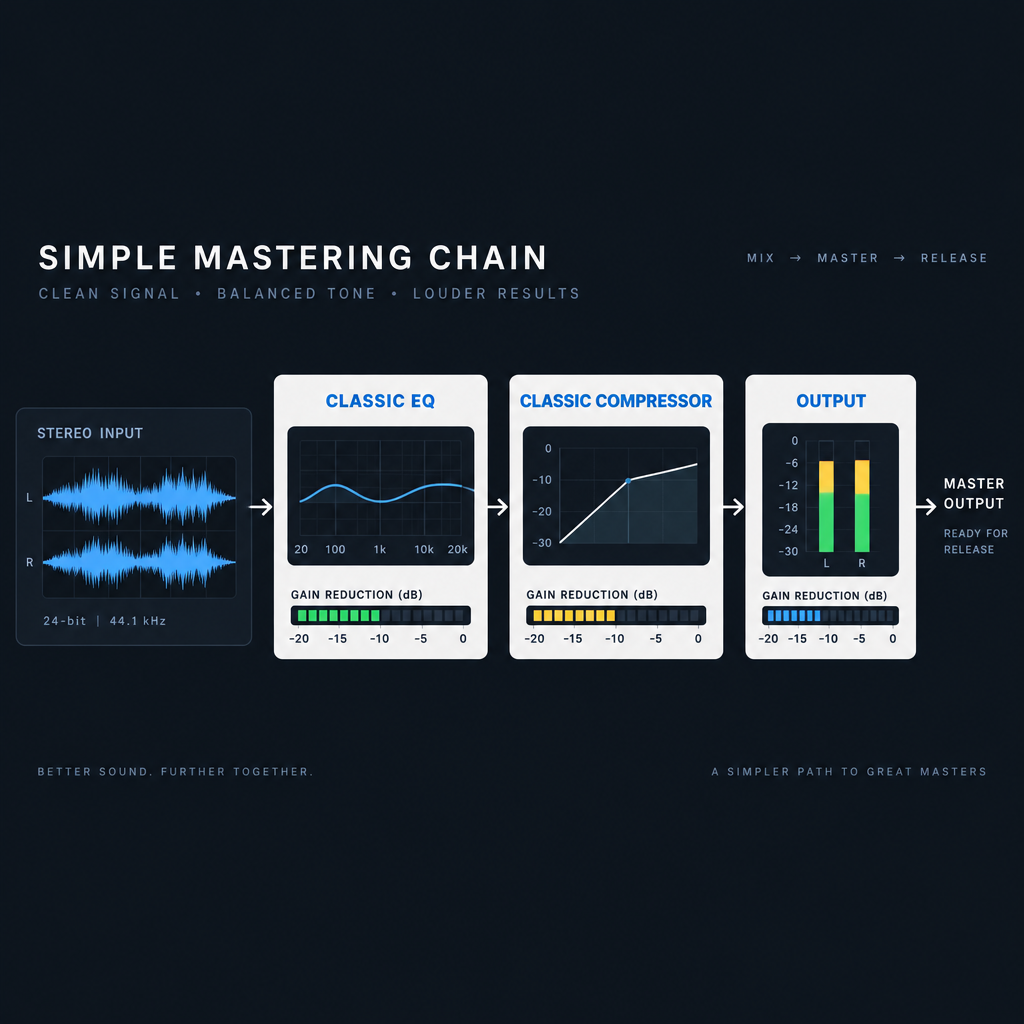
The free Classic EQ and Classic Compressor are enough to learn the core of mastering: gentle tonal balance and a little glue. Here’s a starting chain we use on a finished stereo mix. Treat the numbers as starting points and adjust by ear.
Step 1: Set up the session
In your DAW, put T-RackS on the master bus as the last insert, after any mix-bus processing. Mastering doesn’t need low latency, so raise your audio buffer to 512 or 1024 samples in your DAW’s audio preferences. That gives the processors more headroom and prevents clicks. Leave your project at the sample rate you mixed in, usually 44.1 kHz or 48 kHz.
If you’d rather work outside a DAW, open the standalone T-RackS and drag your bounced mix (a WAV at 24-bit, with roughly 3 to 6 dB of headroom) into the playlist area.
Step 2: Classic Equalizer first
Load the Classic Equalizer into the first slot. Mastering EQ moves are small:
- Cut low rumble below about 30 Hz if your mix has it.
- If the mix sounds dull, try a broad high-shelf boost of 0.5 to 1.5 dB.
- If it sounds muddy, try a gentle cut of 1 to 2 dB somewhere in the 200 to 400 Hz region.
If you find yourself boosting or cutting more than 3 dB, the problem belongs in the mix. Go back and fix it there.
Step 3: Classic Compressor for glue
Put the Classic Compressor in the next slot. For bus glue, aim for a low ratio around 1.5:1 to 2:1, and set the threshold so the meter shows about 1 to 3 dB of gain reduction on the loudest parts. A medium attack keeps drum transients intact, and a release that lets the needle recover between beats keeps the track breathing. Use the compressor’s output gain to match the loudness before and after, so you’re judging tone rather than volume.
Producer tip
Toggle the whole chain on and off at matched loudness. If the processed version only sounds better when it’s louder, back the settings off until it still wins at equal level.
Step 4: Add a limiter
This is where the free version runs out. If your free modules are the Classic EQ and Classic Compressor, you have no brickwall limiter in the chain. You can trial IK’s Stealth Limiter inside the shell, or put a free third-party limiter after T-RackS in your DAW.
For streaming, Spotify and YouTube normalise playback to around -14 LUFS integrated, and Apple Music sits around -16 LUFS. Setting your limiter ceiling at -1 dBTP (true peak) is a safe default that avoids clipping when platforms convert your file to lossy formats. Pushing far louder than -14 LUFS just means the platform turns you down, often with a squashed sound left behind.
Step 5: Save the chain
Save the slot setup as a preset in the T-RackS shell. Next time, you can load your starting chain in one click and spend your time on decisions rather than setup.
Paid modules worth trialling
The trial mode is the free version’s hidden value, so it helps to know what to try. These are well-known modules in the catalogue and the jobs they’re built for.
| Module | Type | What it’s for |
|---|---|---|
| Master Match | Matching EQ/loudness | Matches your master’s tone and loudness to a reference track |
| Stealth Limiter | Brickwall limiter | Transparent final-stage loudness |
| Dyna-Mu | Variable-mu compressor | Smooth, musical mastering compression |
| ONE | All-in-one processor | Fast tonal shaping with a few macro controls |
| EQual | Digital EQ | Precise, flexible equalisation |
| Lurssen Mastering Console | Mastering chain | Chain built with mastering engineer Gavin Lurssen |
| Vintage Compressor Model 670 | Tube compressor model | Classic Fairchild-style colour and glue |
| Vintage Tube Program Equalizer | Tube EQ model | Pultec-style broad tonal boosts |
| White 2A | Opto compressor model | Gentle levelling on vocals and buses |
| Black 76 | FET compressor model | Fast, aggressive compression on drums and vocals |
Master Match is the one we’d trial first. You load a commercial track whose tone you like, and the module analyses both and suggests EQ and loudness moves. It’s a useful learning aid, as long as you pick a reference that suits your genre and arrangement.
Limits and upsells to know about
The free version is honest about what it is: a funnel into paid modules. That’s fine as long as you know the limits going in.
- Three core modules. The permanently free processors are the Classic EQ, Classic Compressor and Master Match X Lite. No limiter, no tape, no reverb.
- Constant upsell. The browser shows the whole paid catalogue, and IK’s promotional emails arrive often once you register.
- No Linux, no CLAP, no LV2. Windows and macOS only.
- Account dependency. You need IK Product Manager and an online account to install and authorise.
- No watermark on free modules. Audio processed with the unlocked Classic modules exports clean. Trial modules are the restricted ones.
Watch out
Only download T-RackS through IK Product Manager. Unofficial “full version” downloads are a common route for malware, and they won’t authorise properly anyway.
Free alternatives that fill the gaps
If the free T-RackS leaves you short, a handful of genuinely free tools cover limiting, dynamic EQ and loudness metering. Several run natively on Linux.
| Tool | Price | Platforms | Formats | Best for |
|---|---|---|---|---|
| TDR Nova | Free (paid GE version) | Windows, macOS | VST2, VST3, AU, AAX | Dynamic EQ on the master |
| TDR Kotelnikov | Free (paid GE version) | Windows, macOS | VST2, VST3, AU, AAX | Transparent bus compression |
| LoudMax | Free | Windows, macOS, Linux | VST, AU, Linux builds | Simple, clean limiting |
| LSP Plugins | Free, open source (LGPL 3) | Linux, with Windows builds | LV2, VST2, CLAP | Full mastering toolkit on Linux |
| Airwindows | Free, open source (MIT) | Windows, macOS, Linux | VST, AU, LV2, CLAP via Consolidated | Character, saturation, dithering |
| Youlean Loudness Meter 2 | Free (paid Pro version) | Windows, macOS | VST, VST3, AU, AAX, standalone | LUFS and true-peak metering |
TDR Nova
Tokyo Dawn Records’ free dynamic EQ is our pick to pair with the Classic Equalizer. It only cuts when a frequency gets too loud, which tames a harsh vocal or boomy bass note without dulling the whole mix. The paid GE version adds more bands and features, but the free one is fully usable.
TDR Kotelnikov
Kotelnikov is a clean, low-colour compressor that many engineers use for mastering glue. If the Classic Compressor sounds too vintage for your material, swap it in.
LoudMax
LoudMax is a two-knob limiter: threshold and output ceiling. It’s the quickest fix for the missing limiter in the free T-RackS chain, and it runs on Linux too.
LSP Plugins
For Linux users, LSP Plugins is the strongest replacement for T-RackS as a whole. It includes parametric and graphic EQs, multiband compressors, limiters and loudness meters, all open source and available as LV2 and CLAP.
Airwindows
Chris Johnson’s Airwindows catalogue is huge, MIT-licensed and cross-platform. It’s best for tone and texture: tape-style saturation, console emulation and quality dithering for your final 16-bit export.
Youlean Loudness Meter 2
Whatever you master with, you need accurate loudness numbers. Youlean’s free version shows integrated LUFS, short-term loudness and true peak. The Pro version adds extras, but free covers everything you need to hit the targets above.
Our verdict
The free T-RackS is worth installing for anyone on Windows or macOS. The Classic EQ and Classic Compressor are decent processors in their own right, the standalone app is a handy way to master without a DAW, and trial mode lets you audition high-end modules on your own mixes for nothing.
It isn’t a complete free mastering suite, though. Without a limiter, you’ll need at least one extra tool, and LoudMax plus Youlean Loudness Meter 2 closes that gap at no cost. On Linux, skip T-RackS and build your chain from LSP Plugins and Airwindows. Spend money only after a trial proves a module does something your free chain can’t, and wait for an IK sale when you do.
Looking for the Tumbleweed T-Rack instead?
The same search term also turns up a bike part. The Tumbleweed T-Rack is a chromoly steel rack for bikepacking and touring, originally a RatKing design whose production moved to Tumbleweed. Riders use it with Tumbleweed’s Mini Pannier Rack and similar options to carry bags and cargo. That’s a different product entirely, and this page is about the audio software only.
FAQ
Is T-RackS really free?
The shell and a small set of Classic modules are free with an IK Multimedia account, and they don’t expire. The rest of the catalogue runs in trial mode until you buy it.
Is “T-Racks” the same as T-RackS?
Yes. IK spells it T-RackS, but people search “t-racks,” “t-rack” and “trackS” interchangeably. All of them point to the same IK Multimedia mixing and mastering suite.
Can I use T-RackS without a DAW?
Yes. The standalone app loads audio files directly, processes them through your chain and exports finished masters. It also handles album sequencing.
Does T-RackS work on Linux?
No. There’s no native Linux build and no LV2 or CLAP version. Linux users get better results from LSP Plugins, Airwindows and LoudMax.
Does the free version include a limiter?
Not if your free modules are the Classic Equalizer and Classic Compressor. Trial the Stealth Limiter inside the shell, or put a free limiter like LoudMax after T-RackS in your DAW.
What loudness should I master to?
For streaming, -14 LUFS integrated with a -1 dBTP ceiling is a sensible target. Spotify and YouTube normalise to around that level, so going much louder costs dynamics without making your track sound louder to listeners.