
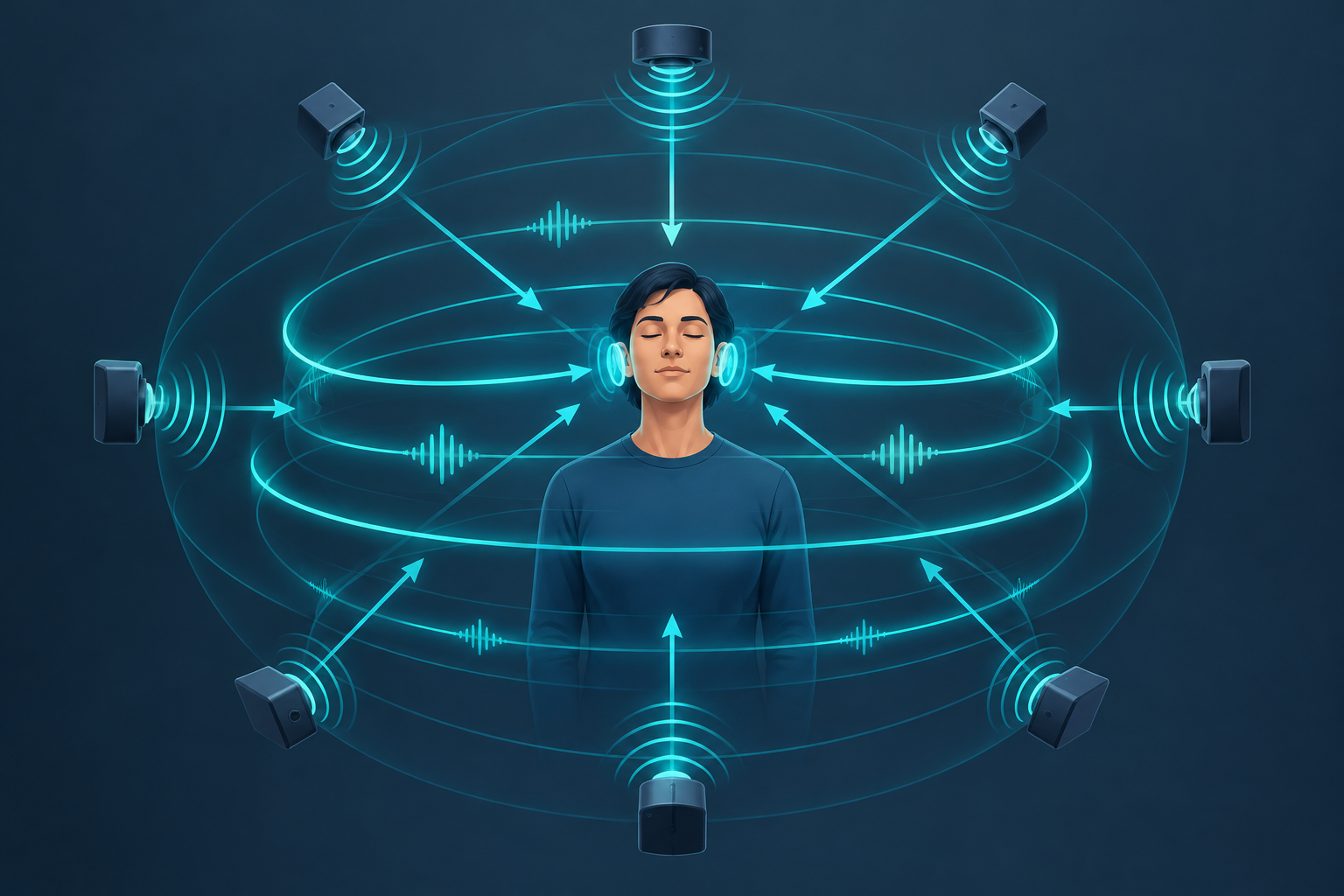
OpenAL is a free, cross-platform audio API that games and apps use to position sounds in 3D space around a listener. You give it a listener, some sound sources and their coordinates, and it works out volume, panning and pitch for each speaker. Today most people run it through OpenAL Soft, an open-source implementation that ships with many Linux distros and games.
What OpenAL is, and what it is not
OpenAL stands for Open Audio Library. It is a programming interface, not an app. You will not find an icon to click or a mixer window to open.
Developers call its functions from C, C++ or a binding in another language. The library then mixes the audio and sends it to your sound system.
The design deliberately copies OpenGL. Function names start with al and alc. The coordinate system is right-handed, like OpenGL’s. If you have written graphics code, the API feels familiar.
It is not a music tool. You will not use it to edit tracks the way you would with the Audacity audio editor. Its job is real-time spatial playback for interactive software.
A short history: Loki, Creative and OpenAL Soft
OpenAL started around 1999 at Loki Software. Loki ported Windows games to Linux and needed a portable audio layer. Creative Technology later took over stewardship and pushed the API toward its Sound Blaster hardware.
The last official specification is OpenAL 1.1, from 2005. Creative’s later Windows runtime was proprietary. It added hardware acceleration and EAX effects on Creative cards.
The original open sample implementation went stale. Chris Robinson forked it and created OpenAL Soft. That fork became the de facto standard. It is software-only, LGPL-licensed and still actively maintained, with its source code public on GitHub.
So when someone asks if OpenAL is open source, the honest answer has two parts. The spec is open. OpenAL Soft is open source. Creative’s old Windows runtime is not.
How OpenAL models 3D sound
Listener, sources and buffers
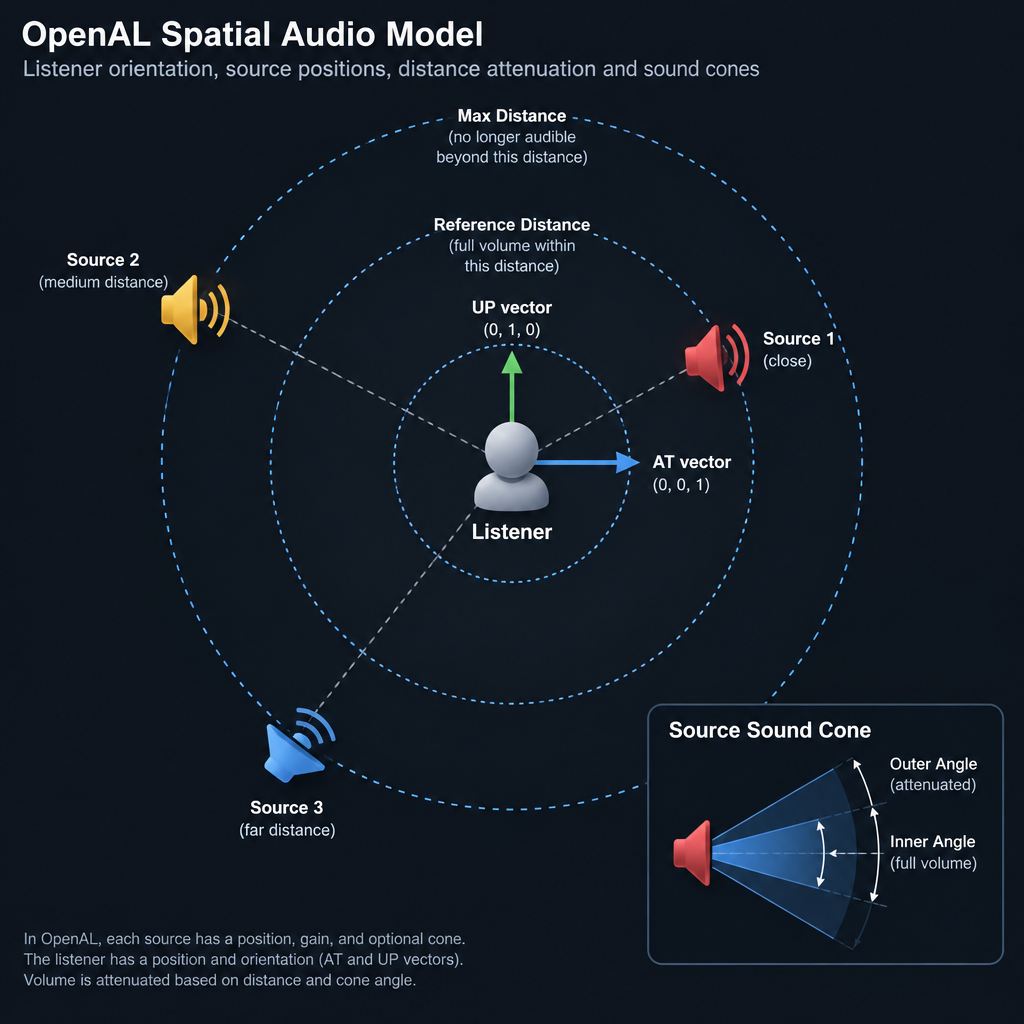
The whole model rests on three objects:
- Buffers hold raw PCM audio data, such as a footstep sample.
- Sources are emitters in the world. Each one plays a buffer and has its own position, velocity and gain.
- The listener is the player’s ears. There is exactly one per context. It has a position, a velocity and an orientation.
Orientation uses two vectors. An “at” vector says where the listener faces. An “up” vector says which way is up. OpenAL compares each source’s position against these to decide left, right, front and back.
Distance attenuation
Sounds get quieter as they move away. OpenAL handles this with distance models. The default is AL_INVERSE_DISTANCE_CLAMPED. Linear and exponential models also exist, and you can switch attenuation off with AL_NONE.
Three per-source values shape the curve:
| Parameter | Default | What it does |
|---|---|---|
AL_REFERENCE_DISTANCE |
1.0 | Distance where gain is 1.0 (full volume) |
AL_ROLLOFF_FACTOR |
1.0 | How fast volume falls off |
AL_MAX_DISTANCE |
Max float | Distance beyond which it stops getting quieter |
With the defaults, the inverse model gives gain = 1 / (1 + (distance − 1)). A source 2 units away plays at 0.5 gain, about −6 dB. At 4 units it drops to 0.25, about −12 dB. Each doubling of distance costs roughly 6 dB, which matches real-world physics.
Raise the rolloff factor for small rooms. Lower it for open landscapes where you want distant sounds to carry.
Doppler and velocity
Give a source and the listener velocities, and OpenAL shifts pitch automatically. A car racing toward you sounds higher, then drops as it passes.
Two global settings control this. AL_SPEED_OF_SOUND defaults to 343.3 units per second, matching metres in air. AL_DOPPLER_FACTOR scales the effect. Set it to 0 to disable Doppler entirely.
Sound cones
Sources can be directional. A cone defines where a sound is loudest. AL_CONE_INNER_ANGLE sets the full-volume zone. AL_CONE_OUTER_ANGLE sets the edge. Outside it, gain drops to AL_CONE_OUTER_GAIN. A speaker on a wall or a character shouting forward benefits from this.
Why your stereo files do not move
This trips up nearly every beginner. OpenAL only spatialises mono buffers. Load a stereo file and it plays straight to the left and right channels, ignoring position.
Export positional sound effects as mono. Keep stereo for music and ambience beds that should not move.
Producer tip
Bounce game SFX to mono, 16-bit, at the same sample rate your engine outputs (48 kHz is a safe choice). This avoids resampling and keeps 3D panning accurate.
For sounds glued to the player, such as UI clicks, set AL_SOURCE_RELATIVE to true. The source then moves with the listener instead of sitting in the world.
EFX: reverb, echo and filters
Plain OpenAL 1.1 only does position, gain and pitch. The Effects Extension, called EFX, adds environmental audio.
EFX introduces auxiliary effect slots, effects and filters. You route sources through a slot holding a reverb, and the sound picks up the character of a cave or hallway. Low-pass filters simulate sound through walls.
OpenAL Soft implements EFX in software. Reverb, echo, chorus, flanger, distortion and more are available. That means you get these effects on any sound card.
HRTF and headphones in OpenAL Soft
Stereo panning only tells your ears left or right. It cannot convincingly place a sound above or behind you.
OpenAL Soft fixes this with HRTF, short for head-related transfer function. It filters each source the way your head and ears would. On headphones, sounds can seem to come from behind or above.
HRTF only works properly with headphones. On speakers it sounds coloured and odd. Turn it on when you game with headphones, and off for speakers.
Installing OpenAL
Linux
Most distros package OpenAL Soft. On Ubuntu or Linux Mint, the runtime library is libopenal1 and the development headers are libopenal-dev. Fedora calls them openal-soft and openal-soft-devel. Arch uses openal.
Games often bundle their own copy, so you may already have it.
Windows
Older games may ask for Creative’s OpenAL installer. It adds devices such as “Generic Software”. Newer titles usually ship OpenAL Soft as a DLL next to the game. Developers can download OpenAL Soft binaries from the project’s site.
macOS
macOS includes an OpenAL framework, but Apple has deprecated it. For new projects, link OpenAL Soft instead, available through Homebrew as openal-soft.
Quick steps: install and test OpenAL Soft on Ubuntu
- Open a terminal.
- Run sudo apt install libopenal1 libopenal-dev.
- Install the openal-info tool if your distro packages it separately.
- Run openal-info to list devices and extensions.
The openal-info output shows your default device, supported extensions, whether EFX is present and available HRTF data sets. It is the first thing to check when you need help debugging silent audio.
Command-line and config options that control the sound output
OpenAL Soft has no settings window of its own inside games. You control it with environment variables and a config file.
Environment variables
Set these before launching a game or test tool:
ALSOFT_DRIVERSpicks the backend, for examplepipewire,pulse,alsaorjack.ALSOFT_LOGLEVELsets log detail. Use 3 for verbose output.ALSOFT_LOGFILEwrites the log to a file instead of the terminal.
A typical debug launch looks like this:
ALSOFT_DRIVERS=pipewire ALSOFT_LOGLEVEL=3 openal-info
The alsoft.conf file
For permanent changes, edit the config file. On Linux, OpenAL Soft reads /etc/openal/alsoft.conf system-wide, then ~/.config/alsoft.conf or ~/.alsoftrc per user. On Windows, it reads %AppData%\alsoft.ini.
A practical starting point:
[general]
drivers = pipewire,pulse,alsa
frequency = 48000
hrtf = true
A smaller period_size lowers latency but raises the risk of crackles. Change it in small steps.
If you prefer a GUI, OpenAL Soft includes alsoft-config. It writes the same file through tabs for playback, HRTF, renderer and backends. Not every distro packages it.
Watch out
Some games ship their own OpenAL Soft DLL or .so file and ignore system settings. If your changes do nothing, check the game folder for a bundled library.
A minimal playback flow for developers
The documentation and the spec PDF cover every call, but the core sequence is short:
alcOpenDevice(NULL)opens the default output.alcCreateContextandalcMakeContextCurrentset up the context.alGenBuffersandalBufferDataload mono PCM, for exampleAL_FORMAT_MONO16.alGenSources, then attach the buffer withalSourcei(src, AL_BUFFER, buf).- Set
AL_POSITIONon the source and listener withalSource3fandalListener3f. - Call
alSourcePlayand update positions every frame.
For long music or dialogue, do not load the whole file. Queue small chunks with alSourceQueueBuffers and recycle them with alSourceUnqueueBuffers. This streaming loop keeps memory use low.
OpenAL can also capture input through alcCaptureOpenDevice. It is handy for voice chat. For plain recording audio to a file, a dedicated recorder is simpler.
Limits worth knowing
OpenAL is mature, but it has gaps:
- Frozen spec. Version 1.1 dates from 2005. New features arrive only as OpenAL Soft extensions.
- No occlusion physics. It does not know about walls. Your engine must calculate obstruction and apply EFX filters.
- No authoring tool. Middleware like FMOD and Wwise gives sound designers visual editors. OpenAL gives you code.
- Apple deprecation. Relying on the system framework on macOS or iOS is a dead end.
Even so, it is a sensible choice for indie and open-source projects. It is free, LGPL-licensed, cross-platform and battle-tested. Minecraft Java Edition gets its audio through OpenAL Soft via the LWJGL library, and the ioquake3 engine supports it too.
FAQ
Is OpenAL free to use?
Yes. The spec is open, and OpenAL Soft is free under the LGPL. You can link it into commercial games. If you modify the library itself, the LGPL requires you to share those changes.
Do I need to install OpenAL to play games?
Usually not. Most modern games bundle it. Some older Windows titles still need Creative’s installer, and the game will tell you at launch.
Is OpenAL the same as OpenGL?
No. OpenGL handles graphics, while OpenAL handles audio. They share a naming style and coordinate conventions, and that is all.
Why does my game sound flat on headphones?
HRTF is probably off. Set hrtf = true in alsoft.conf or enable it in alsoft-config, then restart the game.
Can I use OpenAL to make music?
Not directly. It is a playback engine for interactive apps. For producing tracks, use a DAW or audio editor and export the results as assets.