

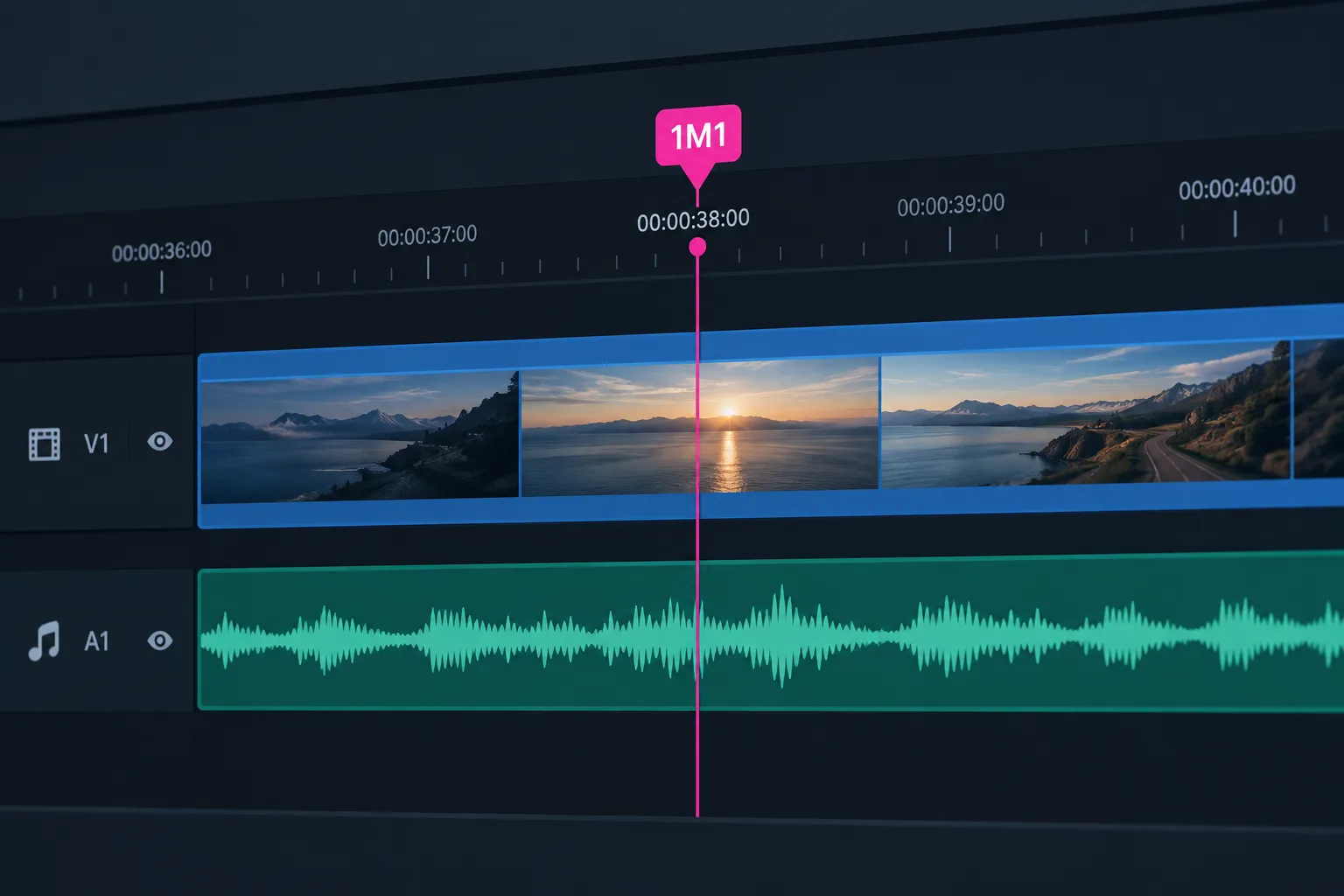
A music cue is one piece of music with a set start point, a set end point and a job to do at a specific moment in a film, TV episode, game, stage show, DJ set or practice session. In film and TV, each cue gets a code like 1M1 and goes on a cue sheet, and that cue sheet decides whether the composer gets paid. Below, each meaning of the term comes with how it works and a free tool you can use for it, plus a copy-ready cue sheet template.
Key takeaways
- In film and TV, a cue is a numbered piece of music, and 1M1 means reel 1, music cue 1.
- The production company or network files the cue sheet, but a missing or wrong one costs the composer money.
- Usage codes matter: visual (featured) uses pay more than background ones, so check every code.
- ASCAP’s 2027 cue sheet deadlines are Jan 1, Apr 2, Jul 2 and Oct 1, 2027.
- DJ hot cues, theatre GO lists, practice loops and DAW clip launchers all use the same word, and each has a free tool.
Fact-checked
We checked these key facts against the sources named, on November 15, 2026:
- ASCAP and BMI launched RapidCue in 2007 (source: thescl.com)
- In a standard split, writer and publisher shares add up to 100% of the work (source: ascap.com)
- SOCAN in Canada published a Cue Sheet Submission and Management guide in January 2026 (source: socan.com)
- Audacity 4.0 (September 2026, with 4.0.2 out in November 2026) rebuilt the interface on Qt 6 (source: ubuntuhandbook.org)
- Mixxx 2.5.6, released on March 27, 2026, is the current stable version and the last release of the 2.5 branch (source: mixxx.org)
What is a music cue? The short answer
A music cue is a single piece of music placed at one exact point in a production. It is defined by where it starts, where it stops and what it has to do there. The word also turns up in several other settings, and they all share the same idea: a marked point where something sound-related happens.
Music cue meaning in film, TV and games
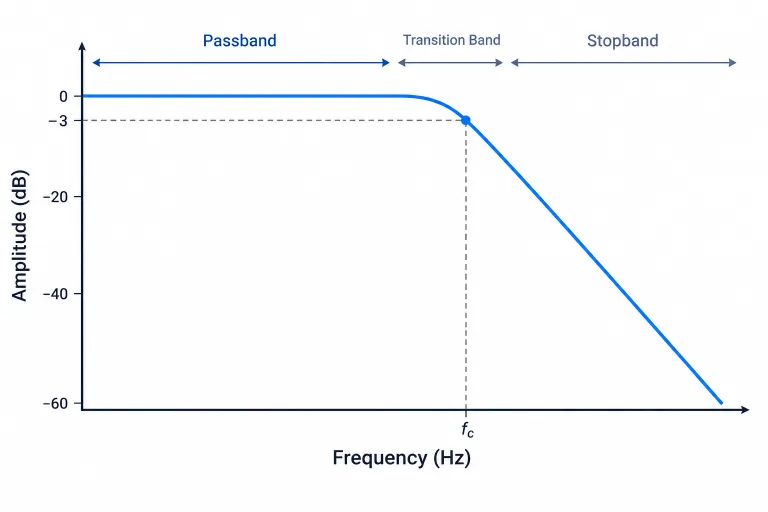
In film and TV, a cue is any separate stretch of music. That covers a two-second sting, a three-minute chase or the main title. Each one is spotted, numbered, scored and reported separately. Games use cues too, but they are triggered by what the player does. A combat cue might start when an enemy notices you, and a low pass filter might muffle the music when you open the pause menu. Game cues rarely have the fixed timings of a film reel.
People who search for “audio cue” usually mean the wider category. That includes any triggered sound: a music cue, a sound effect, a voice line or, in theatre, a whole playback event. A “music cue song” search usually means one of two things. Either it is a licensed song used as a cue in a film or show, or it is a song queued to play at a set moment of a live event, such as a wedding entrance.
Other things people call a “cue”: DJ, theatre, DAW and practice
| Context | What a cue is | Who uses it | Free tool |
|---|---|---|---|
| Film and TV score | A numbered piece of music (1M1) with timings | Composers, music editors | Ardour (markers and ranges) |
| Cue sheet entry | One reported music use, with usage code and splits | Production companies, PROs | A spreadsheet that follows the ASCAP/BMI template |
| DJ cue and hot cue | A stored point in a track you can jump to | DJs | Mixxx |
| Theatre, show or event cue | A step in a GO-button playback list | Sound operators, event techs | Linux Show Player, MultiPlay |
| Practice or rehearsal cue | A marked section you loop, slow down or jump to | Musicians, dancers, choreographers | Audacity (labels and loop region) |
| DAW clip cue | A clip slot you launch live or while arranging | Producers, live performers | Ardour 7.0 and later |
Cues for practice, dance and rehearsal
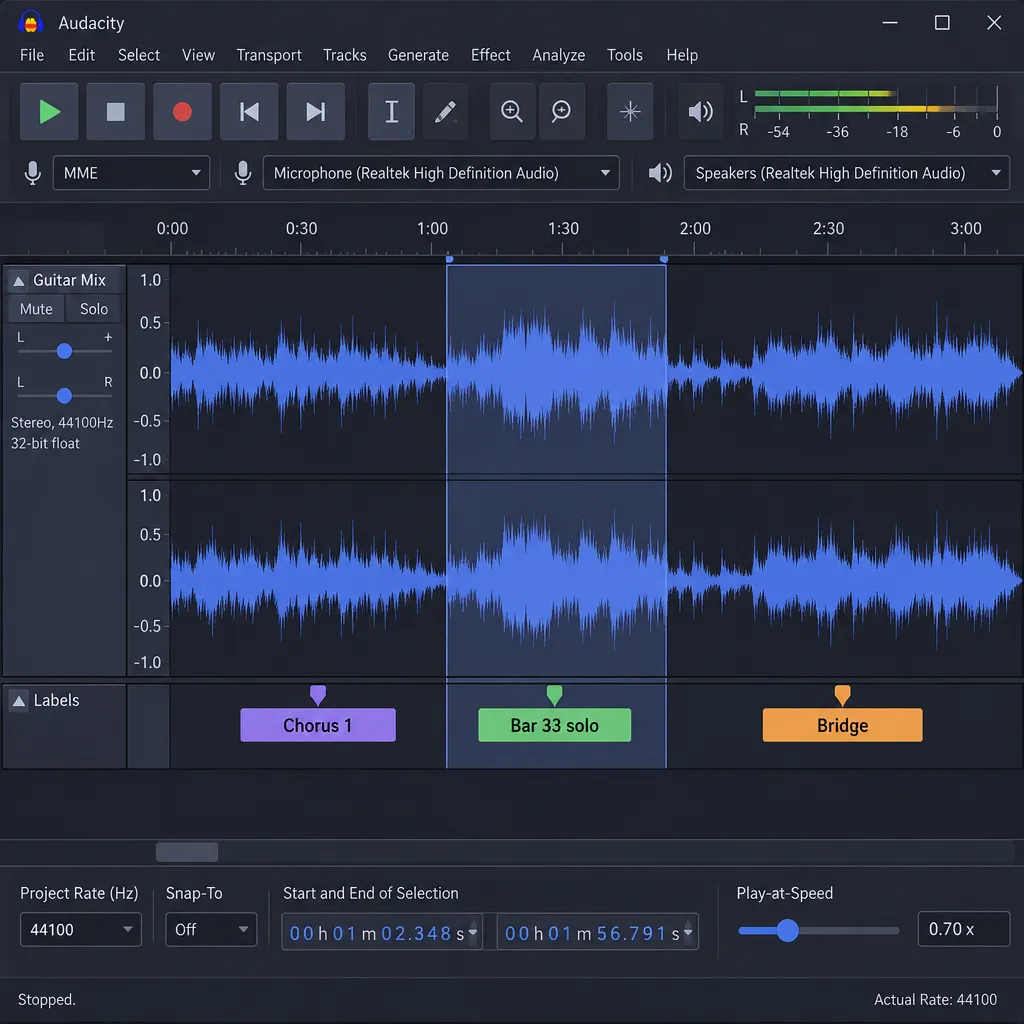
A practice cue is a marked section of a track that you can loop, slow down or jump straight to. Musicians use them to drill a hard passage or transcribe a solo, and dancers use them to rehearse one eight-count at a time. Audacity is free and open source (GPL), runs on Windows, macOS and Linux, and does the job well.
These steps use the Audacity 3.7 series. Audacity 4.0 (September 2026, with 4.0.2 out in November 2026) rebuilt the interface on Qt 6, so some controls have moved, but labels and loop regions work the same way.
- Import the track (File > Import > Audio).
- Select the first section you want to drill, then add a label with Edit > Labels > Add Label at Selection (Ctrl+B) and name it, such as “Chorus 1” or “Bar 33 solo”.
- Repeat for each section. Click a label later to reselect exactly that range.
- Set the loop with Select > Set Loop Region to Selection (Shift+L), then press L to turn looping on. Space now plays that section over and over.
- To slow it down without editing the file, show the Play-at-Speed toolbar (View > Toolbars) and play the loop below 1.0x.
The loop region stays defined when you switch looping off, so you can come back to it without setting it up again. Mixxx is a good alternative if you’d rather tap pads: set a hot cue at each section, then lower the tempo with key lock on so the pitch stays put.
CueMusic is a paid option built for this job on iPhone and iPad. It needs iOS or iPadOS 26 or later and costs $6.99 to unlock, and version 3.0.0 added uploads from the Files app.
Producer tip
When you slow a passage down to learn it, raise the speed in small steps over several sessions rather than jumping straight back to 1.0x. A label for each tempo stage (“Solo 70%”, “Solo 85%”) shows how far you’ve got.
How film and TV music cues work
A film cue is decided in a meeting, timed to the frame and named with a code that follows it through every later step. Music that a character can hear on screen, such as a car radio or a band in a bar, is a source (diegetic) cue. Music only the audience hears is a score cue. Both go on the cue sheet, usually under different usage codes.
The spotting session
The spotting session is the meeting where the director, composer and usually the music editor watch the locked cut and agree where music starts and stops. For each cue they note:
- The start point, often tied to a cut, a line of dialogue or an action.
- The end point, which can be a hard out or a tail under the next scene.
- The purpose, such as building dread, covering a time jump or landing a joke.
- Whether it is source or score, and whether it needs a licensed song.
The notes from this session become the master list that the score, the stems and later the cue sheet all follow.
Cue numbering: 1M1, reels and why 11 minutes
In 1M1, the first number is the reel, M stands for music and the last number is the cue’s position within that reel. So 3M4 is the fourth music cue on reel 3. Film scoring writer Ryan Leach explains that a 35mm reel held 1,000 feet of film, which ran about 11 minutes. Digital workflows have no physical reels, but productions still split features into reel-sized chunks and keep the numbering.
Under the standard scheme, the cue counter starts again on each reel: 1M1, 1M2, 1M3, then 2M1. That answers a common question from new composers. Cues added after spotting usually get a letter (2M3A) so the other cues don’t have to be renumbered.
Did you know?
According to the film music history blog Music Behind the Screen, cues in the 1960s and 1970s were often numbered by reel and part, written like R7P2. Many films through the 1940s simply numbered cues in order.
TV numbering schemes
TV replaces the reel with the episode. A common pattern adds the episode code in front of the cue number, so the third cue of season 1, episode 2 becomes 102M3. Some shows number by act instead. Whatever scheme the music editor picks, use it the same way in file names, session markers and the cue sheet.
Producer tip
Name your cues in the 1M1 format from the spotting session onward. When your DAW session, bounced stems and cue sheet all use the same IDs, a missing or misreported cue is obvious at a glance.
What is a music cue sheet?
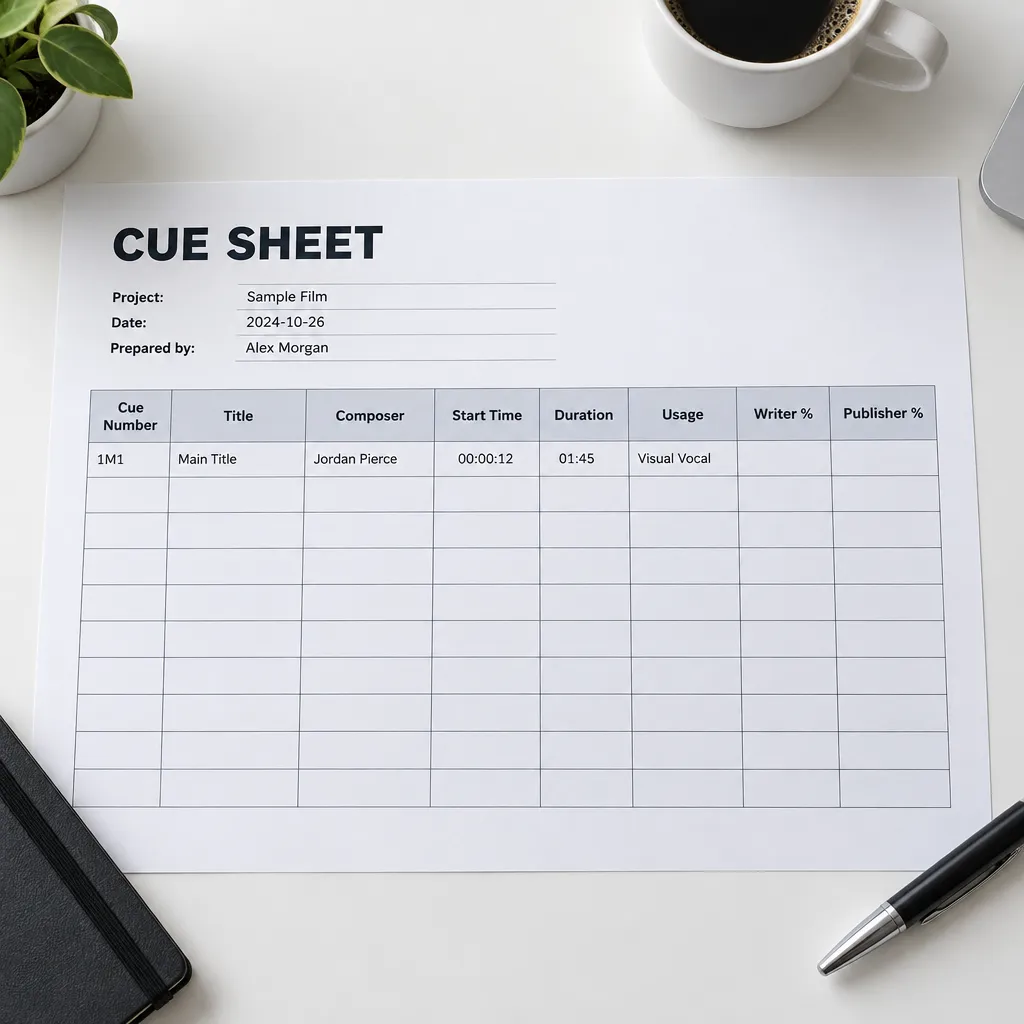
A cue sheet is the log of every piece of music used in a production. Performing rights organisations (PROs) use it to work out who gets paid when that production airs. BMI says royalty calculation depends on a detailed and accurate cue sheet, so it is in composers’ and publishers’ interest to make sure it is prepared properly. Without a cue sheet, the PRO cannot connect a broadcast to your music.
Fields on a standard ASCAP/BMI cue sheet
The standardized template that ASCAP and BMI share groups its fields into two blocks. Both societies publish the official version with a sample sheet and instructions on their cue sheet pages, and the free template below follows the same layout.
Production block: series or film title, episode title and number, production company, air or release date, total running time, and the contact who prepared the sheet.
Cue block (one row per cue):
- Cue number and cue title
- Usage code (BI, BV, VI, VV, MT, ET and so on)
- Timing (duration of that use)
- Composer(s), with PRO affiliation and share
- Publisher(s), with PRO affiliation and share
- Identifiers where available, such as the ISWC for the composition
Free cue sheet template (copy into any spreadsheet)
The template below mirrors the ASCAP/BMI production and cue blocks and is pre-filled with the worked example further down. Copy each block into a plain text file saved as .csv, then open it in LibreOffice Calc, Google Sheets or Excel and save as .xlsx if you need that format.
Production block:
Field,Value
Production Title,Harbour Lights
Episode Title,Low Tide
Episode Number,104
Production Company,Example Pictures LLC
Air or Release Date,2026-12-01
Total Running Time,0:44:12
Prepared By (Name / Email),Music Coordinator / [email protected]
Cue block (one line per writer or publisher, repeated for co-writers):
Cue No.,Cue Title,Usage,Timing,Role,Name,PRO,Share,ISWC
104M2,Harbour at Night,BI,1:42,Composer,A. Rivera,ASCAP,50%,
104M2,Harbour at Night,BI,1:42,Publisher,Rivera Tunes,ASCAP,50%,
104M5,Neon Diner,VV,0:38,Composer,J. Okafor,BMI,25%,
104M5,Neon Diner,VV,0:38,Composer,L. Chen,BMI,25%,
104M5,Neon Diner,VV,0:38,Publisher,Library Music Pub,BMI,50%,
To add a usage-code dropdown, select the Usage column and set a list of BI, BV, VI, VV, MT, ET:
| App | Menu path |
|---|---|
| LibreOffice Calc | Data > Validity > Allow: List, then enter one code per line |
| Google Sheets | Insert > Dropdown, then add one option per code |
| Microsoft Excel | Data > Data Validation > Allow: List, Source: BI,BV,VI,VV,MT,ET |
Producer tip
Format the Timing column as text before you paste. Otherwise spreadsheets read 1:42 as a clock time, and the value can change when the file is saved or exported.
Worked example: cues filled in
Here is a hypothetical indie drama episode with one original underscore cue and one licensed library cue heard on screen. In a standard split, writer and publisher shares add up to 100% of the work. That is why one composer and one publisher each show 50%.
| Cue # | Title | Usage | Timing | Composer (PRO, %) | Publisher (PRO, %) |
|---|---|---|---|---|---|
| 104M2 | Harbour at Night | BI | 1:42 | A. Rivera (ASCAP, 50%) | Rivera Tunes (ASCAP, 50%) |
| 104M5 | Neon Diner | VV | 0:38 | J. Okafor (BMI, 25%), L. Chen (BMI, 25%) | Library Music Pub (BMI, 50%) |
The second row is coded VV because a jukebox singer is on screen. If it were filed as BI, the writers would be paid at the background weighting instead of the higher feature weighting for the same 38 seconds.
Who files it, and what to do if nobody does
The production company, or the network or distributor, prepares and files the cue sheet. The composer does not. In practice, composers often end up chasing it. If the production never filed, you have two routes:
- Ask the producer for the sheet in writing and point to your sync licence.
- Contact your PRO, which can help get the cue sheet submitted.
For library tracks, including “royalty-free” ones, look for composer, publisher and PRO details in the track metadata, on the licence certificate or on the library’s cue sheet information page. Libraries such as PremiumBeat publish reporting pages for exactly this purpose.
Producer tip
Add a clause to every sync licence that requires the producer to file a cue sheet and send you a copy. It costs nothing to ask for, and it gives you something to point to later.
Cue usage codes and why they change your royalty
Usage codes tell the PRO how the music was heard, and the PRO applies a different weighting to each type of use. Featured or visual uses are weighted above background uses, and theme credit follows its own rules. Neither ASCAP nor BMI publishes one fixed public ratio, such as “visual vocal pays X times background”, so the table below shows the order of value.
| Code | Name | Example on screen | How it is weighted |
|---|---|---|---|
| BI | Background Instrumental | Underscore beneath a dialogue scene | Background weighting |
| BV | Background Vocal | A song with audible lyrics under dialogue | Background weighting |
| VI | Visual Instrumental | A pianist playing on camera | Feature weighting, above background |
| VV | Visual Vocal | A singer performing on camera | Feature weighting, above background |
| MT | Main Title theme | Opening theme used across episodes | Theme weighting |
| ET | End Title theme | Closing theme used across episodes | Theme weighting |
How the weighting is actually calculated
The usage code is one input among several, which is why a fixed multiplier would mislead you. BMI says it weights theme, feature, background and logo performances differently. The value of each performance also depends on how long the music plays and on audience data. BMI also treats song uses (BV, VI and VV) that run for at least one minute as “Super Usages”, which earn extra credit.
ASCAP’s formula applies a use weight, covering how the music was used, and a licensee weight, which reflects what the broadcaster paid. ASCAP members can read the full rules, but the society’s public pages don’t show a simple background-versus-feature ratio. In practice, the best way to see the gap is to compare two of your own lines on the same statement: one cue coded BI and one coded VI or VV on the same programme.
Did you know?
APRA AMCOS reports that PRS, IMRO and KODA apply one flat weighting to background, feature and theme uses. ASCAP, SOCAN, SACEM, GEMA and TEOSTO use different multipliers for each, so the same mis-coding costs more money in some territories than in others.
Background vs visual vs theme
BMI’s US television royalty rules set out the line clearly. When the performer is on camera, the use is Visual Vocal or Visual Instrumental. Underscore is Background Instrumental. BMI gives theme credit only when a work is used across multiple episodes of a series. Opening or closing music that appears in just one episode is credited by how it is actually used, and a segment theme reused within a program counts as background.
Under the same rules, a song whose lyrics the audience can hear is a Background Vocal even when dialogue plays over it. It is not Background Instrumental.
Common mis-codings that underpay writers
- On-camera performance coded BI. This is the most expensive mistake, because a featured use gets credited at the background weighting.
- Audible lyrics coded BI instead of BV. It happens often with songs played quietly in a scene. At BMI it can also cost a song use of a minute or more its Super Usage credit.
- One-off openers coded MT. BMI recodes these, but a wrong code can delay processing.
- Missing timings or rounded durations. Timing is part of the calculation, so 0:38 entered as 0:30 pays less.
To check how your cue was coded, ask the production for the filed copy, then compare it with the title and episode lines on your PRO statement.
Filing with ASCAP, BMI and SESAC
In the US, cue sheets for ASCAP and BMI go through one shared system, and SESAC takes its own submissions. Outside the US, the local society handles it. SOCAN in Canada published a Cue Sheet Submission and Management guide in January 2026, and APRA AMCOS covers Australia and New Zealand.
RapidCue and the shared template
ASCAP and BMI launched RapidCue in 2007 and introduced a standardized cue sheet template in 2016. You enter the data once, and it is loaded automatically into both PRO databases. That means a sheet listing an ASCAP composer and a BMI composer needs only one submission. The Society of Composers & Lyricists passed the RapidCue news on to its members when it launched. SESAC is not part of RapidCue, so a sheet that lists SESAC writers also needs to go directly to SESAC.
Quick steps: file a cue sheet with free tools
- Copy the free template above into LibreOffice Calc or Google Sheets.
- Fill in one row per cue from your spotting list, with the 1M1 numbers.
- Add usage codes, exact timings, writers, publishers, PROs and shares.
- Submit through RapidCue for ASCAP and BMI, and separately to SESAC if any of its writers are listed.
- Save a dated copy and check it against the next statements.
2027 ASCAP deadlines
ASCAP’s Cue Sheet Corner lists the date by which a cue sheet must reach ASCAP to be processed for each quarterly distribution. These dates were checked on November 15, 2026, and this table is reviewed after each quarterly cutoff. The 2026 cutoffs (Jul 3, 2026 and Oct 2, 2026) have already passed.
| Distribution | Cue sheet deadline |
|---|---|
| March / April 2027 | January 1, 2027 |
| June / July 2027 | April 2, 2027 |
| September / October 2027 | July 2, 2027 |
| December 2027 / January 2028 | October 1, 2027 |
Late filing does not always mean lost money. ASCAP can credit members retroactively for royalties missed because of a late cue sheet if they notify it in time. On ASCAP’s cue sheet page, the deadline for Survey Year 2025 performances is January 31, 2027 for composers and December 31, 2026 for publishers.
Watch out
Missing a quarterly cutoff delays payment, and missing ASCAP’s retroactive claim window can lose it for good. Diary the December 31 and January 31 dates.
ISWC, ISRC and IPI: the IDs that get you paid
- ISWC identifies the composition. It is assigned when the work is registered with a society.
- ISRC identifies a specific recording of that composition.
- IPI identifies you, the writer or publisher, across societies worldwide.
Cue sheets are matched against registered works. If your work isn’t registered, or your IPI is missing, a correct cue sheet can still go unmatched. Publishing administrators such as Songtrust register works with societies for writers who don’t have a publisher.
Composer checklist: making sure your cues get paid
The composer cannot file the sheet, but the composer controls almost everything that makes it accurate.
- Register every cue as a work with your PRO before delivery.
- Embed metadata in every delivered file.
- Put a cue-sheet clause in every sync licence.
- Request the filed copy and check the codes and timings.
- Compare it with your statements once the deadlines above have passed.
Metadata to embed in every WAV and MP3
Put your legal name, PRO, IPI number, splits and a clearance contact in the Comments field of every bounced file. Do it when you export the final mixes, so stems that get passed between editors still carry your details.
Why fingerprinting alone misses cues
Broadcasters and vendors such as Synchtank use audio fingerprinting to detect music, but it is not dependable for cues. Synchtank notes that a time stretch or pitch shift of about two percent can stop a fingerprint from matching. The cue airs and never gets reported. Edited, looped and stretched underscore is exactly the material most likely to slip through, so a cue sheet is still essential.
Cues in DJing: cue points and hot cues
For a DJ, a cue is a saved position in a track. The cue button returns to a set point. The headphone cue (PFL) lets you hear a deck before the crowd does. Hot cues are numbered buttons that jump to stored points instantly. Mixxx is free and open source (GPL), runs on Windows, macOS and Linux, and handles all three.
Hot cues in Mixxx 2.5
Mixxx 2.5.6, released on March 27, 2026, is the current stable version and the last release of the 2.5 branch. The 2.5 series added a beat count and the time remaining to the next hot cue or loop directly on the waveform. That makes it easy to see how long until a drop or a vocal comes in. Set hot cues at structural points such as the first downbeat, the breakdown and the outro, and you can mix without searching through the track.
The same layout works for walk-on music and sports moments. Set hot cue 1 at the exact bar you want the crowd to hear, and the song starts on the hook, not the intro.
Watch out
The Mixxx 2.6 beta (May 2025) lets you move a cue without recreating it and adds per-stem volume and effects. It is still beta software, so back up your library before you try it, and keep 2.5.6 for gigs.
Cues in theatre, live shows and events
In theatre, a cue list is a sequence of sound events. The operator fires each one with a GO button, and fades, waits and overlapping playback are handled automatically. QLab is the industry standard, but it runs only on macOS and needs a paid licence for its full feature set. Two free options cover Linux and Windows.
| Player | Licence | Platform | Best for |
|---|---|---|---|
| Linux Show Player | Free, GPL-3.0 or later | Linux (Flathub) | Stage shows with MIDI or OSC control |
| MultiPlay | Free | Windows | School, community and corporate shows |
| QLab (paid comparison) | Paid licence for full features | macOS only | Professional theatre |
Linux Show Player
Linux Show Player (LiSP) is a free cue player for stage sound playback, licensed under GPL-3.0 or later and available on Flathub. It offers a cart layout, concurrent cue playback, pre- and post-waits, undo and redo, real-time effects, ReplayGain normalisation, and MIDI and OSC control. It is developed and tested for Linux only. On a Chromebook, it can run inside the Linux development environment as a Flatpak. Test that setup with the show’s audio interface before tech week.
MultiPlay (Windows)
MultiPlay is a free Windows cue player built for theatre and corporate events. It is used in both amateur and commercial productions. For a school or community show on a Windows laptop, it is the most direct free stand-in for QLab.
Cueing songs for weddings, recitals and events
A wedding ceremony or a dance recital is a short GO list. The processional, the bride’s entrance, the signing music and the recessional are each one cue, fired when the moment arrives. Build them in Linux Show Player or MultiPlay with a fade-out on each cue and a wait before the next one. Then a nervous volunteer only has to press GO when the officiant nods. The ReplayGain normalisation in Linux Show Player also stops a quiet classical piece from following a loud pop track at a jarring level.
Producer tip
Number theatre sound cues to match the stage manager’s book (SQ 1, SQ 2), not your own file names. When a call comes over the headset, nobody should have to translate.
Cues in your DAW: clip launching and markers
Inside a digital audio workstation, “cue” means two things: clip slots you launch live, and markers that lay out a scoring session. Ardour handles both. It is open source (GPL) and runs on Windows, macOS and Linux. Linux distributions package it for free, while the official ready-to-run builds are pay-what-you-want, and the free demo build goes silent after a set time.
Ardour 9 cue slots
Clip launching arrived in Ardour 7.0, with a dedicated Cue page for triggering clips. Ardour 9.0, released on February 5, 2026, added two things. You can now edit MIDI cue and clip contents in the GUI, and you can record directly into cue slots. That makes it practical to sketch loop-based ideas live and then drag them into the timeline to mix the song as normal.
Building a cue list from markers
For scoring, create a range marker for each cue and name it with its 1M1 code. Ardour’s Locations window (Window > Locations) lists every range with its start and end times. Copy those into the Timing column of the cue sheet template, and the cue sheet timings will match the session exactly.
Free tools for every kind of music cue
Each cue job has a free option. The table weighs three things: what the tool costs, which platforms it runs on, and how closely it matches the paid tool for that job. Versions are current as of November 2026.
| Task | Free or open-source tool | Platforms | Paid tool it replaces |
|---|---|---|---|
| Spot and time score cues | Ardour 9 (markers, ranges) | Win, Mac, Linux | Pro Tools |
| Live clip and cue launching | Ardour 7.0+ Cue page | Win, Mac, Linux | Ableton Live |
| DJ cue points and hot cues | Mixxx 2.5.6 | Win, Mac, Linux | Serato DJ, Rekordbox |
| Practice loops and section cues | Audacity (labels, loop region) | Win, Mac, Linux | CueMusic (iOS, $6.99 unlock) |
| Theatre and event playback | Linux Show Player | Linux | QLab |
| Theatre and event playback | MultiPlay | Windows | QLab |
| Cue sheet drafting | Spreadsheet built on the ASCAP/BMI template | Any | Cue sheet software from music admin vendors |
The honest counter-argument: on a production with dozens of episodes and hundreds of library cues, paid cue sheet platforms save hours and catch errors automatically. For an indie film, a web series or a single composer’s catalogue, a well-kept spreadsheet and RapidCue do the same job. The same goes for practice: a dedicated phone app is handier at a dance studio, and Audacity is the better choice when you’re at a desk with headphones.
FAQ
What is a music cue?
It is a single piece of music with a start time, an end time and a purpose, placed at a specific point in a film, TV show, game, stage show or set. In DJing, theatre and practice apps, the word means a stored trigger point or marked section.
What is a music cue sheet?
It is the record of every music use in a production, with timings, usage codes, writers, publishers, PROs and shares. ASCAP, BMI and other societies use it to pay royalties.
What does 1M1 mean in film music?
Reel 1, music, cue 1. The counter usually restarts on each reel, so the first cue on reel 2 is 2M1.
Who is responsible for filing a cue sheet?
The production company, or the network or distributor that takes on the job. The composer’s job is to check it and follow up.
What are cue sheet usage codes like BI, BV, VI and VV?
Background Instrumental, Background Vocal, Visual Instrumental and Visual Vocal. Visual (on-camera) uses are weighted above background uses. BMI also gives extra Super Usage credit to song uses of a minute or more.
How much more does a visual vocal pay than a background cue?
Neither ASCAP nor BMI publishes one fixed public ratio, because duration, audience data and the type of broadcaster also feed the calculation. Compare a BI line with a VV line for the same programme on your own statement to see the real difference.
How do I submit a cue sheet to ASCAP or BMI?
Use the standardized template and submit it through RapidCue. One submission loads into both databases. SESAC writers need a separate submission to SESAC.
Is there a free music cue sheet template?
Yes. ASCAP and BMI publish the official standardized template with a sample sheet and instructions. The copy-ready CSV template in the “Free cue sheet template” section above follows the same production and cue blocks and is pre-filled with example rows 104M2 and 104M5. It opens in LibreOffice Calc, Google Sheets or Excel.
What is a hot cue in DJing?
A numbered button that jumps straight to a stored point in a track. Mixxx supports hot cues for free on all three desktop platforms.
What is a music cue in theatre?
It is one step in the operator’s playback list, fired with the GO button and usually numbered to match the stage manager’s prompt book.
Can I use a cue player for a wedding or recital?
Yes. Load each song as a cue in Linux Show Player or MultiPlay, add fades and waits, and fire them in order with GO. Test the full list on the venue’s sound system before the day.
What is a practice cue?
A marked section of a track that you can loop, slow down or jump to. In Audacity, a label marks each section and the loop region (Shift+L, then L) repeats it.
Do royalty-free tracks still need to go on a cue sheet?
Yes. “Royalty-free” means you paid no extra sync fee, but the composer and publisher still earn performance royalties when the production is broadcast.
If none of the composers are PRO members, do we still need a cue sheet?
No society is collecting in that case, but broadcasters and distributors still commonly require a cue sheet as a delivery item. Writers can also join a PRO later. Keep one on file anyway.
Do I need a cue sheet for a YouTube or indie film?
You need one as soon as the film is broadcast or sold to a channel or platform that licenses PRO music. Writing it from your spotting list now takes about an hour. Rebuilding it two years later, when a broadcaster asks, takes much longer.
Next step: build your cue list now
Open your current project and create a range marker for every cue, named in 1M1 format. Then paste the template above into a spreadsheet and copy each range’s start and duration into it. You’ll be ready for spotting notes, stem delivery and the January 1, 2027 ASCAP cutoff, and anyone checking your royalty statements later can trace every cue back to your session.
Keep reading
Free music tools
Editorial notes
- Fact-checked by Vivian Osei against the sources listed below before publication.
- Published
Sources (8)
- ASCAP Cue Sheet Corner (ascap.com)
- ASCAP Cue Sheet Corner (2026 cycle) (ascapfoundation.org)
- BMI and ASCAP Announce New Standardized Cue Sheet Template Powered by RapidCue (bmi.com)
- BMI, ASCAP Announce Launch of RapidCue Online Cue-Sheet Technology (bmi.com)
- ASCAP and BMI Announce Launch of RapidCue Online Music Cue Sheet Technology (SCL) (thescl.com)
- BMI U.S. Television Royalties (bmi.com)
- BMI: What is a Cue Sheet? (bmi.com)
- PremiumBeat: Reporting Music Used In Your Projects (premiumbeat.com)