
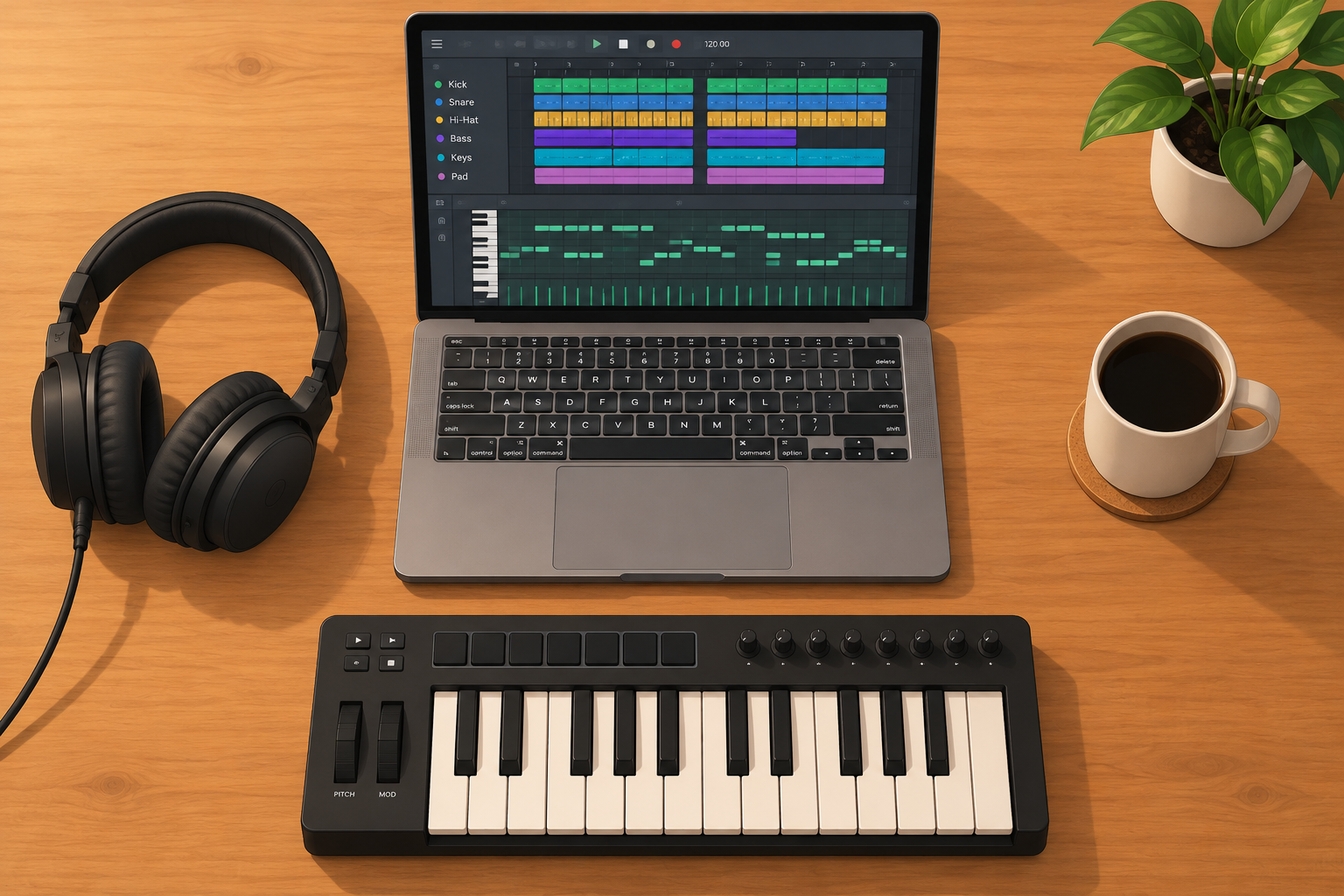
You can make beats at home with a laptop, a pair of headphones and free software. This guide walks you through eight steps, from an empty project to an exported track, using free tools on Windows, macOS or Linux. By the end you will have a finished beat of about three minutes and a method you can repeat.
Quick steps: make your first beat
- Install a free DAW and set tempo and audio settings.
- Load a drum kit and a few free samples.
- Program a one-bar drum pattern.
- Add an 808 or bassline in the song’s key.
- Write a four-chord progression or melody.
- Arrange it into intro, hooks and verses.
- Balance levels, EQ and leave headroom.
- Export a 24-bit WAV and an MP3.
What You Need Before You Start
Beat making is cheap to start. Most beginners already own the hardware for it. The list below covers what matters now and what can wait.
Essential:
- A computer. Any machine from the last eight years or so will run a free DAW. Aim for 8 GB of RAM, and 16 GB once you use heavy synths. An SSD makes samples load faster.
- Headphones. Closed-back studio models like the Audio-Technica ATH-M50x or Sony MDR-7506 are common choices. Avoid bass-boosted consumer earbuds for mixing, because they lie about the low end.
- A digital audio workstation. This is the program where you build the whole beat. Free options are covered in the next section.
- Sounds. A drum kit, a few loops or one-shots, and at least one synth plugin.
Optional, buy later:
- A MIDI keyboard. A 25-key controller such as the Akai MPK Mini lets you play melodies instead of clicking them in. You can start without one.
- An audio interface. You need one to record vocals or instruments, or to get lower latency on Windows. For pure in-the-box beats, your computer’s headphone output works.
- Studio monitors. Good later. Small speakers in an untreated bedroom often mislead you more than decent headphones do.
You don’t need a mic preamp, a microphone or any outboard gear to make beats. Those matter once you start recording vocals.
Pick a Free DAW
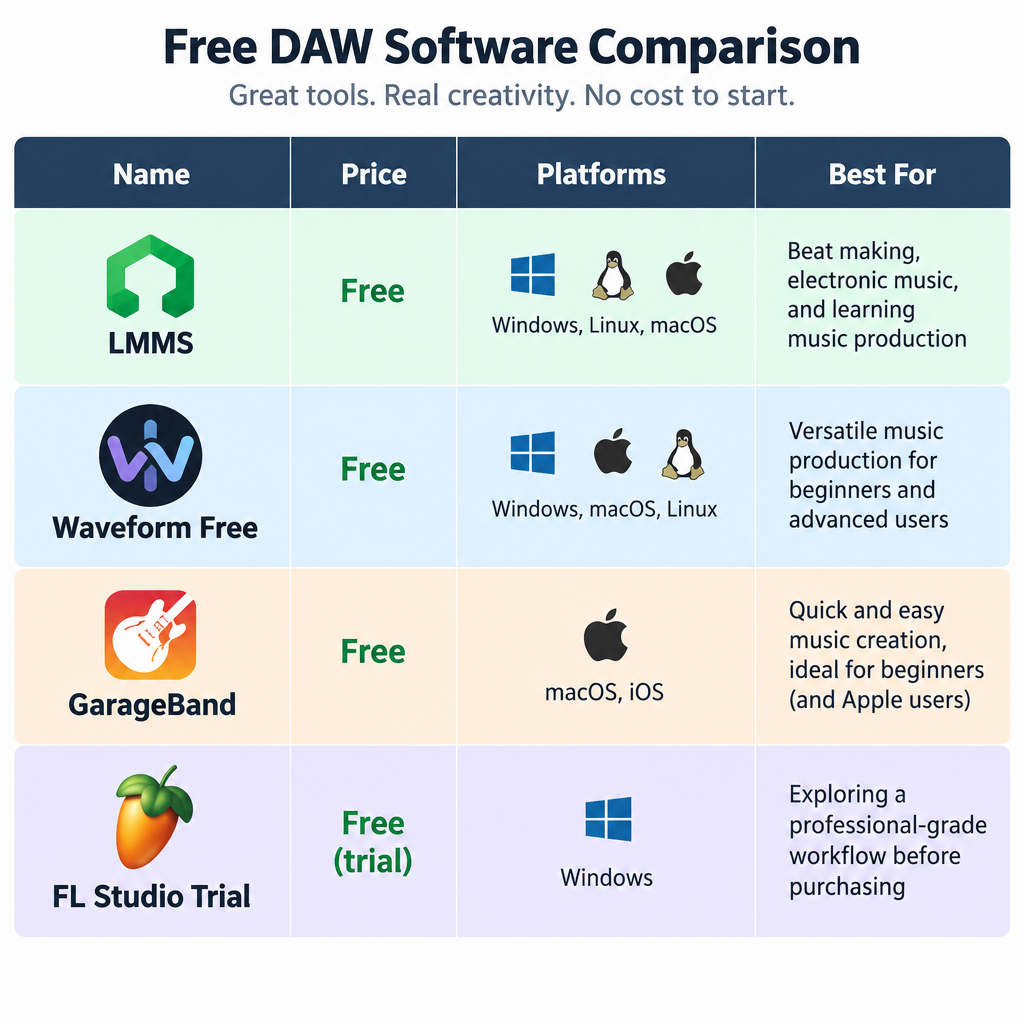
Your DAW choice matters less than people think. Every program below can make a professional-sounding beat. Pick one, then stay with it for at least a month. If you are new to the concept, a digital audio workstation is simply a recorder, sequencer and mixer combined in one app.
| Tool | Price | Platforms | Plugin formats | Best for |
|---|---|---|---|---|
| LMMS | Free, open source (GPL-2.0) | Windows, macOS, Linux | VST on Windows, LADSPA | Pattern-based beats on older PCs |
| Waveform Free (Tracktion) | Free, upsell to Waveform Pro | Windows, macOS, Linux | VST, VST3, AU on Mac | A full DAW with no track limits |
| GarageBand | Free | macOS, iOS | AU | Mac users who want loops fast |
| BandLab | Free | Browser, iOS, Android | Built-in instruments only | Chromebooks, phones, collaborating |
| FL Studio trial | Free trial, paid to reopen projects | Windows, macOS | VST, VST3, AU | Testing the most popular trap workflow |
LMMS
LMMS is the closest free thing to the classic FL Studio layout. It has a Song Editor, a pattern editor for drums, a Piano Roll and a mixer. It ships with built-in synths like TripleOscillator and ZynAddSubFX, plus a sampler called AudioFileProcessor.
The big limit: the long-running 1.2 releases can’t record audio from a microphone. You make beats from samples and MIDI only. VST support works on Windows, and on Linux through Wine. It runs well on modest hardware, which makes it a good pick on Ubuntu or Linux Mint machines.
Waveform Free
Waveform Free gives you unlimited tracks, audio recording and third-party plugin support on all three desktop systems. The interface is unusual at first, but it is a full DAW, not a demo. Tracktion promotes the paid Pro version inside the app, though the free one has no time limit or watermark.
GarageBand
On a Mac, GarageBand is already installed or free from the App Store. Its Drummer tracks and Apple Loops library get you a decent beat in minutes. The trade-off is limited mixing control and no Windows version.
FL Studio trial
FL Studio is what a large share of trap and hip-hop producers use. The trial has every feature, but you cannot reopen saved projects until you buy a licence. That makes it fine for testing, frustrating for real work.
Watch out
Only download DAWs and plugins from the developer’s own site. “Free” cracked versions of paid software are a common source of malware.
The Only Music Theory You Need Right Now
You can make a beat with zero theory. A small amount, though, stops your melody clashing with your 808.
Pick a key and stay in it
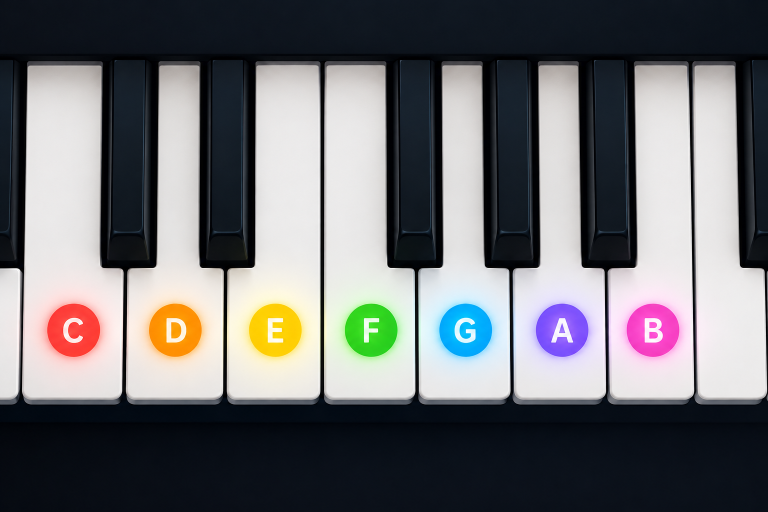
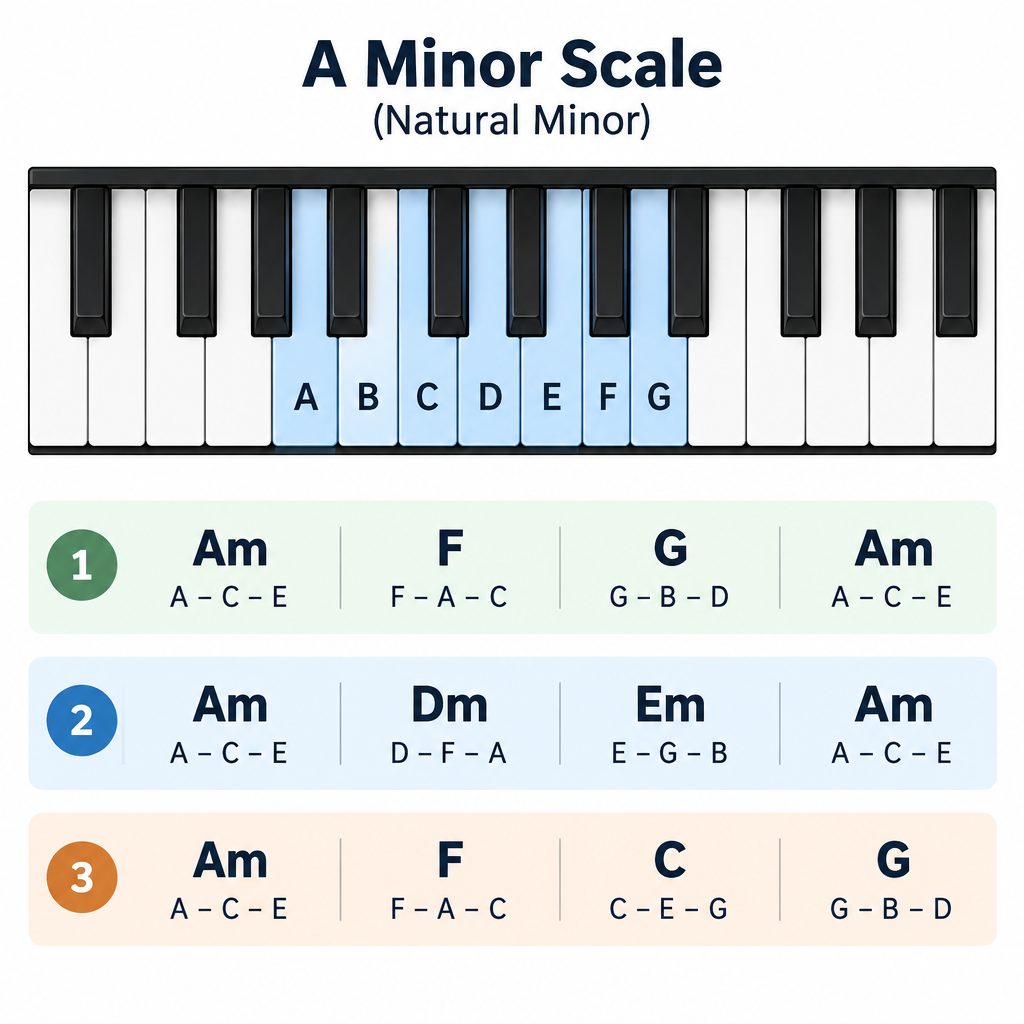
A key is a set of notes that sound good together. For your first beats, use A minor. It contains only the white keys on a piano: A, B, C, D, E, F and G. Every note you play from that set will fit. Our guide to the music scale goes deeper when you are ready.
Minor keys dominate trap, drill and most dark hip-hop. Major keys feel brighter and suit pop, house and upbeat R&B.
Learn three chord progressions
Chords are three or more notes played together. In A minor, these three progressions cover a huge amount of modern music:
- Am, F, G, Am (i, VI, VII, i): dramatic, cinematic, very common in trap.
- Am, Dm, Em, Am (i, iv, v, i): moodier and more classic.
- Am, F, C, G (i, VI, III, VII): emotional, works in lo-fi and melodic rap.
To build any of these chords, take the root note and stack the notes two and four white keys above it. Am is A, C and E. F is F, A and C.
Know your genre’s tempo
Tempo, measured in BPM, sets the feel before any sound plays. These are typical ranges, not rules:
- Lo-fi hip-hop: 70-90 BPM
- Boom bap: 85-95 BPM
- Trap: 130-150 BPM, programmed with a half-time feel
- UK and NY drill: 140-145 BPM
- House: 120-128 BPM
That is all the theory you need for now.
Step 1: Set Up Your Project
Getting the settings right first prevents crackles and timing problems later.
Set the tempo
In LMMS, the tempo box sits in the top toolbar and defaults to 140 BPM, which is already perfect for trap. Click and drag on the number to change it. In GarageBand, double-click the tempo display in the control bar.
For this walkthrough, pick one genre. The examples below use trap at 140 BPM and boom bap at 90 BPM.
Set sample rate and buffer size
Sample rate is how many times per second audio is measured. Use 44.1 kHz or 48 kHz. Higher rates use more CPU with no audible benefit for beats.
Buffer size controls latency, the delay between pressing a key and hearing it. Smaller is faster but strains your CPU.
- While writing and playing parts: 128 or 256 samples
- While mixing with many plugins: 512 or 1024 samples
In LMMS, open Edit > Settings and go to the audio section to change the backend and buffer. In GarageBand, use GarageBand > Settings > Audio/MIDI (called Preferences on older macOS versions).
On Windows, use an ASIO driver if you have an audio interface, since the generic Windows driver adds noticeable latency. On Linux, modern distributions route audio through PipeWire, which handles JACK-style low latency well.
Producer tip
If you hear clicks or crackles during playback, double the buffer size before you blame your computer. It fixes the problem nine times out of ten.
Step 2: Choose Your Sounds
Sound selection is the step most beginners rush. A great kick and snare make a simple pattern sound professional. Weak samples make even clever programming sound amateur.
Build a small starter kit
Before you write a note, pick these:
- 1 kick
- 1 snare or clap (or both, layered)
- 1 closed hi-hat
- 1 open hi-hat
- 1 808 (for trap and drill) or a bass sound
- 1 percussion sound, like a rim, shaker or perc loop
Limit yourself to that. Scrolling through 4,000 snares is how beats never get finished.
Where to get free sounds safely
- Your DAW’s own library. LMMS, Waveform and GarageBand all include usable drums and instruments.
- Free sample pack sites. Many sound design companies give away royalty-free packs in exchange for an email address. Read the licence in the download before you release anything.
- Freesound. A huge community library, but each file carries its own Creative Commons licence. CC0 is free for anything. CC BY needs credit. CC BY-NC bans commercial use, so skip it for beats you plan to sell.
- Free instrument plugins. Spitfire Audio’s LABS (Windows, macOS) gives you free pianos, strings and textures through the Spitfire app. Decent Sampler (Windows, macOS, Linux) plays thousands of free sample libraries.
A word on sampling records
Chopping a song from a record is the root of hip-hop. If you release a beat built on an uncleared copyrighted sample, though, you risk takedowns and lost income. For practice, sample anything. For releases, use royalty-free packs, recordings you made yourself, or a paid clearance service like Tracklib, which licenses real recordings for use in new music.
If you record your own loops, tune your instrument first. A free guitar tuner takes ten seconds and saves you a sample that sits slightly sharp against everything else. For trimming and cleaning recordings, the free Audacity audio editor is handy before you drag files into your DAW.
Step 3: Program the Drums
Drums carry the groove. Get this right and the rest of the beat almost writes itself.
Understand the 16-step grid
Most DAWs show one bar of 4/4 as 16 steps. Each step is a sixteenth note. Steps 1, 5, 9 and 13 are the four main beats you would clap along to.
In LMMS, open the pattern editor (Beat+Bassline Editor in the 1.2 releases). Each row is a drum sound, and each button is a step. Click a step to turn it on.
Starting patterns by genre
| Element | Boom bap (90 BPM) | Trap (140 BPM, half-time) | House (124 BPM) |
|---|---|---|---|
| Kick | Steps 1, 8, 11 | Steps 1, 11 (try adding 15) | Steps 1, 5, 9, 13 |
| Snare or clap | Steps 5, 13 | Step 9 only | Steps 5, 13 |
| Closed hi-hat | Every odd step (1, 3, 5…) | Every step, with rolls | Steps 2, 4, 6, 8… |
| Open hi-hat | Step 15 | Occasional, before the snare | Steps 3, 7, 11, 15 |
The trap snare only lands on step 9. That is the half-time feel: at 140 BPM, the snare hits as if the song were at 70 BPM, while the hats run fast on top.
Make the hats feel human
Programmed drums sound robotic when every hit is the same volume. Fix it with two moves:
- Velocity. Lower the volume of every other hi-hat by 20 to 30 percent. In LMMS, open the drum pattern in the Piano Roll to edit note velocity.
- Rolls. In trap, replace the last two or three hats in a bar with fast 1/32 notes or triplets. Raise or lower the pitch of the roll for extra movement.
For boom bap, add swing. Most DAWs have a swing or groove control that delays every second sixteenth slightly. Around 55 to 60 percent swing gives that laid-back head-nod feel.
Loop it for eight bars
Copy your one-bar pattern so it repeats for eight bars. Then change something on bar 4 and bar 8: drop a kick, add a snare roll, or cut the hats. These small fills tell the listener a new section is coming.
Producer tip
Layer a clap slightly after your snare, by 5 to 10 milliseconds. The two hits read as one fatter sound instead of two flat ones.
Step 4: Add the 808 or Bassline
In trap and drill, the 808 is the bass, a pitched, melodic low end that plays alongside a separate kick. In boom bap and lo-fi, a warmer bass guitar or synth bass usually does the job.
Tune the 808 to your key
An 808 is a pitched sound. If it plays the wrong note, the whole beat feels off even when the drums are perfect.
- Load your 808 sample into a sampler.
- Check its root pitch. Many free 808s list the note in the file name, like “808_C.wav”. If not, play it alongside a piano note and adjust until they match.
- Play the 808 on the root note of your key. In A minor, that is A. A1 sits at 55 Hz, which is deep but audible on most headphones.
- Follow your chord roots. If your chords go Am, F, G, play the 808 on A, F and G.
Program the 808 pattern
The simplest rule: put an 808 note wherever the kick hits, then let it ring. This makes kick and bass work as one unit.
Once that works, add movement. Slide between notes using glide or portamento in your sampler. Leave short gaps so the beat breathes. Add one or two notes an octave up near the end of the bar for bounce.
Stop the kick and 808 fighting
When a kick and a long 808 hit at the same moment, their low frequencies can cancel or stack into mud. Three fixes, from easiest to most advanced:
- Choose a kick with little sub. A punchy, clicky kick leaves the deep lows to the 808.
- Shorten one of them. Trim the kick tail so it ends before the 808 swells.
- Sidechain. Put a compressor on the 808, fed by the kick, so the 808 ducks for a split second whenever the kick plays.
Step 5: Write a Melody or Chords
Now you give the beat its mood. Keep it simple. Many classic beats loop a two-bar or four-bar idea the whole way through.
Pick a free instrument
Some strong free options:
- Vital (Windows, macOS, Linux): a wavetable synth with a free Basic tier. It has a smaller preset bank than the paid tiers and upsells them, but the synth engine is the full thing.
- Surge XT (Windows, macOS, Linux): fully open source under GPL-3.0, available as VST3, AU, CLAP and LV2. Hundreds of presets with no upsell.
- Spitfire LABS (Windows, macOS): pianos, strings and textures that suit lo-fi and soulful beats.
- Built-in synths: LMMS’s ZynAddSubFX is a deep synth that many people never realise is already installed.
Write four chords in the Piano Roll
- Create a new instrument track and open its Piano Roll.
- Draw the chord Am (A, C, E) across one bar.
- Draw F (F, A, C) across the next bar, then G (G, B, D), then Am again.
- Loop the four bars and listen with your drums and 808.
That is already a beat. If it feels static, try these:
- Move the top note of a chord up an octave.
- Play the chord notes one at a time (an arpeggio) instead of together.
- Shorten notes into a rhythmic stab pattern that bounces off the snare.
Add a simple top melody
Pick three or four notes from A minor and write a short, repeating phrase over the chords. Leave space. A melody that plays nonstop leaves nowhere for a rapper or singer to sit.
A good test: hum your melody without the beat. If you can’t remember it after hearing it twice, it is too busy.
Step 6: Arrange It Into a Full Beat
A loop is not a beat. Arrangement turns eight good bars into a track someone can rap over or listen to start to finish.
A standard rap beat structure
| Section | Length | What plays |
|---|---|---|
| Intro | 4-8 bars | Melody only, or melody plus filtered drums |
| Hook | 8 bars | Everything, at full energy |
| Verse 1 | 16 bars | Drums and 808, melody simplified or quieter |
| Hook | 8 bars | Everything |
| Verse 2 | 16 bars | Like verse 1, with one new element |
| Hook | 8 bars | Everything |
| Outro | 4-8 bars | Strip back to melody, then fade |
At 90 BPM, a 64-bar arrangement like this runs about 2 minutes 50 seconds. That is a normal length for a modern rap beat.
Arrange by subtracting
The fastest way to arrange: copy your full loop across the entire timeline, then delete parts. Mute the drums for the intro. Drop the melody’s top line in the verses. Remove the 808 for one bar before each hook so it hits harder when it returns.
In LMMS, you place patterns as blocks in the Song Editor and mute or delete blocks per section. In Waveform and GarageBand, duplicate the clips along the timeline and cut sections out.
Add transitions
Transitions stop sections feeling glued together. Easy ones:
- A reverse cymbal leading into each hook.
- A one-beat drop where everything cuts out before the hook lands.
- A filter sweep on the melody during the last bar of the intro.
- A snare roll that speeds up over the final bar of a verse.
Step 7: Mix the Beat
Mixing makes every sound clear and balanced. You don’t need expensive plugins. Most beginner mixes improve more from volume balance than from any processor.
Start with volume and headroom
- Pull every fader down.
- Bring up the kick until it peaks around -10 dBFS on its channel.
- Bring up the 808 or bass until it sits with the kick, neither one swallowing the other.
- Add the snare, then hats, then melody, balancing each against what is already playing.
- Check your master bus. Peaks should land between -6 and -3 dBFS. That headroom leaves room for mastering later.
If the master is clipping into red, turn the channels down. Never fix it by putting a limiter on the master while you mix.
Clean up with EQ
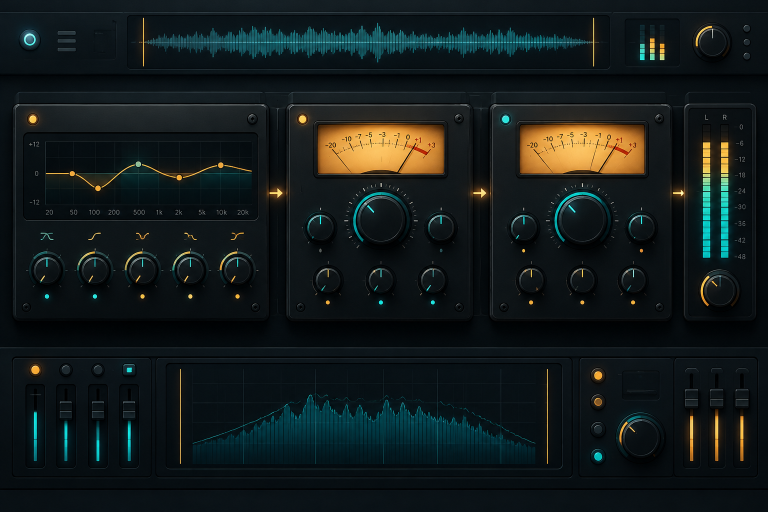
EQ cuts or boosts frequencies. The single most useful move: high-pass filter anything that isn’t bass.
- Hi-hats and percussion: cut below roughly 200-400 Hz.
- Melody and chords: cut below roughly 100-200 Hz, depending on how low the instrument plays.
- Vocal samples: cut below roughly 100-150 Hz.
This clears the low end so your kick and 808 hit cleanly. TDR Nova, a free dynamic EQ for Windows and macOS, is a strong upgrade over most stock EQs.
Add space, carefully
Reverb and delay place sounds in a room. Put them on separate send or aux channels rather than directly on each instrument. That way several sounds share one reverb and the mix stays cohesive.
Valhalla Supermassive, free for Windows and macOS, is a favourite for wide reverbs and delays on melodies. Keep kick and 808 almost completely dry. Reverb on low frequencies turns the mix to mush.
Use a reference track
Load a professional song in the same genre into your project on its own track. Turn its volume down to match your beat by ear, then switch back and forth. You will instantly hear whether your hats are too loud or your 808 is too quiet.
Watch out
Mixing on headphones for hours tires your ears and skews your judgement. Take a 10-minute break every hour, and recheck the mix the next morning before exporting.
Step 8: Export and Finish
A beat only counts when it is finished and saved as an audio file.
Export settings
- Format: WAV for the master copy, MP3 at 320 kbps for sharing.
- Bit depth: 24-bit for the WAV.
- Sample rate: the same as your project, usually 44.1 or 48 kHz.
In LMMS, go to Project > Export, choose WAV, then set sample rate and bit depth in the dialog. In GarageBand, use Share > Export Song to Disk. Most other DAWs place it under a File, Export or Render menu.
Mastering, briefly
Mastering makes the final file louder and more consistent across speakers. For a first beat, a light touch is enough. Put a free limiter such as LoudMax (Windows, macOS, Linux) on the master and push until the track is reasonably loud without audible distortion.
Spotify normalises playback to around -14 LUFS by default, so crushing your beat louder than that mostly adds distortion with no real volume gain. A free loudness meter like Youlean Loudness Meter 2 shows you where you sit. The free edition covers the basics, while the paid version adds extra features.
Save stems if you plan to work with artists
Rappers and engineers often ask for stems: separate WAV files for drums, 808, melody and effects. Export each group solo from bar 1 to the end so they line up when imported. Keep an untagged, unmastered version of every beat on file.
What Your First Beat Should Sound Like
Set honest expectations. Your first finished beat will probably have a solid groove, a recognisable melody and a low end that sounds slightly off on other speakers. That is normal and fine.
A successful first result looks like this:
- About two to three minutes long, with clear intro, hooks and verses.
- Drums that make you nod your head.
- An 808 or bass that plays in key with the melody.
- No clipping on the master, with peaks below 0 dBFS.
- A WAV and an MP3 sitting in a folder.
If you hit those five points, you have done more than most people who download a DAW ever do.
6 Beat-Making Mistakes That Kill Your Sound
1. Never finishing anything
Most beginners have dozens of eight-bar loops and no complete beats. Arranging and exporting teach you more than another loop ever will. Rule of thumb: finish every third idea, even when you don’t love it.
2. Too many sounds at once
Six drum sounds, two synths and one 808 is plenty. If every frequency is filled, nothing stands out. When a beat feels cluttered, mute elements one by one until it suddenly sounds better.
3. 808 out of key
This is the most common reason a trap beat sounds wrong when you can’t say why. Tune the sample, play the root notes of your chords, and check that long 808 notes don’t clash with the melody.
4. Everything at full volume
If every channel sits near 0 dBFS, the master will clip. Start low, build up, and keep headroom on the master as described in Step 7.
5. Robotic drums
Every hi-hat at identical velocity sounds like a metronome. Vary velocity, add swing on slower genres, and nudge a few hits slightly off the grid.
6. Copying presets without listening
Presets are a fine starting point, but stacking ten untouched presets creates a beat that sounds like everyone else’s. Change at least one thing on each sound: the filter cutoff, the attack, or the octave.
Free Plugins That Hold Their Own Against Paid Ones
A common myth says you need expensive plugins to sound professional. For beat making, free tools cover nearly every job:
| Job | Free plugin | Platforms | Limits |
|---|---|---|---|
| Wavetable synth | Vital (Basic) | Win, Mac, Linux | Smaller preset bank, paid tiers upsold |
| All-round synth | Surge XT | Win, Mac, Linux | None, fully open source |
| Drum sampler | Sitala | Win, Mac, Linux | 16 pads only |
| Sample player | Decent Sampler | Win, Mac, Linux | Needs separate libraries |
| Dynamic EQ | TDR Nova | Win, Mac | Paid version adds more bands |
| Reverb and delay | Valhalla Supermassive | Win, Mac | No Linux build |
| Limiter | LoudMax | Win, Mac, Linux | Simple controls by design |
Surge XT in particular stands up to synths that cost well over a hundred dollars, and Valhalla Supermassive gets used on commercial records. The difference between a beginner beat and a pro beat almost always comes down to sound choice, arrangement and mixing, not the price of the plugins.
What Real Producers Do Differently
Watching experienced producers work reveals habits more than secret tools.
They build sound libraries before sessions. Pros spend separate time sorting kicks, snares and 808s into a favourites folder. When they sit down to make beats, they don’t browse. They create.
They work fast and judge later. Many producers aim to sketch a full beat idea in 20 to 30 minutes. Speed keeps the energy of the first idea alive.
They mix as they go. Instead of saving all mixing for the end, they keep levels balanced while writing. The rough mix already sounds close to finished.
They use templates. A saved project with their go-to drum kit, an 808, a few synths, sends with reverb and delay, and a meter on the master. Opening it takes seconds instead of ten minutes of setup.
They layer. A lead synth doubled an octave up, or duplicated and slightly detuned, sounds wider. It is the same idea vocalists use with automatic double tracking, applied to instruments.
How to Get Better at Making Beats Fast
Skill comes from volume and focus. These drills work:
- The one-hour beat. Set a timer and finish a full arranged beat in 60 minutes. Quality doesn’t matter. Finishing does.
- Recreate a favourite beat. Pick a track you love and rebuild it by ear: tempo, drum pattern, 808 notes, chords. You will learn more about arrangement in one session than from a dozen tutorials.
- The limited kit challenge. Make a beat using only one kick, one snare, one hat and one synth. Constraints force creative decisions.
- Flip a sample. Take one free loop and chop it into a completely different beat. Change the tempo, pitch it down, rearrange the pieces.
- Get feedback. Share finished beats with other producers in online communities. Ask specific questions like “Is my 808 too loud?” instead of “What do you think?”
Aim for two or three finished beats a week. After 50, you will hear an obvious jump in your sound.
FAQ
Can I make beats for free?
Yes. LMMS, Waveform Free, GarageBand and BandLab are all free, and plugins like Vital, Surge XT and Valhalla Supermassive cover synths and effects at no cost. Your only real expense is decent headphones.
How long does it take to learn beat making?
You can make a simple, finished beat on your first day by following the steps above. Producing beats that sound release-ready typically takes several months of regular practice. Consistency matters more than the number of hours in one sitting.
Do I need a MIDI keyboard to make beats?
No. You can draw every note with a mouse in the Piano Roll, and many successful producers still do. A small MIDI keyboard makes writing melodies faster and more natural, so it’s a worthwhile second purchase.
What is the best software to make beats as a beginner?
On Windows or Linux, start with LMMS for a pattern-based workflow or Waveform Free for a full DAW. On a Mac, GarageBand is the easiest start. On a Chromebook or phone, use BandLab in the browser or its app.
Can I sell beats made with free software?
Yes. Free and open-source DAWs don’t claim rights over the music you create in them. Check the licence on every sample pack and preset you use, and avoid uncleared samples from copyrighted records.
Should I master my beats before sending them to artists?
Send a lightly mastered MP3 for previews so it sounds competitive. Keep an unmastered WAV and stems on file, because many engineers prefer to mix the vocal and beat together before mastering the full song.