

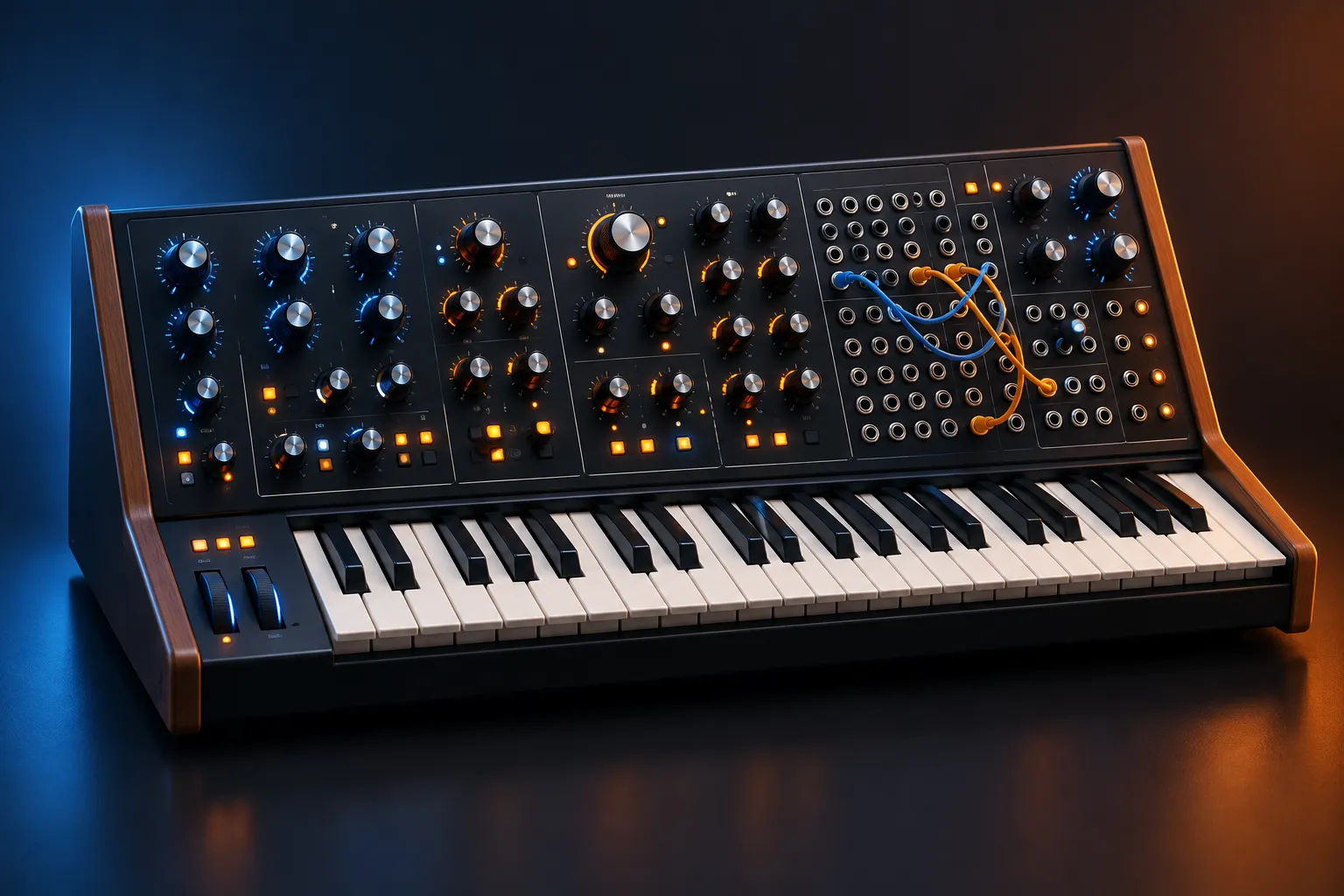
The term “virtual analog” was coined around one red Swedish keyboard: Clavia’s Nord Lead, released in 1995. A virtual analog synthesizer uses digital signal processing to imitate the oscillators, filters, amplifiers and envelopes of an analog synth, along with the small imperfections that make those circuits sound warm. You can now get excellent VA synths for free. Surge XT, OB-Xf and Odin 2 are good enough to replace many paid plugins.
Key takeaways
- A VA synth is a digital instrument that models analog circuit behavior instead of playing back samples.
- How good a VA sounds comes down to anti-aliased oscillators, zero-delay-feedback filters and modeled drift.
- Surge XT, OB-Xf and Odin 2 are free, GPL-licensed and run on Windows, macOS and Linux.
- Waves Element 2.0 is a solid paid VA, but the free options match it on most of the things that matter.
- Hardware VA such as the Roland GAIA 2 makes sense when you want hands-on control, not a different sound.
Fact-checked
We checked these key facts against the sources named, on November 12, 2026:
- The SH-4d launched in 2023 at $649.99 (source: roland.com)
- $600–$900, want hands-on and live use: GAIA 2 for keys, SH-4d for a desktop setup (source: perfectcircuit.com)
- Both are GPL-licensed and ship LV2 and CLAP builds, which most paid VA plugins do not offer at all (source: librearts.org)
- Propellerhead’s ReBirth RB-338 (1997) emulated Roland’s TB-303 and drum machines on a desktop computer (source: en.wikipedia.org)
- The term “virtual analog” was coined around one red Swedish keyboard: Clavia’s Nord Lead, released in 1995 (source: en.wikipedia.org)
What is a virtual analog synthesizer?
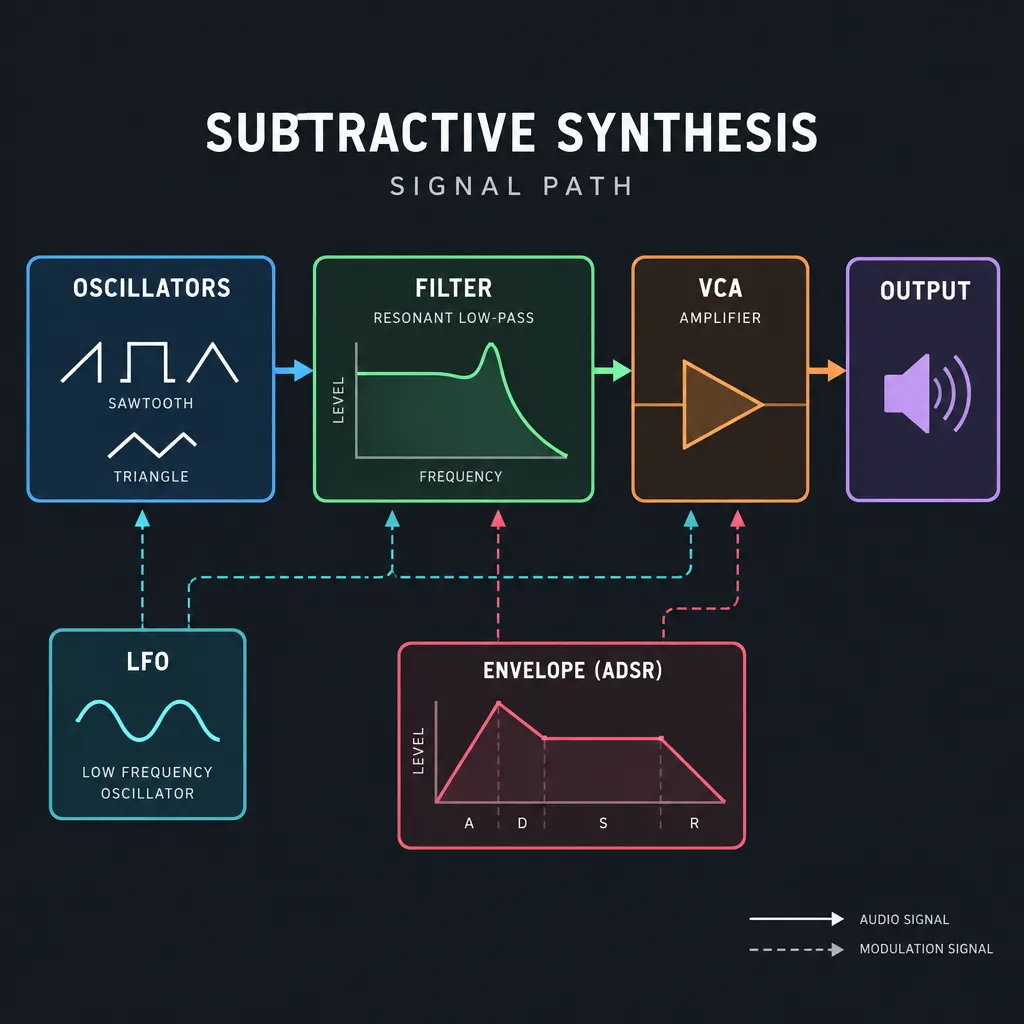
A virtual analog synthesizer is a digital synth that uses DSP code to simulate the circuits of a subtractive analog synth. Those circuits are the voltage-controlled oscillators, filter, amplifier (VCA), envelopes and LFOs. A good VA also reproduces the non-ideal behavior of real analog parts: pitch drift, filter saturation, resonance that thins out the low end, and envelopes with curved rather than straight segments.
The signal path is the classic subtractive one. Oscillators produce harmonically rich waves (sawtooth, pulse, triangle, plus noise). A resonant low-pass filter removes some of those harmonics. An amplifier shapes the volume over time. Envelopes and LFOs move all of these parameters. A VA sounds convincing when the interactions between these stages are modeled too. A real ladder filter distorts when you push it, an oscillator’s pitch wanders by a fraction of a cent, and a real envelope’s attack curve has a shape of its own. Those details are what make one VA sound like an instrument and another sound like a test tone generator.
Virtual analog vs analog vs “analog-style” presets
A true analog synth produces sound with continuous electrical voltages in physical components such as transistors, capacitors and op-amps. A virtual analog synth computes those voltages as numbers, sample by sample. An “analog-style” preset on a ROMpler or workstation is something else again: usually a recording of an analog waveform played back through a generic digital filter. It sounds analog until you sweep the filter or push the resonance.
Perfect Circuit’s history of the format makes this distinction directly. Clavia’s achievement with the Nord Lead was not making waveforms that looked like analog ones. Its engineers simulated the electrical behavior inside the components.
Did you know?
According to Perfect Circuit’s history of virtual analog, Clavia’s engineers built mathematical simulations of the electrical signals inside analog components for the Nord Lead. That approach separated it from the “analog” presets on other 1990s digital synths.
Is a VA synth digital? Yes, and why that matters
Every VA synth is a digital instrument, from the Nord Lead to Surge XT, because the sound is calculated by a processor. This has practical effects you will notice:
- Polyphony costs processing power, not hardware. A plugin can play dozens of voices, while each voice in a polyphonic analog synth needs its own physical circuitry.
- Everything is recallable. Every knob position is saved with the patch and with your DAW project.
- The tuning stays put. VA drift is deliberate and adjustable. It does not come from temperature changes in the room.
- The weak points are digital ones. Aliasing, coarse parameter steps and CPU spikes take the place of noisy jacks and dying capacitors.
How virtual analog works (without the math)
Three engineering problems decide how good a VA sounds: aliasing in the oscillators, the feedback loop in the resonant filter, and the small imperfections that make analog sound alive. Developers who solve all three make convincing instruments. Developers who skip them make synths that sound thin, fizzy or sterile.
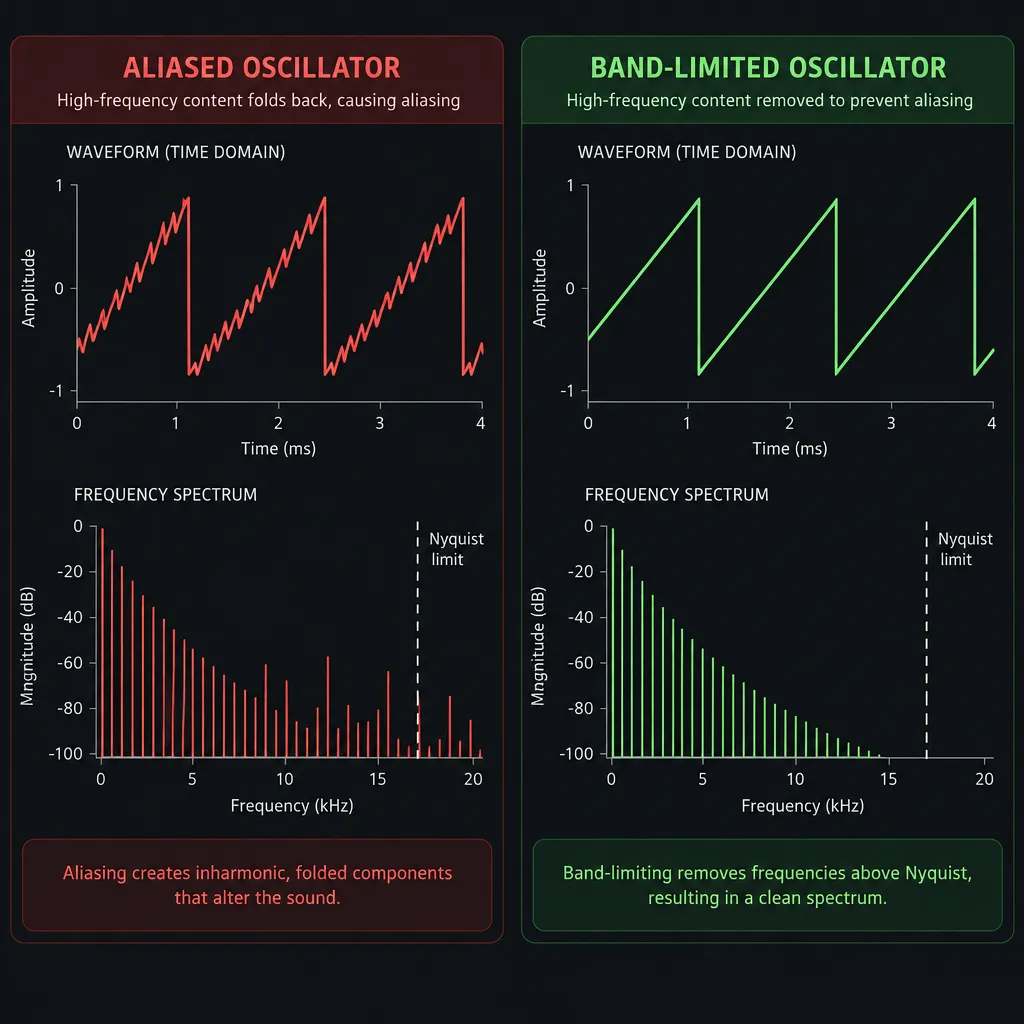
Why cheap VA sounds “fizzy”: aliasing
A perfect sawtooth wave contains harmonics up to infinity. A digital system can only represent frequencies below half its sample rate, the Nyquist frequency, which is 22.05 kHz at 44.1 kHz. A naive digital sawtooth produces harmonics above that limit anyway. They fold back down into the audible range as inharmonic tones that have nothing to do with the note being played.
On low notes this aliasing hides among the real harmonics. On high notes, and on pitch bends, it shows up as whistling tones that move the wrong way. Bend the note up and the aliases slide down. That is the “fizzy” or “digital” quality people hear in cheap VA.
Good VA synths use band-limited oscillators, which build the waveform so that few harmonics exist above Nyquist in the first place. Common methods include BLEP (band-limited step) corrections, band-limited impulse trains and oversampling, where the synth runs internally at a multiple of your project rate and filters the result down. You do not need to know which method a plugin uses. You need to hear whether it works.
Producer tip
To check a VA’s oscillators for aliasing, play a raw saw several octaves above middle C with the filter fully open, then sweep the pitch wheel. Inharmonic whistles that move against the bend mean the anti-aliasing is poor.
Zero-delay-feedback filters and self-oscillation
Resonance in an analog filter comes from feeding the output back into the input instantly. Early digital filters could not do that. They had to delay the feedback by one sample, which made resonance and cutoff behave badly at high frequencies, especially as the filter approached self-oscillation.
Zero-delay-feedback (ZDF) filters solve the feedback equation within the same sample. The technique is also called the topology-preserving transform and was popularized by Vadim Zavalishin’s The Art of VA Filter Design, written while he was at Native Instruments. The result is a digital filter that keeps the analog circuit’s structure. Cutoff tracks correctly across the keyboard, resonance builds smoothly, and nonlinear saturation can sit inside the loop, where it belongs. Waves lists ZDF filters as a headline feature of Element 2.0, and most modern free VAs use similar designs.
Producer tip
Turn filter resonance all the way up until the filter self-oscillates, then play it across the keyboard with key tracking at 100%. A good ZDF filter produces a clean sine-like tone that stays in tune over several octaves.
Drift, saturation and analog envelope curves
Analog oscillators never sit perfectly in tune. Each voice wanders slightly, so a chord on a polyphonic analog synth has a gentle, constantly shifting chorus effect. VA synths model this with drift parameters that add a small random pitch movement per voice. Envelopes matter as well. Analog envelopes charge and discharge capacitors, so the attack is a curve that rises quickly and then slows, while decays are exponential. A linear digital envelope sounds stiff next to them, especially on plucks and basses.
Saturation completes the picture. Real filters and VCAs distort when they are driven, and that adds harmonics that fill out a sound in a mix. When you compare VAs, listen to what happens as you raise the drive or oscillator level. A good model gets thicker. A poor one simply gets louder and then clips.
Supersaw: the sound VA invented
Some VA sounds did not imitate analog at all. Roland’s JP-8000 introduced the Supersaw oscillator, which stacks seven detuned sawtooth waves into one oscillator. An analog synth with seven oscillators per voice would have been impractical. In software it was cheap, and the result became the defining sound of late-1990s trance and much of the EDM that followed. Today almost every VA offers some form of unison (multiple detuned copies of each oscillator) so that you can build this sound yourself.
A short history: from Nord Lead (1995) to today
Virtual analog started in hardware in the mid-1990s, moved into software around the turn of the millennium and is now largely free and open source. The first wave was a response to a market that had abandoned analog for samples and FM. Musicians wanted knobs and filter sweeps back without the cost, weight and tuning problems of vintage gear.
| Year | Synth | Maker | Why it mattered |
|---|---|---|---|
| 1995 | Nord Lead | Clavia | First commercial VA; credited with popularizing the term “virtual analog” |
| 1995 | Prophecy | Korg | Monophonic modeling synth from a major Japanese manufacturer |
| 1996–97 | JP-8000 | Roland | Introduced the Supersaw; shown at NAMM 1997 (some sources date it to 1996) |
| 1997 | Virus | Access | German VA that became a studio standard for trance and techno |
| 1997 | AN1x | Yamaha | Yamaha’s polyphonic analog-modeling keyboard |
| 2023 | GAIA 2 | Roland | Combines VA and wavetable engines in a performance keyboard |
| 2025–26 | OB-Xf | Surge Synth Team | Free, GPL-3.0 Oberheim-inspired VA reaches version 1.0 |
The first wave of VA hardware
The Nord Lead was Clavia’s first synthesizer, a red, knob-covered keyboard that played like an analog mono synth but offered polyphony and patch memory. Korg’s Prophecy followed the same year. Roland answered with the JP-8000 and its Supersaw, Access launched the Virus in 1997, and Yamaha released the AN1x that same year. Within about two years every major manufacturer had a VA on the market, and the knob-per-function interface was back in fashion.
In parallel: software synthesizers
As computers became fast enough, the same modeling ideas moved into plugins. Propellerhead’s ReBirth RB-338 (1997) emulated Roland’s TB-303 and drum machines on a desktop computer. Native Instruments’ Pro-Five and Pro-52, modeled on the Sequential Prophet-5, showed that a plugin could stand in for a vintage polysynth. From then on, software VA advanced much faster than hardware, because a plugin could use all the extra processing power each new CPU generation provided.
VA persistence and the open-source era
VA never went away. Clavia kept developing the Nord Lead line, Roland built modeling into the ZEN-Core engine behind the JUPITER-X and JUNO-X, and in 2023 it launched the GAIA 2. The biggest recent change happened in software. Surge, originally a commercial synth by Vember Audio, was open-sourced in 2018 and became Surge XT. OB-Xd, a free Oberheim-style synth, was taken over by discoDSP and turned into a commercial product. The Surge Synth Team then picked up the last open-source OB-Xd code and released it as OB-Xf, which went into public beta in September 2025 and reached version 1.0 in March 2026.
Analog vs virtual analog vs other digital synths
True analog wins on the feel of the instrument and its resale value. Virtual analog wins on polyphony, recall, price and portability. Wavetable and FM synths go after sounds that neither of the other two can make easily. In a finished mix, a well-made VA and a real analog synth are much harder to tell apart than forum arguments suggest. The differences show up mostly in solo playing, at extreme settings and in the way the instrument responds under your hands.
| Factor | True analog | Virtual analog | Wavetable / FM digital |
|---|---|---|---|
| Sound source | Physical circuits | Modeled circuits in DSP | Stored wave tables or operator math |
| Typical character | Warm, unstable, saturates naturally | Close to analog when well modeled | Bright, complex, often metallic or evolving |
| Polyphony | Limited by hardware cost | High, limited by CPU | High, limited by CPU |
| Patch recall | Often partial or none on vintage units | Total | Total |
| Tuning stability | Drifts; needs warm-up and calibration | Stable; drift is optional | Stable |
| Price | Highest per voice | Free (plugins) to mid-range hardware | Free to premium |
| Weight and portability | Heavy | Plugin or light desktop units | Plugin or light hardware |
| Maintenance | Calibration, aging components | Software updates | Software updates |
| Best at | Bass, leads, character | Classic subtractive sounds at scale | Evolving pads, digital textures, bells |
Can you hear the difference between analog and VA in a mix?
This is one of the most common questions in synth forums. Inside a dense arrangement with drums, vocals and effects, a modern VA patch and a real analog patch are rarely distinguishable once both are well programmed. The differences are clearest on exposed, unprocessed parts: a solo bassline, a resonant filter sweep, or a chord where per-voice drift is audible. For most productions, your choice of preset, filter envelope and mix processing matters far more than the circuitry.
How VA differs from wavetable, FM and sample-based synths
Wavetable synths such as Vital and Xfer Records’ Serum play through a series of single-cycle waveforms and morph between them. FM synths, the approach behind Yamaha’s DX7, build timbres by having one oscillator modulate the frequency of another. Sample-based synths play recordings. Many modern plugins are hybrids. Vital can load a basic saw and run it through a modeled analog filter, which makes it capable of VA sounds even though it is not designed as a VA. This is also why Serum is not technically a virtual analog synth: its core is wavetable playback, although its filters and basic waves can produce very convincing analog-style patches.
Are analog synthesizers still made?
Yes, analog synths are still made, in larger numbers than ever. Moog, Korg, Sequential and Behringer all sell new analog instruments, and Roland’s current Analog/Modeling category includes the JD-XA, whose analog section sits beside a digital one. Roland’s US category page lists the GAIA 2, SH-4d, JUNO-X, JUPITER-X, JUPITER-Xm, JD-XA, JD-Xi and the original GAIA SH-01 together, so read the specifications carefully. “Analog/Modeling” on that page covers both true analog circuits and digital models.
Best free virtual analog synth plugins in 2026
The best free virtual analog synth for most people is Surge XT. OB-Xf is the closest free route to an Oberheim sound, and Odin 2 is the most flexible semi-modular option. The shortlist below was chosen from published specifications, licences, platform support and the reputation each synth has built among producers. Sound quality (anti-aliasing, filter design) and platform reach counted most. Learning curve and preset content counted less.
| Synth | Developer | License | OS | Formats | VA character | Best for |
|---|---|---|---|---|---|---|
| Surge XT 1.3.4 | Surge Synth Team | GPL-3.0, open source | Win, macOS, Linux | VST3, AU, CLAP, LV2, standalone | Hybrid VA with many filter models | All-round sound design |
| OB-Xf 1.0.3 | Surge Synth Team | GPL-3.0-or-later | Win, macOS, Linux | CLAP, VST3, AUv2, standalone (LV2 reported) | Oberheim OB-X/OB-Xa/OB-8 inspired | Brassy polysynth chords and pads |
| Odin 2 (2.4.0) | TheWaveWarden | GPL-3.0, open source | Win, macOS, Linux | VST3, AU, LV2, CLAP | Semi-modular hybrid with modeled filters | Thor-style patching, basses |
| Vital (Basic) | Matt Tytel / Vital Audio | Free tier; paid content tiers | Win, macOS, Linux | VST3, AU and Linux builds | Wavetable with analog-style filters | Modern EDM and VA hybrids |
| Tyrell N6 | u-he | Freeware, no serial | Win, macOS, Linux | VST, VST3, AU, AAX, CLAP | Juno-flavored two-oscillator VA | Learning, warm polysynth sounds |
| TAL-NoiseMaker | TAL Software | Freeware | Win, macOS, Linux | VST, VST3, AU, CLAP | Classic three-oscillator VA | Beginners, fast presets |
| Helm | Matt Tytel | GPL-3.0, open source | Win, macOS, Linux | VST, AU, LV2 | Simple subtractive | Learning subtractive basics |
Producer tip
On Linux, start with Surge XT or Odin 2. Both are GPL-licensed and ship LV2 and CLAP builds, which most paid VA plugins do not offer at all.
Surge XT: the all-rounder
Surge XT is the most capable free synth you can install today, and its classic oscillator and filter section make a first-rate VA. Each patch has two scenes, and each scene has three oscillators, two filters and a deep modulation system that includes MSEGs and step-sequencer LFOs. The filter list covers ladder, OB-Xd-style, K35 and diode designs. The current stable version is 1.3.4, which the team describes as a bugfix release on the way to 1.4 and Shortcircuit XT. Nightly builds are already preparing 1.4.0 with CLAP and macOS 26 fixes.
Verdict: Surge XT is the best free VA for anyone who wants one synth that can grow with them. It looks dense at first, but its classic oscillator plus a single low-pass filter is as simple as any beginner synth once you ignore the rest.
OB-Xf: open-source Oberheim
OB-Xf continues the last open-source release of OB-Xd under the Surge Synth Team. It is licensed GPL-3.0-or-later and modeled on the Oberheim OB-X, OB-Xa and OB-8. The team has stated it will stay free in all contexts with no premium version planned. Version 1.0 arrived in March 2026, a 1.0.1 update in late March fixed Bitwig menu scaling and added more than 130 patches, and the download page now offers 1.0.3 for Windows, macOS and Linux.
If you are asking whether any free synth actually sounds like a real Oberheim, this is the strongest answer. Wide, brassy unison chords and slow-attack pads are where it shines.
Watch out
OB-Xd patches and banks do not load in OB-Xf because the engine changed. Before you switch, print your favorite OB-Xd sounds to audio or rebuild them by ear.
Verdict: OB-Xf is the free pick for classic polysynth sounds, and the gap to commercial Oberheim emulations is narrower than their prices suggest.
Odin 2: Thor-style semi-modular
Odin 2 by TheWaveWarden is a free GPL-3.0 synth for macOS, Windows and Linux in AU, VST3, LV2 and CLAP formats. Its layout recalls Reason’s Thor: you choose oscillator and filter modules from menus, including analog-style oscillators and modeled ladder and SEM-style filters, then route them freely. Version 2.4.0 refreshed the interface in 2025, which fixed one of the most common complaints about the synth.
Verdict: Odin 2 is the best choice if you want VA sounds plus room to experiment, and it handles fat mono basses particularly well.
Vital: is it still free?
Yes, Vital is still free. The Basic tier includes the full synth engine with all features, 75 presets and 25 wavetables. Paid tiers add only content. Plus costs $25 for 250 presets and 70 wavetables, Pro costs $80 for 400+ presets and 150 wavetables plus text-to-wavetable generation, and a $5 monthly subscription is also available. Vital is made by Matt Tytel, the developer of Helm, and it is a wavetable synth first. Its analog-modeled filters and basic shapes still make it a capable VA when you load a plain saw.
So is the free version limited, or does it just have fewer presets? It just has fewer presets. Nothing in the engine is locked.
Surge XT or Vital first? For learning classic subtractive synthesis, Surge XT’s classic oscillator teaches the fundamentals more directly. For modern genres built on morphing wavetables, Vital’s visual feedback makes it easier to start with. Both are free, so install both and learn one at a time.
Tyrell N6 and TAL-NoiseMaker: best for learning
Tyrell N6 is u-he’s free synth, distributed without a serial number, and a 2025 public beta added CLAP and native Apple Silicon builds alongside VST, VST3, AU and AAX on macOS, Windows and Linux. u-he says a larger update with a new UI, MPE and polyphonic parameter modulation is still to come. Its compact two-oscillator design owes a lot to the Roland Juno, which makes it a strong free answer to the question of which synth sounds like a real Juno.
TAL-NoiseMaker remains a simple, efficient freeware VA from TAL Software, with a large bank of presets and Linux builds. Is it outdated in 2026? Its interface looks dated, but the sound holds up for basses, plucks and leads. It is also one of the clearest synths for learning subtractive synthesis when everything else has too many knobs.
Helm: the retired teacher
Helm is Matt Tytel’s earlier open-source synth. Its simple, color-coded layout still makes it a good teaching tool. Development has effectively moved to Vital, so treat Helm as a learning synth rather than one you can expect future updates for.
Free vs paid: does Waves Element (or any paid VA) beat them?
For most users, no. Waves Element 2.0 is a polished, well-designed VA, but Surge XT matches or beats it on features, and OB-Xf beats it on classic polysynth character. Element’s advantages are its focused workflow and its integration with the Waves ecosystem, not its sound.
| Feature | Waves Element 2.0 | Surge XT 1.3.4 | OB-Xf 1.0.3 |
|---|---|---|---|
| Price | $119 list; often $29.99 on sale; or a Waves subscription | Free | Free |
| License | Commercial | GPL-3.0 | GPL-3.0-or-later |
| Platforms | Windows, macOS | Windows, macOS, Linux | Windows, macOS, Linux |
| Filters | Zero-delay-feedback | Many models incl. ladder, OB-Xd-style, K35, diode | Oberheim-style filter modeling |
| Effects | 5 (delay, reverb, distortion, chorus, two crushers) | Large built-in effects rack | Minimal; use your DAW’s effects |
| Sequencer | 16-step, usable as a mod source | Step-sequencer LFO mode and MSEGs | Not a core feature |
| Modes and extras | Element 1/2 modes, standalone, 0 samples latency | Two scenes, MPE, microtuning, standalone | Standalone, large patch library |
Where Element still wins
Element’s single-page layout is quicker to learn than Surge XT’s dense interface, and its 16-step sequencer can be routed as a modulation source, which is very useful for rhythmic basses. If you already use Waves plugins, the subscription is worth considering. Essential costs $14.99 a month or $149.99 a year for 120+ plugins, and Ultimate costs $24.99 a month or $249.99 a year for 240+ plugins, both with a seven-day free trial. Element is included in those bundles.
Where the free synths win
The free synths win on platform support, on licensing (GPL software cannot be withdrawn or tied to a subscription) and on depth. Linux users cannot run Element natively at all. At the $29.99 sale price Element is a fair purchase. At the $119 list price, the honest verdict is that you should master Surge XT and OB-Xf first and only buy Element if you specifically want its workflow.
Virtual analog hardware worth buying now
Hardware VA is worth buying when you want physical knobs, a self-contained instrument for live playing, or a break from the computer. It is not worth buying for a better sound than the best free plugins. Roland dominates the current market, and Clavia’s Nord Lead line remains the premium option.
| Model | Engine | Launch (US list) | Recent street price | Notes |
|---|---|---|---|---|
| Roland GAIA 2 | VA + wavetable | 2023, $899.99 | About $749–$825 at US retailers (Equipboard $824.99, lowest new $749.99) | Best value in VA hardware; knob-per-function |
| Roland SH-4d | 13 oscillator models | 2023, $649.99 | About $686–$740 at US retailers | Compact desktop unit with drum tracks and sequencer |
| Roland JUNO-X | ZEN-Core, Juno-60/106 models | 2022 | $2,199.99 at Sweetwater | 61 keys; Juno sound plus a broad workstation library |
| Roland JUPITER-X | ZEN-Core, multiple vintage models | 2019 | About $3,190–$3,270 at Sweetwater | Flagship; premium build and keybed |
| Nord Lead A1 | Clavia VA | 2014 | About $1,923 average; $2,199 new at major US retailers | Mature design, aging relative to its price |
Roland GAIA 2
The GAIA 2 launched in the US in September 2023 at $899.99 and is now listed at about $749 to $825 new at US retailers, with Equipboard tracking $824.99 and the lowest new price found at $749.99. It pairs a virtual analog engine with wavetable oscillators and keeps the original GAIA’s hands-on, one-knob-per-function design. For anyone deciding between a GAIA 2 and plugins, the GAIA 2 makes sense if you play live or learn better with physical controls. If you mostly program sounds in a DAW, it adds little that Surge XT does not already do.
Roland SH-4d, JUNO-X and JUPITER-X
The SH-4d launched in 2023 at $649.99. It packs 13 oscillator models, a sequencer and drum tracks into a desktop box, and US retailers currently list it at roughly $686 to $740. The JUNO-X and JUPITER-X are built on Roland’s ZEN-Core engine, and the JUNO-X is the more affordable of the two at $2,199.99. Both carry models of classic Roland synths, but at these prices you are paying for keyboards, build quality and the workstation features as much as for VA modeling.
The Nord Lead line
The Nord Lead A1 is the current descendant of the 1995 original. It sells for about $2,199 new at major US retailers, and Equipboard tracks an average around $1,923. It is a lovely, fast performance synth, but its age shows next to newer and cheaper competition. Buy it used, or buy it if the Nord workflow is specifically what you want.
Plugin, VA hardware or true analog: a decision path
- Budget of zero, or you are learning: Surge XT plus OB-Xf, running inside a free DAW.
- Budget under $100, mostly in the box: Stay with the free plugins and spend the money on a MIDI controller with knobs.
- $600–$900, want hands-on and live use: GAIA 2 for keys, SH-4d for a desktop setup.
- $2,000+, want a flagship keyboard: JUNO-X or JUPITER-X, or a true analog polysynth if character and resale value matter more than polyphony.
- You chase one specific vintage tone: Buy the true analog original or a reissue, then use VA plugins for everything else.
Build your first VA patch in 15 minutes (Surge XT)
The fastest way to understand virtual analog is to build three classic sounds from a single sawtooth. The recipes below use Surge XT because it is free on every platform. The same settings translate almost directly to OB-Xf, Odin 2 or any hardware VA.
Quick steps: first VA patches in Surge XT
- Load Init Saw from the patch browser’s Templates category.
- Choose a Lowpass filter type for Filter 1.
- Shape Filter EG and Amp EG.
- Set Play Mode and unison voices.
- Add chorus or reverb last.
- Save each patch under a new name.
Before you start, insert Surge XT on an instrument track in your DAW (or open the standalone app), set your audio interface to 48 kHz with a buffer of 128 or 256 samples for comfortable playing latency, and turn the volume down. Self-oscillating filters can be loud.
Producer tip
When you judge a VA’s raw tone, switch off unison and all effects first. Chorus and reverb hide aliasing and a weak filter, so judge the dry oscillator through the filter before you decorate it.
Patch 1: classic saw bass
A classic saw bass is one sawtooth through a resonant low-pass filter with a short filter envelope.
- Load Init Saw from the Templates category in the patch browser.
- In the scene’s Play Mode menu, choose Mono so that new notes cut off old ones. Add a little portamento if you want slides.
- Set Filter 1 to a 24 dB low-pass type such as the Vintage Ladder. Start the cutoff around 300–500 Hz and the resonance around 20–30%.
- Raise the Filter 1 envelope amount so the filter opens on every note. On the Filter EG, set the attack near 0 ms, the decay around 150–300 ms, the sustain at 0 to 20% and a short release.
- On the Amp EG, use attack 0 ms, sustain 100% and a release under 100 ms. Switch the envelope to Analog mode for curved, snappier segments.
- Play in the lowest two octaves. Shorter decay gives a plucky acid-style tone. Lower cutoff and less resonance give a deep sub-heavy line.
Patch 2: supersaw lead
A supersaw lead is one or two saw oscillators with seven unison voices, detuned and spread across the stereo field. This is the JP-8000 sound.
- Start from Init Saw again and set Unison Voices to 7 on Oscillator 1.
- Raise Unison Detune gradually. Around 15–25 cents gives a trance-style shimmer, and more than that starts to sound out of tune.
- Optionally enable Oscillator 2 as another saw an octave up with lower unison and a quieter level.
- Open the filter almost fully (cutoff high, resonance low) and use only a small filter envelope amount.
- Set the Amp EG attack around 5–10 ms with full sustain and a 200–400 ms release.
- Add the Chorus and Reverb effects at modest mix levels. Effects that widen a sound are the same idea behind automatic double tracking on vocals.
Write the lead melody in a key that suits the track. If you are unsure which notes fit, a music scale chart for your key is a faster guide than trial and error.
Patch 3: warm Juno-style pad
A Juno-style pad is a saw plus a pulse wave, slow envelopes, a gentle filter and a lot of chorus.
- Load Init Saw. Keep Oscillator 1 as the saw, and enable Oscillator 2 as a pulse at a slightly lower level, or use the Classic oscillator’s sub mix if you prefer.
- Set Play Mode to Poly.
- Set Filter 1 to a 12 or 24 dB low-pass with the cutoff around 1–2 kHz and low resonance. Use a slow filter envelope (attack about 1 second, high sustain).
- On the Amp EG, set the attack to 500 ms–1.5 seconds, sustain to 100% and release to 1–2 seconds.
- Turn up the Osc Drift control a little so each voice wanders slightly, as on a real polysynth.
- Insert the Chorus effect with a slow rate. The Juno’s character came largely from its chorus, so do not skip this step. Add a long reverb at a low mix.
If you want to capture a live performance of these patches as audio, the same routing used for recording audio on your computer applies. Arm an audio track and record the synth’s output, or bounce the MIDI track in place.
Virtual analog synths online (in the browser)
You can play basic virtual analog synths in a web browser, but they are best for learning and quick experiments, not for production. Browser synths are built on the Web Audio API, and the better ones use Web MIDI so that you can play them from a USB keyboard. Web MIDI works in Chromium-based browsers such as Chrome and Edge but not in Safari.
The limits are real. Audio latency in a browser is usually higher and less predictable than in a DAW with a properly configured audio driver. Browser synths cannot load into your DAW as plugins, so there is no automation, no project recall and no offline bouncing. Their oscillators and filters are generally simpler than those in Surge XT or OB-Xf. Interactive teaching sites such as Ableton’s Learning Synths are excellent for understanding oscillators, filters and envelopes in a few minutes. Once you want to make finished music, install a free plugin instead.
FAQ
What is a virtual analog synthesizer?
A virtual analog synthesizer is a digital synth that uses DSP code to model the oscillators, filters, amplifiers and envelopes of an analog subtractive synth, including imperfections such as drift and saturation. It can be hardware, like the Roland GAIA 2, or software, like Surge XT.
Is a virtual analog synth as good as a real analog synth?
For most production work, yes. A well-designed VA with anti-aliased oscillators and zero-delay-feedback filters is very hard to tell apart from analog in a mix. Real analog still has the edge for exposed solo parts, physical feel and resale value.
What is the difference between analog and digital synthesizers?
Analog synths produce sound with continuous voltages in physical circuits. Digital synths calculate sound as numbers. Virtual analog is a type of digital synth that imitates analog behavior, while wavetable, FM and sample-based synths take different digital approaches.
Are analog synthesizers still made?
Yes. Several major manufacturers still produce analog synths, and Roland’s Analog/Modeling range includes the JD-XA’s analog section alongside modeling instruments such as the GAIA 2 and JUNO-X.
Is Vital synth still free?
Yes. Vital’s Basic tier is free and includes the full engine, 75 presets and 25 wavetables. The Plus ($25), Pro ($80) and $5-a-month subscription tiers add presets, wavetables and text-to-wavetable generation, not synth features.
What is the best free virtual analog VST?
Surge XT is the best free all-round VA plugin, with VST3, AU, CLAP and LV2 builds for Windows, macOS and Linux. For Oberheim-style polysynth sounds, choose OB-Xf. For a Juno-like synth that is easy to learn, choose u-he’s Tyrell N6.
Is there a free synth that sounds like a real Juno or Oberheim?
OB-Xf is the closest free match to an Oberheim OB-X or OB-Xa. Tyrell N6, or Surge XT with a saw-plus-pulse patch and heavy chorus, gets close to the Juno character.
What synthesizer does Billie Eilish use?
Finneas has said that all the sounds on “Ocean Eyes” were stock Logic sounds, tweaked with EQ and layered. According to MusicRadar, the album title Hit Me Hard and Soft most likely comes from a preset in FabFilter Twin, a commercial synth plugin.
Did you know?
According to MusicRadar, Finneas built every sound on Billie Eilish’s “Ocean Eyes” from Logic’s stock instruments, shaped only with EQ and layering. A hit record did not need boutique analog hardware.
What was the first virtual analog synthesizer?
The Clavia Nord Lead, released in 1995, is widely recognized as the first commercial virtual analog synthesizer and the instrument that popularized the term.
Is Serum a virtual analog synth?
No. Xfer Records’ Serum is a wavetable synth. It can produce convincing analog-style sounds with basic waveforms and its filters, but it is not built around modeling analog circuits.
Should you buy a hardware VA like the GAIA 2 or just use plugins?
Use plugins if you work mostly inside a DAW. Buy a GAIA 2 (around $749–$825 new in the US) if you want knobs under your hands, play live or learn faster with physical controls. It will not give you a better sound than Surge XT, but it may well change the way you play.
Can you use a virtual analog synthesizer online in your browser?
Yes. Browser synths built on the Web Audio API work for learning and sketching, and Chromium browsers support MIDI keyboards. Latency, simpler sound engines and the lack of DAW integration make them a poor substitute for a free plugin.
Where to start today
If you want the fastest way into virtual analog, install Surge XT and OB-Xf tonight, build the three patches above, and spend a week making music with nothing else. By then you will know exactly what you want from a synth. You might want more hands-on control, which points to a GAIA 2 or SH-4d, a specific vintage character, which points to true analog, or nothing at all, because two free GPL synths already cover nearly everything a paid VA offers.
Keep reading
Free music tools
Editorial notes
- Fact-checked by Vivian Osei against the sources listed below before publication.
- Published
Sources (8)
- Perfect Circuit: Exploring the History and Current State of VA Synthesis (perfectcircuit.com)
- MusicRadar: The history of virtual analogue synthesizers (musicradar.com)
- Roland JP-8000 (wikiwand.com)
- Roland Announces GAIA 2 Synthesizer (roland.com)
- Equipboard: Roland GAIA 2 (equipboard.com)
- Roland: Synthesizers – Analog/Modeling (roland.com)
- Big Fish Audio: Element Virtual Analog Synth (bigfishaudio.com)
- Waves: Element 2.0 Virtual Analog Synth (waves.com)