


Peppermint OS is a free, GPLv3 Linux desktop that installs with very few apps, and since November 24, 2026 it comes in three editions: Debian 13, Devuan 6 and a rolling Void Linux build. It suits old 64-bit laptops, people who like to build their own system and anyone who wants to skip systemd. This guide covers which ISO to download, how to verify and install it, and how to turn the bare desktop into a low-latency music workstation. It also compares Peppermint with Lubuntu and antiX.
Session notes
- Pick the Debian ISO (peppermint_debian-amd64.iso) for a lean, stable install. The default SourceForge download is the 5.2 GB Void Loaded build.
- Devuan Excalibur gives you SysVinit, OpenRC or runit in place of systemd. Void Loaded is rolling and uses XBPS and runit.
- No ISO is 32-bit. Budget 2 GB of RAM at least, and 4 GB if you plan to run a browser and a DAW.
- XLibre has replaced X.Org, and the project has no near-term plans for Wayland.
- For music, add PipeWire-JACK, join the pipewire group and set the quantum to 256 or lower.
Fact-checked
We checked these key facts against the sources named, on November 27, 2026:
- If you still see “Peppermint is Ubuntu-based” on a forum, that post is older than 2022 (source: en.wikipedia.org)
- AlternativeTo reported in September 2026 that Peppermint OS dropped X.Org for XLibre and put any Wayland transition on hold (source: alternativeto.net)
- At 48 kHz, a 256-sample quantum adds about 5.3 ms of buffer, which feels immediate when you play a soft synth from a MIDI keyboard (source: oneuptime.com)
- CommandLinux notes that Enrico Weigelt, a contributor banned from freedesktop.org, forked XLibre from X.Org in mid-2025, and critics have called it a politically motivated fork (source: theregister.com)
- Peppermint OS is a free, GPLv3 Linux desktop that installs with very few apps, and since November 24, 2026 it comes in three editions: Debian 13, Devuan 6 and a rolling Void Linux build (source: peppermintos.com)
Peppermint OS in 2026: the short answer
Peppermint OS is a minimal Linux distribution. It ships an Xfce desktop, the Thunar file manager and little else, so you install only the software you want. It started on Ubuntu, has been based on Debian since 2022, and now builds on Debian 13 “Trixie”, Devuan 6 “Excalibur” and Void Linux. The ISOs have no version numbers and get refreshed as the base distributions update.
The same idea runs through every edition: give you a working desktop and stay out of the way. No office suite, media player or app store is preinstalled on the Debian build. The SourceForge project page describes it as a “minimum linux desktop distribution”. As of November 27, 2026 it holds a 4.5 out of 5 rating from 24 reviews and gets about 5,339 downloads a week.
Is Peppermint OS based on Ubuntu?
No, not anymore. Peppermint was Ubuntu-based up to Peppermint 10. Peppermint 11 arrived in 2022 after roughly three years of development. It moved to Debian 11 “Bullseye”, replaced the LXDE desktop with Xfce 4.16 and swapped the Ubiquity installer for Calamares, according to Linux Today’s coverage of that release. If you still see “Peppermint is Ubuntu-based” on a forum, that post is older than 2022.
Is Peppermint OS still supported?
Yes, and 2026 has been its busiest year in a long time. The team released the systemd-free Devuan build on June 12, started moving from X.Org to XLibre in September, refreshed the Debian ISO on November 17 and launched the Void Loaded edition on November 24. SourceForge shows the Void ISO uploaded at 11:05:58 UTC on November 25, 2026. Security fixes reach you through the base distributions (Debian, Devuan and Void), so an installed system stays current even between ISO refreshes.
The three Peppermint editions and which one to download
Most people should download the Debian edition. Choose Devuan if you specifically want to avoid systemd on a stable base. Choose Void Loaded if you want a rolling release with applications already installed and you have no problem learning a new package manager. The table sets out the differences.
| Edition | Base | Latest release | Init | Package manager | Release model | ISO name | ISO size | Best for |
|---|---|---|---|---|---|---|---|---|
| Peppermint Debian (Trixie) | Debian 13 “Trixie” | ISO refresh Nov 17, 2026 | systemd | apt, Synaptic GUI | Stable base, continuous updates | peppermint_debian-amd64.iso | Lean, minimal apps | Old laptops, first-time users, audio work |
| Peppermint Devuan (Excalibur) | Devuan 6 “Excalibur” (Debian 13) | Jun 12, 2026 | SysVinit, OpenRC or runit (your choice) | apt, Synaptic GUI | Stable base, continuous updates | Devuan Xfce ISO | Lean, minimal apps | People who want to avoid systemd |
| Peppermint Void (Loaded) | Void Linux | Nov 24, 2026 | runit | XBPS, Peppermint Software Center | Rolling | pepvoid-x86_64-linux-xfce-xlibre-loaded.iso | 4.86 GiB (5.2 GB), 720 packages | Rolling-release fans who want apps preinstalled |
Peppermint Debian (Trixie): the flagship
This is the edition the project is known for. The November 17 refresh, reported by 9to5Linux, includes every Debian 13 update up to that date. It runs the Linux 6.12 LTS kernel, ships XLibre in place of X.Org and is 64-bit only. The Trixie rebase itself came out in October 2025 with Xfce 4.20 and a Qt6 build of the Calamares installer.
You get Debian’s security team, Debian’s huge repository and the audio stack Debian packages. For music work, that matters more than anything else on this page.
Peppermint Devuan (Excalibur): systemd-free, with SysVinit, OpenRC or runit
Devuan is Debian with systemd removed. Peppermint’s Devuan build, which Linuxiac covered on June 12, 2026, is based on Devuan 6 “Excalibur”. It shares the Debian 13 package base, so most apt commands and packages work the same way. The only things missing are applications that strictly require systemd.
The release came later than first planned. Some forum users spent the spring asking when the Excalibur build would arrive.
Did you know?
According to Linuxiac’s report on the June 2026 release, the Devuan edition asks you to pick your init system during installation: SysVinit, OpenRC or runit.
Peppermint Void (Loaded): rolling, 720 packages
Void Loaded is a different kind of Peppermint. FOSSLinux reports that it uses XBPS in place of apt and runit in place of systemd. The ISO is 4.86 GB with 720 packages, and it adds a new Peppermint Software Center and an updated PepFetch. “Loaded” means the applications come preinstalled, which explains why the ISO is so large for a “minimum” distro. AlternativeTo’s write-up of the official announcement says a slimmer “Flagship” Void build is planned, but no date has been given.
Void Loaded is an extra base and does not replace the Debian or Devuan editions. Treat it as the newest and least proven edition, released three days before this article was last checked.
Why SourceForge’s Download button gives you a 5.2 GB file
SourceForge’s big green button always serves the newest upload. Since November 25 that has been pepvoid-x86_64-linux-xfce-xlibre-loaded.iso. If you wanted the light Debian build, clicking it gets you the wrong file. Open the Files tab and browse the ISO folders instead.
Producer tip
Skip SourceForge’s main Download button unless you want the 5.2 GB Void Loaded ISO. For a lean install, open Files, go into isos and then XFCE, and pick peppermint_debian-amd64.iso.
The three file sizes you will see quoted (about 4 GB, 4.86 GB and 5.2 GB) all describe one ISO. FOSSLinux’s 4.86 figure is in binary gibibytes. SourceForge shows decimal gigabytes, and 4.86 GiB × 1.074 ≈ 5.2 GB. The official “about 4 GB” is simply a rounded-down estimate.
If you have doubts about downloading from SourceForge, the main thing that keeps you safe on any mirror is checking the published checksums, which the install section below walks through.
What changed: Ubuntu to Debian to XLibre
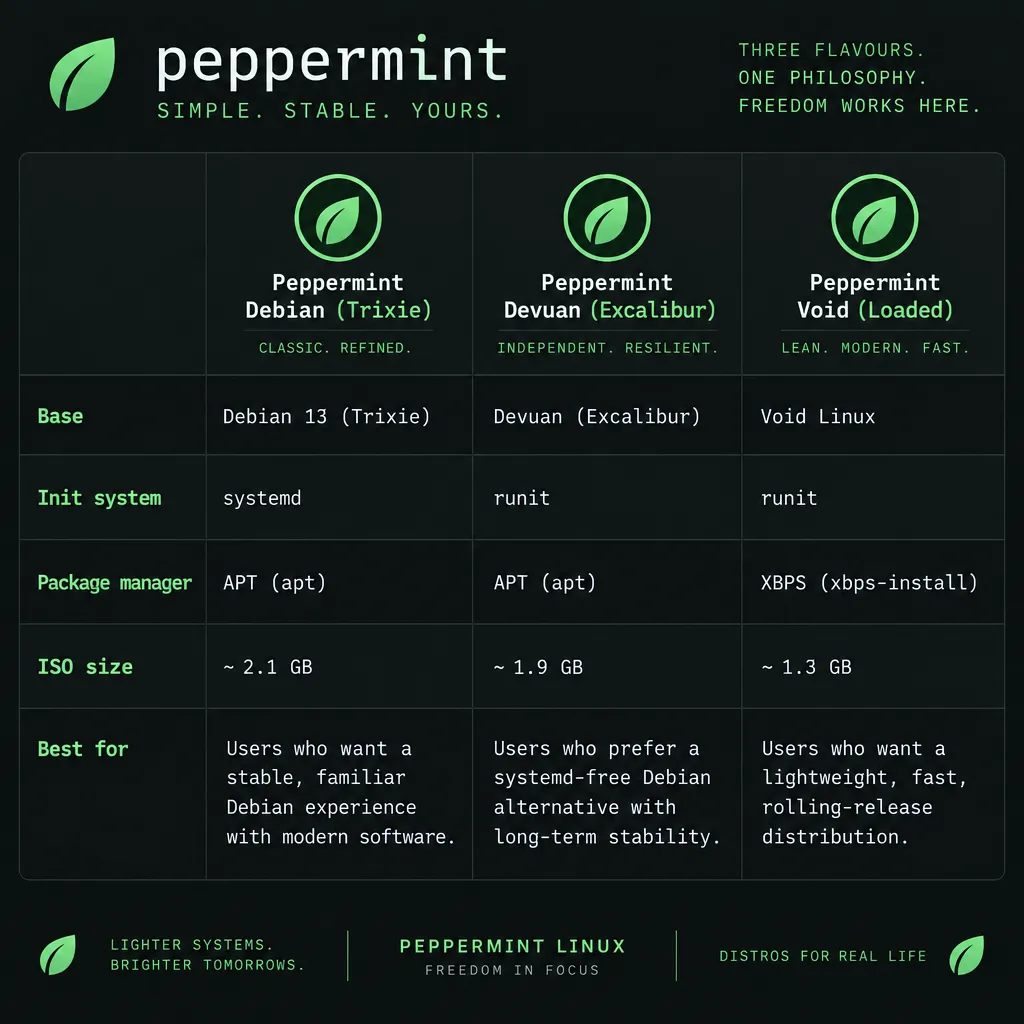
Peppermint has changed a great deal over the years. It moved from Ubuntu to Debian in 2022, and its 2026 releases brought further changes, set out in the table below. The project also lost its lead developer in 2020 and was revived by a volunteer team.
| Year | Milestone | Base | Desktop |
|---|---|---|---|
| 2010 | Founded by Kendall Weaver and Shane Remington | Ubuntu | LXDE |
| 2010s | Mark Greaves (PCNetSpec) takes over after Peppermint 5 and leads it through Peppermint 10 | Ubuntu | LXDE with Xfce parts |
| Jan 14, 2020 | Mark Greaves dies | n/a | n/a |
| 2022 | Peppermint 11: new team, Debian rebase, Calamares installer, Nemo file manager | Debian 11 “Bullseye” | Xfce 4.16 |
| Oct 2025 | Trixie rebase, Linux 6.12 LTS, Qt6 Calamares | Debian 13 “Trixie” | Xfce 4.20 |
| Jun 12, 2026 | Systemd-free build with an init choice | Devuan 6 “Excalibur” | Xfce |
| Sep 2026 | Shift from X.Org to XLibre begins | Debian 13 | Xfce on XLibre |
| Nov 17, 2026 | Debian ISO refresh, first built with mmdebstrap | Debian 13 | Xfce on XLibre |
| Nov 24, 2026 | Void Loaded rolling edition | Void Linux | Xfce on XLibre |
Since 2022 the file manager has gone back from Nemo to Thunar, the standard Xfce choice. The project’s continuity after Greaves’s death is part of why longtime users still trust it: the community kept it going without a company behind it.
XLibre explained, and the controversy
XLibre is a fork of the X.Org display server. Linuxiac reports that Peppermint switched because upstream X.Org repositories are largely frozen, has no immediate plans to move to Wayland and is still rolling XLibre out on the Devuan edition. For you, day to day, little changes. Xfce runs on X11 as before, and old screen-capture tools, remote-desktop tools and global hotkeys keep working the way they always have on X.
The fork is contested, though. CommandLinux notes that Enrico Weigelt, a contributor banned from freedesktop.org, forked XLibre from X.Org in mid-2025, and critics have called it a politically motivated fork. The practical risk is support. Most of the Linux graphics world is moving to Wayland, so XLibre’s future depends on a smaller group of developers. Some users will see a project that keeps X11 alive. Others will see an unnecessary dependency. Both readings are reasonable, and neither stops the desktop from working today.
Did you know?
AlternativeTo reported in September 2026 that Peppermint OS dropped X.Org for XLibre and put any Wayland transition on hold. That makes it one of the few active desktops moving away from Wayland’s direction.
mmdebstrap and the custom ISO builder
The November Debian ISO is the first Debian-based Peppermint built without Debian’s live-build tooling. OSTechnix reports that the team uses mmdebstrap instead. For Void, Opensourcefeed reports that the team wrote its own ISO builder in place of Void’s official void-mklive, and the pepvoid-builder project lives on Codeberg. With these tools the small team can produce three bases from similar scripts, which helps explain how they shipped so much in 2026.
System requirements and old hardware
Peppermint publishes no official system requirements, so the best guide is the Debian 13 installation manual it builds on. Debian lists 1 GB of RAM as the desktop minimum, 2 GB as recommended and 10 GB of disk. You also need a 64-bit (x86-64) processor.
| Component | Minimum | Recommended | Source |
|---|---|---|---|
| RAM | 1 GB | 2 GB (4 GB for web plus a DAW) | Debian 13 install guide; 4 GB is our recommendation |
| Disk | 10 GB | 20 GB or more with an SSD | Debian 13 install guide; SSD advice is ours |
| CPU | 64-bit x86 (amd64) | Dual-core or better | Peppermint ISOs are amd64/x86_64 only |
| USB stick | Larger than the ISO | 8 GB (enough for Void Loaded) | ISO sizes on SourceForge |
A real-world caveat: 1 GB boots the desktop, and that’s about it. A modern web browser alone can use more than that, so a 2 GB machine will swap as soon as you open a few tabs. One forum user found Peppermint “unacceptably slow” on an old Toshiba Satellite. In cases like that the cause is nearly always a spinning hard drive and 2 GB of RAM, not the distro. A cheap SATA SSD does more for an old laptop than any distro choice.
Is there a 32-bit Peppermint?
No. The Register confirmed in its 2025 coverage of the Debian 13 derivatives that Peppermint has no 32-bit version, and all current ISOs are amd64 or x86_64. For a 32-bit-only machine, antiX is the long-standing choice. Its 23 series shipped both 32-bit and 64-bit ISOs.
Peppermint OS mini (Mini ISOs)
Peppermint has also offered small “mini” network-install images. You boot a small file, and the installer downloads the rest during setup. They suit fast wired connections and people who want to choose every package themselves. If your Wi-Fi needs extra firmware, avoid them: a net installer is no help to you without a working network connection.
How to download, verify and install Peppermint OS

The install takes four stages: get the right ISO, verify it, write it to a USB stick and run Calamares from the live session. Allow about 30 minutes on an SSD.
Quick steps: install Peppermint OS
- Download peppermint_debian-amd64.iso plus its .sha512 and .asc files.
- Check the checksum and the GPG signature.
- Write the ISO to a USB stick.
- Boot the live session and test Wi-Fi, sound and graphics.
- Run the Calamares installer and reboot.
Verifying the ISO
SourceForge publishes a .sha512 checksum, an .asc signature and the project’s GPG key file next to each ISO. Download all of them into the same folder as the ISO and run:
sha512sum -c peppermint_debian-amd64.iso.sha512should print “OK”.- Import the key with
gpg --importfollowed by the key file name. - Run
gpg --verify peppermint_debian-amd64.iso.asc peppermint_debian-amd64.isoand look for “Good signature”.
The checksum catches a corrupted download. The signature confirms the file came from the Peppermint team. One user’s install crashed during file copy on a laptop that had installed Lubuntu without trouble. A failed checksum or a badly written USB stick is the most likely cause there, so check both before you suspect the hardware.
Producer tip
Check the ISO against the published .sha512, the .asc signature and the GPG key before you write the USB. It takes a minute and rules out the most common cause of crashes during file copy.
Writing the USB and booting live
On Linux, GNOME Disks (“Restore Disk Image”) or dd both work. On Windows, Rufus in DD mode or balenaEtcher will do. Boot from the stick using your firmware’s boot menu (often F12, F9 or Esc). Spend five minutes in the live session before you install: connect to Wi-Fi, play a sound, check the screen resolution.
Installing with Calamares
Calamares walks you through language, location, keyboard, partitions and user account. “Erase disk” is the simplest option. “Install alongside” keeps Windows or another Linux. Choose manual partitioning only if you know your layout. On the Devuan ISO you also choose SysVinit, OpenRC or runit at this stage. If you have no preference, pick SysVinit, the most widely documented of the three.
Watch out
“Erase disk” wipes the whole drive, including other operating systems. Back up first, and double-check the target disk if a USB drive or SD card is plugged in.
Fixing GRUB install and live-USB Wi-Fi problems
Two complaints come up again and again: “grub can’t install” and “when trying peppermint live USB my wifi doesn’t work”. Both have known causes.
- GRUB fails to install. This is usually a boot-mode mismatch. You booted the USB in UEFI mode on a disk set up for legacy BIOS, or the other way round. Boot the stick in the same mode as the disk, or wipe the disk and let Calamares partition it. On UEFI, create an EFI system partition of at least 300 MB. If Secure Boot rejects the boot loader, turn it off in the firmware.
- “I had to download the grub-pc package in the Terminal to get it to boot.” That matches a legacy-BIOS machine that ended up without the BIOS GRUB package. From a chroot or the live session,
sudo apt install grub-pcfollowed bygrub-installon the disk (for example /dev/sda) fixes it. - Wi-Fi missing in the live session. The chip needs firmware the live image doesn’t load. Connect with Ethernet or USB tethering from your phone, then install the right firmware package. Broadcom and some Realtek chips cause most of these problems.
- Terminal autocomplete not working. Minimal installs can leave out command completion.
sudo apt install bash-completionand a new terminal window restore it.
Producer tip
Always boot the live USB and test Wi-Fi and graphics before you click Install. Live-USB Wi-Fi failures and GRUB errors cause most install complaints, and both are easier to fix before the disk is wiped.
First steps after installing
Once installed, Peppermint gives you a Welcome Screen, the Peppermint Hub control panel and a handful of the project’s own tools. You have a desktop, Thunar and Synaptic, and very little else.
Peppermint’s own tools
| Tool | What it does |
|---|---|
| Welcome Screen | First-boot launcher for the Hub, docs and community links |
| Peppermint Hub | Central settings panel for system and software tasks |
| Kumo SSB | Turns websites into “apps” in their own windows (site-specific browser) |
| xDaily | Runs routine updates and cleanup from the terminal |
| hBlock | Hosts-file blocker for ads and trackers across the system |
| Calamares | The installer |
| Peppermint Software Center | App store on the Void edition |
Another reader question: “Why does the update icon open a terminal instead of an update manager?” Updates are terminal-based on purpose. They run apt in a visible window so you can see what changes. Nothing has gone wrong if a terminal opens.
Making Peppermint beginner-friendly
Synaptic is powerful but looks like a spreadsheet of package names. To get an app-store experience on the Debian or Devuan edition, run sudo apt install gnome-software gnome-software-plugin-flatpak flatpak. Then add Flathub with flatpak remote-add --if-not-exists flathub https://dl.flathub.org/repo/flathub.flatpakrepo and log out. GNOME Software then shows both Debian packages and Flatpaks with screenshots and ratings. The trade-off: GNOME Software pulls in more dependencies and uses more memory than Synaptic, so on a 2 GB machine you may prefer to stay with Synaptic.
Peppermint OS for music and audio production
Peppermint’s bare install is a good starting point for an audio workstation. Very little runs in the background, and Debian 13 packages a full free audio stack. The Debian edition is the easiest base for music. Devuan and Void work too, with some extra setup.
Low-latency setup on Debian 13
PipeWire handles desktop audio and JACK applications at once. Applications such as Ardour, Carla and Hydrogen can then use low latency while your browser keeps playing sound. Run these steps in order:
- Install the stack:
sudo apt install pipewire-audio pipewire-jack libspa-0.2-jack wireplumber qpwgraph. - Point JACK apps at PipeWire. Copy the example config with
sudo cp /usr/share/doc/pipewire/examples/ld.so.conf.d/pipewire-jack-*.conf /etc/ld.so.conf.d/, then runsudo ldconfig. - Give yourself realtime priority. Debian’s PipeWire package ships a limits file (/etc/security/limits.d/25-pw-rlimits.conf) for the pipewire group, so run
sudo usermod -aG pipewire $USER. - Log out and back in (or reboot) so the group membership takes effect.
- Test a lower buffer with
pw-metadata -n settings 0 clock.force-quantum 256. Make it permanent with a file in ~/.config/pipewire/pipewire.conf.d/ that setsdefault.clock.quantum = 256undercontext.properties.
The numbers work like this. At 48 kHz, a 256-sample quantum adds about 5.3 ms of buffer, which feels immediate when you play a soft synth from a MIDI keyboard. A quantum of 128 halves that to 2.7 ms but makes crackles more likely on old CPUs. A quantum of 1024 (about 21 ms) is fine for mixing and safer on weak hardware. The Linux 6.12 kernel in Debian 13 is also the first mainline release with PREEMPT_RT merged. If you still get dropouts, install linux-image-rt-amd64 from the Debian repos.
Producer tip
Set the quantum to 256 at 48 kHz while you record or play virtual instruments, and raise it to 1024 when you mix plugin-heavy sessions. It is a single command, so you can switch for each session.
Devuan and Void caveats for audio
On Devuan there are no systemd user services to start PipeWire for you. Add pipewire, wireplumber and pipewire-pulse to Xfce’s Session and Startup autostart list (Settings, Session and Startup, Application Autostart). On Void, install PipeWire through XBPS (sudo xbps-install pipewire) and add the libjack-pipewire package for JACK applications. Package names differ from Debian, and Void has a smaller library of audio plugins in its repos, so you will rely on Flatpak more. The Void edition is also brand new. Avoid upgrading in the middle of a project the week before a deadline.
Free audio software to install first
From the Debian repos, these cover most of a free studio:
- Ardour (
ardour): a full multitrack DAW. The Debian package is free, while the official binaries from ardour.org are pay-what-you-want. - LMMS (
lmms): pattern-based beat making with built-in synths. - Audacity (
audacity): quick recording and editing. It is the simplest free way to record audio on your computer. - Hydrogen (
hydrogen): drum machine and sequencer. - Carla (
carla): plugin host and patchbay for LV2, VST2 and VST3. - LSP Plugins, x42-plugins and Calf (
lsp-plugins,x42-plugins,calf-plugins): EQs, compressors, meters and effects, mostly in LV2 format. - ZynAddSubFX (
zynaddsubfx) and Qsynth (qsynth): synthesis and SoundFont playback.
If you are comparing recording software across operating systems, Ardour and Audacity cover most needs on Peppermint. Flathub versions are available if you want newer builds than Debian stable ships.
Review verdict: is Peppermint Linux good?
Yes, for the right person. Peppermint is fast, clean and actively maintained. You get Debian’s stability with almost nothing preinstalled, plus real choices of init system and release model in 2026. It is a poor fit if you want everything to work with no setup, or if you need Wayland.
Pros
- Very little preinstalled, so the system is light and you decide what goes on it.
- Three bases: Debian stable, systemd-free Devuan and rolling Void.
- Debian 13 and Linux 6.12 LTS underneath, with strong hardware and audio-package support.
- Active development, with four releases between June and November 2026.
Cons
- Synaptic as the default package manager and terminal-based updates put off beginners.
- No 32-bit ISOs and no official hardware requirements.
- XLibre is a contested fork, and there is no Wayland roadmap.
- The default SourceForge download is the wrong ISO for most readers.
Use it if you are reviving an old 64-bit laptop, want a Debian base without Debian’s installer, or want an audio box with nothing running that you didn’t add. Skip it if you want a polished app store and graphical updater on day one. Linux Mint or Lubuntu suits you better, and our guide to Ubuntu or Linux Mint goes deeper on that choice.
Peppermint vs Linux Mint, MX Linux, Linux Lite, Lubuntu and antiX
| Distro | Base | Desktop | systemd-free option | Default software |
|---|---|---|---|---|
| Peppermint OS | Debian 13, Devuan 6 or Void | Xfce 4.20 | Yes (Devuan, Void) | Minimal: Thunar, Synaptic, Peppermint tools |
| Lubuntu 26.04 LTS / 26.10 | Ubuntu | LXQt 2.3 / 2.4 | No | Standard set with Discover-style app store |
| antiX 26 | Debian 13 (no systemd, no elogind) | IceWM default, plus Fluxbox, JWM, herbstluftwm | Yes, five inits, runit default | Lightweight tools, very small footprint |
| Linux Mint Xfce | Ubuntu LTS | Xfce | No | Full: office, media, Software Manager, Update Manager |
| MX Linux | Debian stable | Xfce (default) | Yes, sysVinit by default | Full, plus MX Tools |
| Linux Lite | Ubuntu LTS | Xfce | No | Full, beginner-oriented |
Lubuntu 26.04 LTS shipped in April 2026 with LXQt 2.3.0 and support until April 2029. Lubuntu 26.10 followed with LXQt 2.4.0 and nine months of support, ending July 2027. As a Lubuntu distro user you get Ubuntu’s PipeWire defaults and easy access to Ubuntu Studio tools. In exchange, you accept systemd and more preinstalled software.
The antiX Linux distro goes the other way. antiX 26 is based on Debian 13 without systemd or elogind, offers runit, SysVinit, dinit, s6-rc and s6-66 with runit as the default, and uses window managers instead of a full desktop. It runs lighter than Peppermint but asks more of you, especially for audio, where you will configure the sound stack yourself.
“Linux Lite vs Peppermint: which works better on an old Lenovo?” With 4 GB of RAM or more, Linux Lite is easier from the first boot. With 2 GB, or if you want to control what’s installed, Peppermint’s Debian edition stays leaner.
Community and support
Peppermint support comes from volunteers, not a company. The main channels are the project’s Matrix, Discord and Telegram groups, the SourceForge discussion forum, the Mastodon account on Fosstodon, and the Codeberg repositories where the build tools live. Report bugs through the Peppermint Issue Logs rather than in chat, so the team can track them. The documentation on the official site covers installation and the Peppermint tools. For Debian-level problems, such as drivers or a package that won’t install, Debian’s own wiki and forums usually have the answer, since the Debian edition uses the Debian repositories directly.
FAQ
What is Peppermint OS used for?
People mostly use it to revive older 64-bit computers, to build a minimal desktop from a clean Debian, Devuan or Void base, and to run lean, dedicated machines such as an audio workstation. It does everyday desktop work once you add the apps you need.
What are the benefits of Peppermint OS?
It installs very little, uses little memory at idle and runs on Debian 13. It lets you choose systemd, systemd-free or rolling editions, and it is free under GPLv3 with no upsells or watermarks.
Is Peppermint OS based on Ubuntu?
Not since 2022. Peppermint 10 was the last Ubuntu-based release. Peppermint 11 moved to Debian, and today’s editions use Debian 13, Devuan 6 or Void Linux.
Is Peppermint Linux good?
Yes, it’s a good choice for users who are comfortable with Synaptic and terminal updates, and who want a fast system with nothing extra. Beginners who want a graphical updater and app store will settle in faster on Linux Mint or Lubuntu.
Is Peppermint OS still supported?
Yes. It had releases in June, September, October and November 2026, the latest being the Void Loaded edition on November 24, 2026. The Debian and Devuan bases keep providing security updates through apt.
What are Peppermint OS system requirements?
There are no official figures. Debian 13’s guidance applies: 1 GB of RAM minimum, 2 GB recommended and 10 GB of disk, on a 64-bit CPU. Plan for 4 GB of RAM if you browse the web and run a DAW together.
Is there a 32-bit version of Peppermint OS?
No. All current ISOs are 64-bit only. For 32-bit hardware, look at antiX instead.
How do I install Peppermint OS?
Download peppermint_debian-amd64.iso and verify it with the .sha512 and .asc files. Write it to a USB stick, boot the live session, test Wi-Fi and sound, then run the Calamares installer and reboot.
What is the difference between Peppermint Debian, Devuan and Void?
Debian uses Debian 13 with systemd and apt. Devuan uses Devuan 6 with apt and your choice of SysVinit, OpenRC or runit. Void Loaded is a rolling release with XBPS, runit and preinstalled applications in an ISO of roughly 4 GB.
Does Peppermint OS use systemd?
The Debian edition does. The Devuan edition and the Void edition do not: Devuan offers SysVinit, OpenRC or runit, and Void uses runit.
Where to start
If you are setting up a spare laptop this week, download the Debian ISO from the XFCE folder and verify it. Test it live, and once it’s installed, do the five-step PipeWire setup before anything else. A working 256-sample quantum on that machine tells you more about whether Peppermint suits your music work than any review. Once your first recording plays back without crackles, add the rest of the software.
Keep reading

Free music tools
Editorial notes
- Fact-checked by Vivian Osei against the sources listed below before publication.
- Published
Sources (8)
- Peppermint OS Void (Loaded) release (peppermintos.com)
- FOSSLinux: Peppermint OS Void rolling release (fosslinux.com)
- AlternativeTo: Peppermint OS expands beyond Debian/Devuan with Void Loaded (alternativeto.net)
- Opensourcefeed: Peppermint OS Void edition release (opensourcefeed.org)
- SourceForge: PeppermintOS files (sourceforge.net)
- SourceForge: PeppermintOS project (sourceforge.net)
- 9to5Linux: Debian-based Peppermint OS updated ISO with XLibre (9to5linux.com)
- OSTechnix: PeppermintOS custom spin tools replace Debian live-build (ostechnix.com)