

Every FL Studio licence includes a free Antares AutoTune plugin that most owners haven’t installed, because it sits in FL Cloud and not in the main installer. This guide covers which FL Studio plugins come with each edition, which free VST plugins match the paid ones, and how to install third-party plugins so FL Studio actually finds them. Prices and versions were last checked on November 15, 2026, against FL Studio 2026.1.7b.
Key takeaways
- FLEX and the 10 FL Cloud Free plugins, AutoTune Go included, cost nothing in any edition, trial included.
- Producer Edition is the realistic minimum, because Fruity Edition can’t record audio.
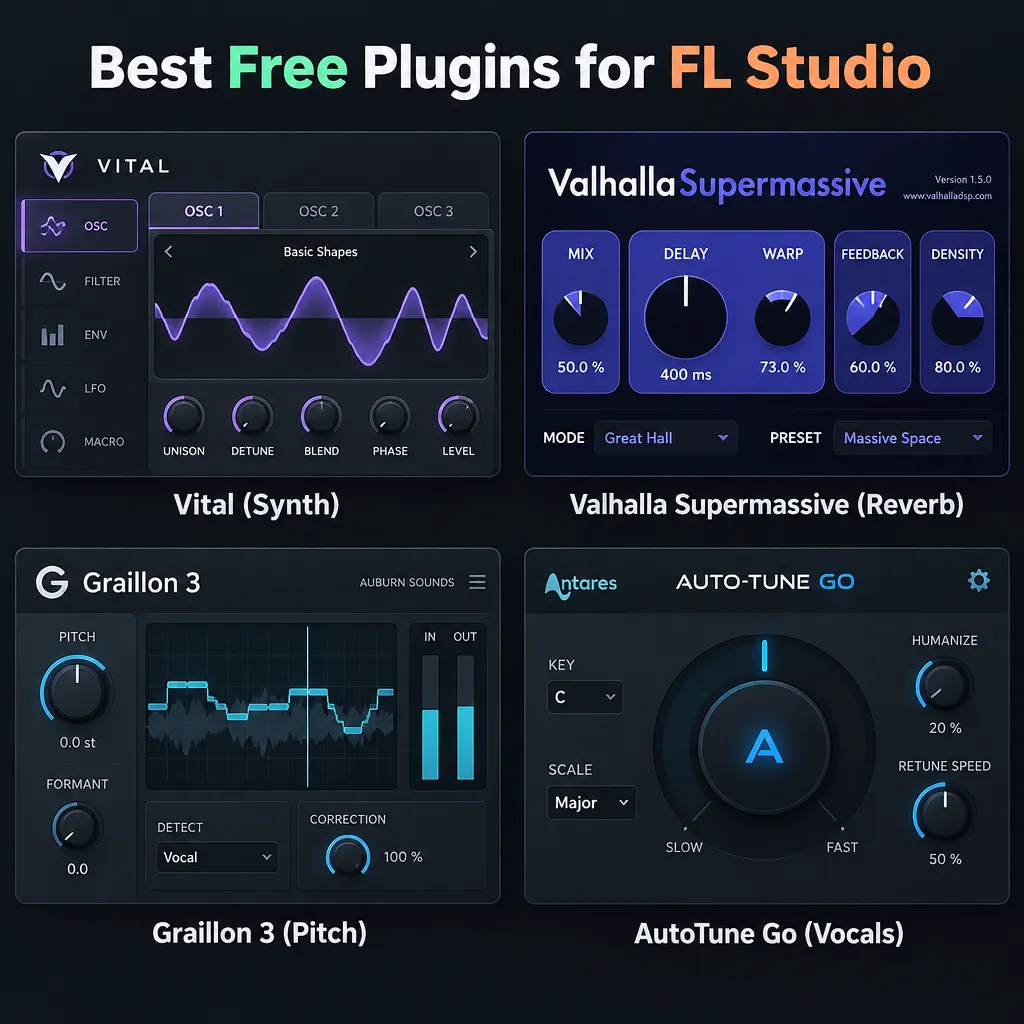
- Vital, Surge XT, Valhalla Supermassive and Graillon 3 do most of what Serum 2, paid reverbs and paid pitch correction do.
- Install VST3 plugins to the default system folder. FL Studio only accepts custom search paths for VST1 and VST2.
- If a plugin is missing, tick “Rescan plugins with errors” and run a full verified scan before reinstalling anything.
FL Studio plugins: the short answer
FL Studio already covers most jobs with its stock plugins. Your first downloads should be free ones: Vital for synths, Valhalla Supermassive for reverb and Graillon 3 or AutoTune Go for vocals. Only pay where the paid tool saves you real time, as FabFilter Pro-Q 4 does for detailed EQ work.
Here’s the five-line version for FL Studio 2026.1.7b, as of November 2026:
- What you already own: FLEX, FPC, Fruity Parametric EQ 2, Fruity Limiter and the rest of your edition’s stock tools, plus 10 FL Cloud Free plugins.
- Synth to install first: Vital Basic (free). Paid upgrade worth it for some people: Xfer Serum 2 ($249).
- Space and effects: Valhalla Supermassive (free). Most producers never need a paid reverb.
- Vocals: AutoTune Go (free through FL Cloud) or Graillon 3 (free edition). Paid step: NewTone ($99) or Antares AutoTune 2026.
- EQ: Fruity Parametric EQ 2 (stock). Paid step: FabFilter Pro-Q 4 (about $199 at major retailers).
The picks in this guide were chosen from published specs, licence terms, official pricing and Image-Line’s documentation. They were weighed on four things: how close the free tool gets to the paid one, whether it runs in FL Studio’s supported formats on Windows and macOS, its limits or upsells, and its CPU cost. Price mattered least, because almost everything recommended first is free.
What plugins come with FL Studio (by edition)
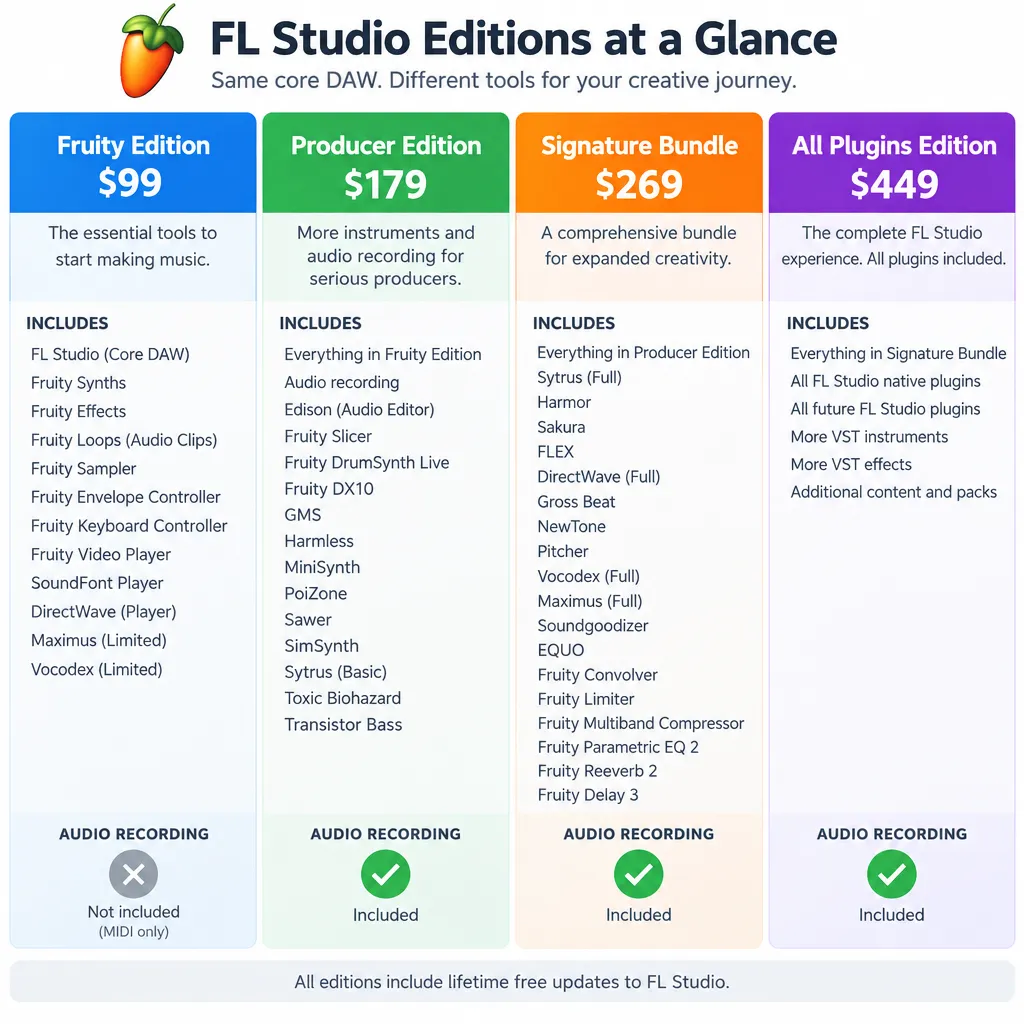
Every edition gets lifetime free updates and the same core FL Studio. The higher editions add Image-Line plugins, and Producer Edition adds the one feature most people need: audio recording. FLEX, the preset-based synth, is free in every edition.
| Edition | List price (USD, Jul 2026) | Audio recording | Key plugins added | Cost of those plugins bought separately |
|---|---|---|---|---|
| Fruity Edition | $99 | No | FLEX, FPC, 3x Osc, Fruity Parametric EQ 2, Fruity Limiter (84 instruments and effects as of v21.0.3) | n/a |
| Producer Edition | $179 | Yes | Edison, Slicex, full Playlist features, automation clips | n/a (edition features) |
| Signature Bundle | $269 | Yes | DirectWave, Hardcore, NewTone, Gross Beat, Pitcher | $366 for DirectWave, Hardcore, NewTone and Gross Beat |
| All Plugins Edition | $449 | Yes | Harmor, Morphine, Ogun, Drumaxx, Transmitter, plus every plugin in the installer | $336 for Harmor, Morphine, Ogun and Drumaxx |
These list prices come from Image-Line’s shop as checked by Music Manta on July 29, 2026. Some retailers and older guides still quote $199, $299 and $499, so check the shop price at checkout. The separate prices come from Image-Line’s plugin page in November 2026: DirectWave $69, Drumaxx $69, Harmless $69, Ogun $69, and Gross Beat, Hardcore, Harmor, Morphine and NewTone at $99 each.
The table shows where the value is. Going from Producer to Signature costs $90 at list price but gets you $366 of plugins. Going from Signature to All Plugins costs $180 for $336 of plugins plus Transmitter. Those gaps only matter if you’d actually use the plugins.
Fruity vs Producer: the recording gap
Fruity Edition can’t record audio. That’s fine if you only program beats with samples and virtual instruments. It’s a dead end once you want to record vocals, guitar or a hardware synth. Image-Line’s manual says Producer Edition is the tier with full Playlist features, audio recording, automation clips, Slicex and Edison.
Edison is FL Studio’s audio editor and recorder. Slicex is its beat slicer. For a vocalist, Producer is the real starting point, ideally with a decent condenser mic and an audio interface (whether you also need a separate mic preamp depends on your interface). Fruity suits a beginner who only works in the step sequencer and Piano roll and wants the lowest price. Since all editions get lifetime free updates, you can upgrade later and keep your projects.
Signature Bundle extras (DirectWave, Hardcore, NewTone, Gross Beat)
Signature Bundle is Producer Edition plus Image-Line’s “signature” plugins. Gross Beat is the one many producers buy it for. It’s a time and volume manipulation effect behind countless trap and lo-fi stutters, tape stops and half-time drops. NewTone is Image-Line’s pitch editor, which works like Melodyne in that you edit notes graphically after recording. Pitcher is the real-time pitch corrector and harmoniser. DirectWave is a sampler and Hardcore is a guitar effects suite.
For most FL users, Signature is the edition with the best value. Gross Beat and NewTone alone cost $198 bought separately, which is more than the $90 jump from Producer.
All Plugins Edition extras (Harmor, Morphine, Ogun, Drumaxx, Transmitter)
All Plugins Edition is Producer Edition plus every plugin in the FL Studio installer. Harmor is a deep additive and subtractive synth that can resynthesise audio. Morphine is an additive synth, Ogun handles metallic and ambient additive tones, and Drumaxx is a modelled drum synth. These are advanced sound-design tools. They aren’t essentials.
The honest argument against All Plugins Edition is that free tools like Vital and Surge XT cover much of the same ground. Buy it if you want Harmor’s resynthesis or Transmitter, or if you prefer one licence to a folder of third-party installers.
FL Studio 2026 changes: rebuilt FLEX, Transmitter
FL Studio 2026 came out in early July 2026 (WeRaveYou dates it July 7) as a free update for every existing licence holder. AudioTechnology reports that it rebuilt FLEX’s synthesis engine for up to 50% lower CPU use and faster loading, and added 8 new Core Series packs with more than 200 presets, free to all users. WeRaveYou describes Transmitter as a new All Plugins Edition plugin that splits a signal into transient and sustain parts, so you can process the attack of a kick separately from its tail. The release also added chord detection to the Piano roll.
The latest maintenance build is 2026.1.7b, posted on Image-Line’s forum on October 12, 2026. It loads large plugin lists faster and adds a Waves plugin verification option, which helps if you have hundreds of third-party VSTs installed.
Did you know?
According to AudioTechnology, the rebuilt FLEX in FL Studio 2026 uses up to 50% less CPU than the previous version, and it stays free in every edition, Fruity included.
FL Cloud Free: plugins you already own and probably haven’t installed
FL Cloud Free is open to every FL Studio user, trial users included, and contains 10 plugins. They don’t come with the main FL Studio installer. You install them yourself from Tools > Manage Cloud Plugins. This is the cheapest upgrade available, because it costs nothing.
To install them:
- Open FL Studio and go to Tools > Manage Cloud Plugins.
- Filter by the Free tier, or search for a plugin by name (for example “AutoTune Go”).
- Click Install.
- FL Studio adds the plugin to the Plugin database automatically. Open it from the Plugin Picker (F8) under the FL Cloud category, from the Browser’s Plugins tab, or from a Mixer insert slot.
Producer tip
Before buying anything, open Tools > Manage Cloud Plugins and install every Free tier plugin, AutoTune Go included. You might find the effect you were about to pay for is already there.
AutoTune Go: what’s free and what’s locked
AutoTune Go is genuinely free and not a trial. Image-Line and Antares launched it in mid-September 2026, and Antares’ help centre says you don’t need a separate purchase or registration code. It shows up as a Free tier plugin in the FL Cloud Plugins app. Bedroom Producers Blog lists support for Windows 10 and 11 and macOS 10.15 or later, on both Intel and Apple Silicon.
It’s a lite version, though. Image-Line says it has no presets and some controls are locked, with an upgrade path to AutoTune 2026. In practice, you set the key and scale, adjust retune speed for anything from natural correction to the hard robotic effect, and print the vocal. If key and scale are new to you, learn the music scale your track is in first, because a wrong key makes the correction pull notes in the wrong direction.
Did you know?
According to Antares’ help centre, every FL Studio user, trial users included, can install AutoTune Go from Tools > Manage Cloud Plugins with no registration code, because it’s a Free tier FL Cloud plugin.
FL Cloud Pro: is it worth it?
FL Cloud Pro is a subscription that adds a much larger catalogue of partner plugins, along with sounds and other services. Image-Line states the plugin count differently on different pages, so check the current list on its official FL Cloud plugins page before you subscribe.
There’s one catch to know. According to Image-Line’s FL Cloud FAQ, Pro-only plugins lock if you cancel. Projects that use them won’t sound the same until you resubscribe. Image-Line offers a free 24-hour “Project Rescue” you can use up to five times, which gives you time to bounce affected tracks to audio. Pro makes sense if you use several of its plugins every week. If you’d rely on just one or two, buying a perpetual licence elsewhere is safer long term.
Best free plugins for FL Studio vs the paid ones they replace
Free plugins now match paid ones on sound in most categories. The paid versions usually win on workflow, preset libraries and polish. The table below sums up each trade-off, and the sections after it explain the details.
| Job | Free / open-source pick | Paid staple | What the free one lacks | Verdict |
|---|---|---|---|---|
| Wavetable synth | Vital Basic | Xfer Serum 2 ($249) | Smaller preset and wavetable library, capped text-to-wavetable, fewer oscillator modes than Serum 2 | Start with Vital, and pay only if you need Serum 2’s oscillator modes or its preset ecosystem |
| Hybrid / virtual analog synth | Surge XT (GPLv3) | Harmor ($99, All Plugins) | Resynthesis of audio, FL-native integration | Surge XT is enough for most bass, lead and pad work |
| Detailed EQ | Fruity Parametric EQ 2 (stock) | FabFilter Pro-Q 4 (about $199) | 7 bands vs 24, no dynamic EQ, no multi-instance control | Stock is enough for beats, and Pro-Q 4 pays off for mixing engineers |
| Reverb and space | Valhalla Supermassive | Paid algorithmic reverbs | Realistic small rooms (it’s built for big, lush spaces) | Free is enough for most producers |
| Pitch correction | AutoTune Go, Graillon 3 | NewTone ($99), AutoTune 2026 | Presets, graphical note editing, locked controls (AutoTune Go) | Free for real-time correction, and pay for NewTone if you edit vocals note by note |
| Drum sampler | FPC (stock), Sitala | DirectWave ($69) | Deep multisample mapping | FPC plus a free sampler covers beat-making |
Synths: Vital and Surge XT vs Serum 2
Vital is the closest thing to a free Serum, but the free tier is a preset and wavetable sampler, not a cut-down engine. Matt Tytel’s spectral-warping wavetable synth gives every tier the same engine, as Produce Like A Pro’s review confirms. What changes between tiers is the content:
| Vital tier | Price | Presets | Wavetables | Text-to-wavetable |
|---|---|---|---|---|
| Basic | Free | 75 | 25 | Limited daily requests |
| Plus | $25 one-time | 250 | 70 | Limited daily requests |
| Pro | $80 one-time | 400+ | 150 | Unlimited |
| Subscription | $5/month | Subscriber packs | Full library | Unlimited |
So is Vital basically free Serum? For sound design, largely yes. Both are wavetable synths with drag-and-drop modulation and visual feedback. Xfer Serum 2 ($249) adds more oscillator types, such as granular and spectral modes. It also has a huge third-party preset market that many genres are built on. If you mostly load presets, Serum 2’s library is a real advantage. If you build sounds from scratch, Vital Basic does the job.
Surge XT, from the open-source Surge Synth Team, is the other free synth to install. It’s released under GPLv3 and runs on Windows, macOS and Linux as VST3, CLAP, AU and LV2. It’s a hybrid synth with wavetable, FM and classic analog-style oscillators, so it also works as a virtual analog synthesizer for basses and leads. Its official downloads page lists 1.3.4 as the current stable version. Version 2.0 is in development and won’t be patch-compatible with 1.x, so use the stable build for projects you need to reopen later.
Producer tip
In Vital, turn the oscillator’s unison voices down before you add effects to a bass. Wide unison on low frequencies smears the low end in mono. Keep the width on the layers above it.
EQ: Fruity Parametric EQ 2 vs FabFilter Pro-Q 4
Fruity Parametric EQ 2 comes with every edition and handles most EQ work in FL Studio. It has 7 bands, a real-time spectrum display and drag-to-edit nodes, which covers cutting mud at 200 to 400 Hz, low-cutting a hi-hat or notching a resonance.
FabFilter Pro-Q 4 sells for about $199 at major retailers. It offers 24 bands, dynamic EQ and control of every Pro-Q instance in a session from one window. Those features save time when you’re balancing a 40-track mix. For a beat-maker working on 12 channels, they’re a convenience you can live without. Buy it when you start mixing other people’s records, not before.
For dynamics, start with the stock Fruity Limiter, which works as a compressor too. If you want a free mastering-grade alternative, Tokyo Dawn Records’ Kotelnikov is free, and its paid Gentleman’s Edition adds extra controls. IK Multimedia’s T-RackS also has a free version with a small set of processors.
Reverb and space: Valhalla Supermassive vs paid reverbs
Valhalla Supermassive is free, has no watermark or time limit, and runs on Windows and macOS. Valhalla DSP built it for huge, washy reverbs and delays, so it suits pads, ambient vocals and trap leads well. Its weakness is small, believable rooms: it doesn’t do a convincing drum booth.
FL’s stock Fruity Reeverb 2 and Fruity Convolver fill that gap. Use Supermassive for big creative spaces and the stock reverbs for realistic rooms, and you won’t need a paid reverb for a long time.
Vocals and autotune: Graillon 3, AutoTune Go, NewTone, Pitcher
FL Studio has four realistic options for autotune, and two of them are free for everyone:
- AutoTune Go (free, FL Cloud): real-time Antares correction with the familiar hard-tune sound, but no presets and some locked controls.
- Graillon 3 (free edition, Auburn Sounds): real-time pitch correction and pitch shifting. Some modules need the paid full version.
- Pitcher (Signature Bundle and up): Image-Line’s real-time corrector. You can play the target notes from MIDI and build harmonies.
- NewTone (included with Signature Bundle and All Plugins Edition): pitch-correction and time-manipulation software for recorded audio, with graphical note-by-note editing for natural results.
For a modern rap or pop vocal, start with AutoTune Go on the insert at a fast retune speed. For a natural ballad vocal, NewTone’s offline editing beats any real-time plugin. For thicker vocals, add a free doubler afterwards, which mimics automatic double tracking.
Drums and samplers: FPC, DirectWave and free options
FPC, FL Studio’s pad-based drum sampler, is in every edition. Drag a sample onto a pad, set velocity layers and program the pattern in the Piano roll. Slicex (Producer and up) chops breaks into playable slices. DirectWave ($69, Signature and up) handles multisampled instruments.
For a free extra, Decomposer’s Sitala is a simple drum sampler with per-pad controls for tuning, shaping and transient adjustment. Transmitter (All Plugins Edition) goes further, letting you process attack and sustain separately on any sound.
Distortion and character: stock tools and BYOD
FL’s Fruity Blood Overdrive, Fruity Soft Clipper and Fruity Waveshaper cover basic drive and clipping. For something richer, Chowdhury DSP’s BYOD (“Build Your Own Distortion”) is open source under GPLv3. You chain modelled drive, tone and amp blocks into your own distortion. It works on bass and drums as well as guitar. If you’re new to adding grit, learn how audio saturation works first, because subtle saturation usually helps a mix more than heavy distortion.
How to install plugins in FL Studio (2026 method)
Run the plugin’s installer with its default folders, then open Options > Manage plugins in FL Studio and run a full scan with Verify plugins ticked. Most “plugin not found” problems come from skipping one of those two steps.
Quick steps: install a VST plugin in FL Studio
- Run the installer and keep the default VST3 or CLAP folder.
- Open FL Studio and go to Options > Manage plugins.
- Tick Verify plugins, then click Find installed plugins.
- Find the new plugin in the list and click its star to favourite it.
- Open it from the Channel rack (instruments) or a Mixer slot (effects).
The full walkthrough, based on Image-Line’s online manual:
- Install with default paths. Choose VST3 (or CLAP) in the installer and don’t change the folder. Image-Line’s manual says VST3 and AU plugins must go in the default system locations.
- Open the Plugin Manager. Go to Options > Manage plugins. The left side shows the plugin search paths FL Studio scans.
- Run a verified scan. Tick Verify plugins, then click Find installed plugins (called “Find more plugins” in the manual). Verifying loads each plugin briefly, so FL can sort it as a generator (instrument) or an effect.
- Check new entries. Newly found plugins appear in the Plugin database under Installed > New.
- Favourite them. Click the star next to a plugin in the Plugin Manager list. Favourites show up in the Channel rack’s Add menu and in Mixer slot menus.
- Load it. Add an instrument from the Channel rack or the Plugin Picker (F8), and add an effect in a Mixer insert slot.
Producer tip
Run Find installed plugins with Verify plugins ticked, not a fast scan. A verified scan sorts instruments and effects into the right categories, so Serum doesn’t end up in your effects list.
Which format to choose: VST3, CLAP, AU
On Windows, pick VST3 unless the developer offers CLAP and you want to use it. On a Mac, pick VST3 too, especially if you share projects with Windows users.
| Format | Windows | macOS | Supported in FL Studio | When to use |
|---|---|---|---|---|
| VST3 | Yes | Yes | Long-standing | The default choice for almost every plugin |
| VST2 | Yes | Yes | Long-standing | Only when no VST3 exists. It’s the only format that works from custom folders |
| CLAP | Yes | Yes | Since FL Studio 2024 (June 28, 2024) | When the developer offers it, for example Surge XT and BYOD |
| AU | No | Yes | macOS only | Mac-only projects, or plugins with no VST build |
Image-Line’s manual is clear about cross-platform work. If you share projects between a Mac and a PC, use the VST versions of third-party plugins, not AU. That’s the only way the projects stay compatible on both systems.
Default plugin folders on Windows and macOS
Installers normally choose these folders for you:
- Windows VST3:
C:\Program Files\Common Files\VST3 - Windows CLAP:
C:\Program Files\Common Files\CLAP - macOS VST3:
/Library/Audio/Plug-Ins/VST3 - macOS AU:
/Library/Audio/Plug-Ins/Components - macOS CLAP:
/Library/Audio/Plug-Ins/CLAP
VST2 plugins are the exception: you can store them anywhere and add that folder as a custom search path in the Plugin Manager. FL Studio doesn’t use custom paths for VST3 or AU.
Apple Silicon: native vs Rosetta 2 and bridged plugins
FL Studio runs natively on Apple Silicon Macs. Install the native ARM or Universal version of a plugin whenever there is one. FL can bridge older Intel-only plugins, but bridging costs extra CPU and adds another possible cause of crashes. If you switch FL Studio between native and Rosetta 2 modes, rescan your plugins afterwards, because each mode sees a different set.
Watch out
Bridged Intel plugins on Apple Silicon use more CPU and are the usual suspects when a large project stutters. Check each developer’s site for a native build before blaming your buffer size.
Plugin not showing up in FL Studio? Fix checklist
Most missing plugins come down to one of five causes: the wrong folder, a VST2-only install, a skipped verification scan, a plugin that failed its last scan, or a crash during scanning. Match your symptom below.
| Symptom | Likely cause | Fix |
|---|---|---|
| “Downloaded Serum but FL Studio can’t find it in scans” | Installer put the plugin in a non-default folder, or you only installed AAX | Reinstall, tick VST3, keep the default path, then rescan with Verify plugins |
| “FL Studio can’t find the .vst3 file after install” | The .vst3 file was moved to a custom folder | Move it to the default VST3 folder. FL ignores custom paths for VST3 |
| Plugin worked before, now missing | It failed a previous scan and was skipped | In Plugin Manager, tick Rescan plugins with errors, scan again and restart FL |
| “Plugin crashes FL when scanning, works if I skip the VST scan” | One plugin crashes during verification | Rescan, note the last plugin name shown, then update or temporarily remove that plugin and scan again |
| Only a VST2 shows, no VST3 | Older installer that only installs VST2 | Download the developer’s current installer, or add the VST2 folder as a custom search path |
| Plugin shows as VST3 but you want CLAP | Both formats installed, VST3 favourited | In Plugin Manager, find the CLAP entry (check the format shown in the list), star it and unfavourite the VST3 version |
| Plugins vanish on a Mac after switching modes | Native and Rosetta 2 modes see different plugin sets | Rescan in the mode you’re actually using |
| Huge plugin list loads slowly | Hundreds of plugins in the database | Update to 2026.1.7b, which loads large plugin lists faster |
Producer tip
If a plugin is missing, tick Rescan plugins with errors in Plugin Manager, run the scan, then fully restart FL Studio. That fixes most cases before you need to reinstall anything.
Free downloads, plugin packs and cracks: what’s safe
Free plugins from the developer’s own site are safe. Bundles called “FL Studio plugin pack free download” on file-sharing sites usually aren’t: they’re mostly cracked commercial plugins, and cracked installers are a well-known way malware gets onto your computer. Cracking FL Studio or its plugins also breaks the licence and copyright law. One more practical cost: a cracked tool can stop working with any update, while a real licence keeps working.
You don’t need cracks to pay less. These are the legitimate routes:
- The FL Studio trial. It’s fully featured, but you can’t reopen saved projects until you buy. It also gets you FL Cloud Free, AutoTune Go included.
- FL Cloud Free and FLEX. Both are free in every edition.
- Fruity Edition at $99 for beat-making without audio recording, upgradeable later.
- Rent-to-own. Image-Line’s plan covers Producer, Signature and All Plugins. After the 12th monthly payment you own FL Studio, with the same lifetime-free-updates licence as buying it outright.
- Lifetime free updates. You buy once and never pay for a new version. FL Studio 2026 arrived as a free update.
- Open-source and free plugins. Surge XT, Vital Basic, Valhalla Supermassive, Graillon 3 and BYOD cost nothing, legally.
Watch out
Pirated plugin packs are a common way malware spreads, and a compromised machine can cost you every project file on it. Download free plugins only from the developer’s own website or official installer.
FL Studio plugins comparison table
This table covers every plugin recommended above, with prices checked in November 2026.
| Plugin | Type | Free or paid | Price (Nov 2026) | Formats | OS | Best for |
|---|---|---|---|---|---|---|
| FLEX (Image-Line) | Preset synth | Free in all editions | $0 | FL native | Win, Mac | Fast presets, Core Series packs |
| AutoTune Go (Antares) | Pitch correction | Free via FL Cloud Free | $0 | FL Cloud plugin | Win 10/11, macOS 10.15+ | Hard-tune and quick correction |
| Vital (Matt Tytel) | Wavetable synth | Freemium | $0 / $25 / $80 | VST2, VST3, AU, LV2 | Win, Mac, Linux | Serum-style sound design |
| Surge XT (Surge Synth Team) | Hybrid synth | Open source, GPLv3 | $0 | VST3, CLAP, AU, LV2 | Win, Mac, Linux | Basses, leads, deep modulation |
| Valhalla Supermassive | Reverb and delay | Free | $0 | VST2, VST3, AU, AAX | Win, Mac | Huge creative spaces |
| Graillon 3 (Auburn Sounds) | Pitch correction and shifting | Freemium | $0 (free edition) | VST, VST3, AU | Win, Mac, Linux | Real-time vocal effects |
| BYOD (Chowdhury DSP) | Distortion | Open source, GPLv3 | $0 | VST3, AU, CLAP | Win, Mac, Linux | Custom drive chains |
| Fruity Parametric EQ 2 | EQ | Stock, all editions | Included | FL native | Win, Mac | Everyday EQ |
| Gross Beat (Image-Line) | Time and volume effect | Paid, Signature and up | $99 | FL native | Win, Mac | Stutters, half-time, tape stops |
| NewTone (Image-Line) | Pitch editor | Paid, Signature and up | $99 | FL native | Win, Mac | Natural vocal tuning |
| Harmor (Image-Line) | Additive synth | Paid, All Plugins | $99 | FL native | Win, Mac | Resynthesis, advanced design |
| Xfer Serum 2 | Wavetable synth | Paid | $249 | VST3, AU, AAX | Win, Mac | Preset ecosystem, extra oscillator modes |
| FabFilter Pro-Q 4 | EQ | Paid | About $199 | VST, VST3, AU, AAX | Win, Mac | Detailed mixing EQ |
Here’s a practical order to work in. Install everything in the free rows first, use them on three or four finished tracks, and note where you get stuck. Buy a paid plugin only when it fixes a problem you keep running into, and check whether a Signature Bundle upgrade covers it first.
FAQ
What is the most popular plugin for FL Studio?
Xfer Serum, now Serum 2, is the third-party synth producer guides and forums mention most often. Among stock tools, Gross Beat and Sytrus come up most. If you want a free version of the Serum workflow, Vital is the usual answer.
How do I get plugins for FL Studio?
There are three sources. Your edition’s stock plugins come with the installer. The 10 FL Cloud Free plugins install from Tools > Manage Cloud Plugins. Third-party VST3, CLAP or AU plugins come from developers’ websites and appear after a verified scan in Options > Manage plugins.
What are all the plugins in FL Studio?
It depends on your edition. Fruity Edition had 84 instruments and effects as of v21.0.3. Producer adds Edison and Slicex. Signature adds DirectWave, Hardcore, NewTone, Gross Beat and Pitcher. All Plugins Edition includes everything in the installer, including Harmor, Morphine, Ogun, Drumaxx and Transmitter.
Is cracking FL Studio legal?
No. Cracking FL Studio breaks the licence and copyright law, and cracked installers often carry malware. The legal low-cost routes are the trial, Fruity Edition at $99 and the payment plans offered in Image-Line’s official store.
Does FL Studio come with autotune?
Yes. Signature Bundle and higher include Pitcher (real-time) and NewTone (graphical editing). Every user, whatever their edition, can also install Antares AutoTune Go for free through FL Cloud Free.
Is AutoTune Go free in FL Studio, or is it a trial?
It’s free and not a trial. Antares says you don’t need a purchase or registration code, and it’s listed as a Free tier FL Cloud plugin. It has no presets and some locked controls, and Antares sells full versions of Auto-Tune if you need more.
How do I install VST plugins in FL Studio?
Run the plugin’s installer with its default folder. In FL Studio, open Options > Manage plugins, tick Verify plugins and click Find installed plugins. Then star the plugin to add it to your favourites.
Where is the VST3 folder for FL Studio?
FL Studio uses the system VST3 folder, not its own. That’s C:\Program Files\Common Files\VST3 on Windows and /Library/Audio/Plug-Ins/VST3 on macOS. VST3 plugins in other folders are ignored.
Does FL Studio support CLAP and AU plugins?
Yes. CLAP has been supported since FL Studio 2024 (June 2024) on Windows and macOS. AU works on macOS only. Use VST3 if you share projects between Mac and Windows.
Do I need the All Plugins Edition or just Producer?
Most people need Producer for audio recording, or Signature if they want Gross Beat and NewTone. All Plugins Edition is worth buying if you’ll use Harmor, Transmitter or the other advanced synths. For most other needs, free plugins fill the gap.
What is the best free synth for FL Studio?
Vital is the best free wavetable synth, because the free tier has the same engine as the $80 Pro tier. Surge XT is the best open-source option, with GPLv3 code, CLAP support and broader synthesis types. Install both. They cost nothing and do different jobs.
Keep reading
Free music tools
Editorial notes
- Fact-checked by Vivian Osei against the sources listed below before publication.
- Published
Sources (8)
- AutoTune Go joins FL Cloud – Image-Line (image-line.com)
- FL Cloud AutoTune Go – Bedroom Producers Blog (bedroomproducersblog.com)
- AutoTune Go in FL Studio – Antares Help Center (help.antarestech.com)
- FL Cloud FAQ – Image-Line (image-line.com)
- FL Cloud Plugins – Image-Line (image-line.com)
- Installing Plugins – FL Studio Online Manual (image-line.com)
- System Settings: File – FL Studio Online Manual (image-line.com)
- FL Studio Edition Features – Online Manual (image-line.com)